Activity
Mon
Wed
Fri
Sun
Jun
Jul
Aug
Sep
Oct
Nov
Dec
Jan
Feb
Mar
Apr
What is this?
Less
More
Memberships
AI + GHL Profit Partners
162 members • Free
BuildRemote Blueprint
3.2k members • $111
Car Part Profits (Free)
2.4k members • Free
$150k Roofing Owner-Op Academy
218 members • Free
Digital Analytics Academy
285 members • Free
Google Ads Foundations
1.8k members • Free
AdSuccess Academy (Free)
2.8k members • Free
Paid Ad Secrets
18.8k members • Free
MediaMentor
9 members • $250/m
15 contributions to Paid Ad Secrets

Sep '25 •
Offline Conversion Imports
Which offline conversion import method do you rely on? And which one do you find most effective? Recently, I discovered a free solution that enables seamless offline conversion imports into Google or Meta Ads. ✅ No monthly subscription fees ✅ Smooth, automated data flow, no need manual import ✅ Just a one-time setup cost I found it to be a real game-changer. 👉 Curious to know who else would be interested in exploring this?
Jul '25 •
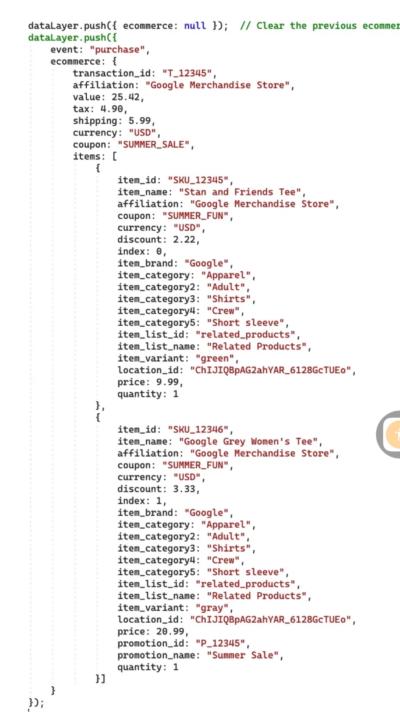
Don’t Skip Platform-Specific Tracking Requirements ⚠️
If you set up GA4 or Meta (Facebook) conversion tracking without following the platform’s recommended array/object structure, your event data might still fire but it will be incomplete, misformatted, or even invalid. ✅ What happens next? GA4 may show inaccurate event parameters Meta may flag your pixel events with warnings or errors (like Missing value, Invalid parameter format, etc.) Worst of all: your ad campaigns won’t optimize properly, and ROAS will suffer 🎯 Platforms like Meta and GA4 rely heavily on correctly structured event data (especially for dynamic events like purchases, add-to-cart, or lead submissions). That includes things like items arrays in eCommerce, event_parameters, and properly formatted value and currency. 💡 Pro tip: Always check the developer documentation for the exact schema. For Meta, improper setup might even break CAPI events when sent via GTM or server-side.
0
0

Jun '25 •
Meta blocked Dataset
I’ve built my business around supporting clients in the health and spirituality space, and it’s been going really well — until now. Last week, two of my clients’ datasets got completely restricted. Lead events just dropped to zero — Meta shut off the pixel entirely (Clients are based in the EU) I’m already in touch with support, but as you can guess, I’m not getting much clarity. This is starting to impact campaign performance, and honestly… it’s making me question whether I need to pivot into a new niche, which I’d really prefer not to do. So I wanted to ask: - Has anyone else here seen this lately in sensitive niches? - Does anyone have experience with this kind of dataset restriction and how to handle it? - And especially — do you know if switching to lead forms would bypass this issue?Or if creating a new domain and pixel actually helps? I’d love to hear any insight or real experiences. Just trying to find the best way forward before this hits more clients. Thanks so much
0 likes • Jun '25
Seen this hit a few EU-based accounts recently, it’s often tied to Meta flagging pixel events due to consent violations or missing GCM signals. Switching to lead forms can be a temp fix, but not a long-term solution. What’s worked is: - Setting up Consent Mode v2 correctly - Using CAPI with proper event and parameter prioritization - Aligning pixel behavior with EU privacy standards

Jun '25 •
google ads made simple
Starting with Google Ads can feel a bit overwhelming at first. So I’ve made it super simple for you. Here are 10 beginner-friendly tips to help you launch smart, avoid wasting money, and start seeing results — fast. ✅ 1. Start small Begin with one campaign and one goal — like getting more website visits or collecting leads. This keeps everything focused and easier to manage. ✅ 2. Use search campaigns first Search ads show up when people are actively looking for what you offer. They’re the best place to start before trying display or video ads. ✅ 3. Write clear, simple ad copy No fancy language. Just say what you offer, who it’s for, and what action you want them to take — like “Book your free consult.” ✅ 4. Target specific locations Only serve customers in New York? Or Los Angeles? Make sure your ads show only to people in those areas — not the whole country. ✅ 5. Add negative keywords These block your ad from showing up in the wrong searches. Example: if you don’t offer free services, add “free” as a negative keyword. ✅ 6. Set a daily budget you’re comfortable with Start small — $5 to $10/day is totally fine. You can always increase later once you see what’s working. ✅ 7. Track conversions Know what counts as a win — form submissions, calls, purchases. If you don’t track conversions, you can’t measure success. ✅ 8. Use broad match carefully Broad match can bring in lots of traffic — but not always quality. Start with phrase match or exact match for more control. ✅ 9. Check your search terms regularly See exactly what people type before clicking your ad. Use that info to improve targeting and block irrelevant traffic. ✅ 10. Let the data guide you Don’t tweak your ads every day. Let them run, collect data, and then optimize based on real performance.
0 likes • Jun '25
Need a hand for setting up conversion tracking accurately for any platform on any CMS? Happy to help!

0 likes • Jun '25
@Tristan Silva DM me
0 likes • Jun '25
@Tristan Silva Let's discuss, what you wanna know?
1-10 of 15

Active 210d ago
Joined Apr 18, 2025
Powered by