Activity
Mon
Wed
Fri
Sun
May
Jun
Jul
Aug
Sep
Oct
Nov
Dec
Jan
Feb
Mar
Apr
What is this?
Less
More
Memberships
AI Automation Society
333.1k members • Free
AI Assistant Lab
268 members • Free
AI Avengers Lab
2.4k members • $89/month
Automation Station
3.3k members • Free
AI Automations by Kia
21.5k members • $1/month
TheTechStack.ai University
402 members • Free
Road to Partner | Nico Seoane
16.2k members • Free
InsightAI Academy
12.1k members • Free
Applied AI Academy
3.2k members • Free
60 contributions to Assistable.ai

7d •
Desperate for help - Outbound calls keep ringing contacts repeatedly after hang-up
Hi, I've been dealing with an issue where outbound calls keep ringing the contact insistently (4 times) after they reject the call, all within the same call session. Twilio shows only ONE call log, but the recording of that single call contains all the repeated attempts inside it. I'm attaching: - The call recording (1 log, multiple ring attempts after hang-up) - The SIP PCAP log - Screenshots showing unanswered calls visible at workspace level but missing at sub-account level What I've ruled out: - Tested on two separate Twilio accounts — same behavior - Tested with Assistable disconnected from GoHighLevel — same behavior - Happens across all sub-accounts, all assistants, and even with all workflows turned off - Tested directly from Assistable's test call — same issue Twilio Console evidence: - Call direction: Trunking Terminating (arrives via SIP trunk, not initiated by Twilio) - Signaling IP: 54.172.60.x (AWS — Assistable's infrastructure) - No HTTP requests logged (not a Twilio REST API call) The system keeps retrying the contact within the same SIP session after they hang up. The repeated attempts are happening before it reaches Twilio. Additional issue (maybe this is the solution): Unanswered calls (0.0 min) are visible at workspace level but not at sub-account level (see attached screenshots). I've been working with customer support for about a month on this but haven't been able to resolve it. Posting here in case anyone has experienced the same or found a workaround. Has anyone else experienced this? Thanks @Jorden Williams @Jason D @Esteban Lopez @Jakin Harper @Brandon Duncan @Justin Lee
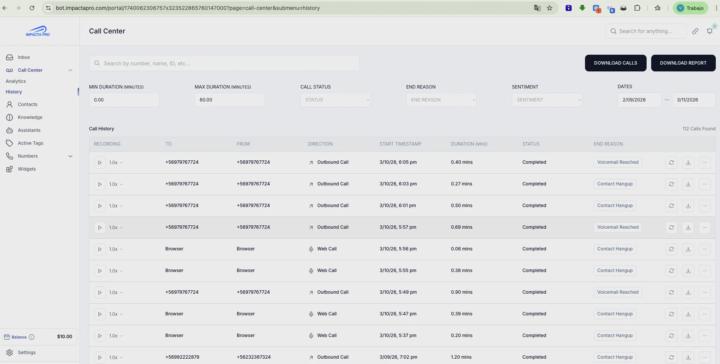
0 likes • 7d
pls 🙌
7d •
Outbound calls not working with Telnyx
Hi, outbound calls with Telnyx never go through. (I am not from USA) I've verified on the Telnyx side that: - Outbound Voice Profile is configured with correct allowed destinations - The number is active and assigned - Direct API calls from Telnyx work (calls reach the destination) - No call events from Assistable appear in Telnyx logs at all The call never leaves Assistable's backend. I've tried Trunk URI as both sip.telnyx.com and [subdomain].sip.telnyx.com — neither works. Questions: 1. Has anyone gotten outbound calls working with Telnyx? 2. Is there a specific Trunk URI format or configuration needed for Telnyx? 3. Is this a known issue with the Telnyx integration? Thanks! @Jorden Williams @Justin Daughenbaugh @Luke Houk
0 likes • 7d
I already done this: https://help.assistable.ai/voice-ai/importing-telnyx-numbers and this: https://docs.google.com/document/d/104KJB1gmOUrZdegMH0FWXNCNeyLSfOSNj-Nlhg79OSQ/edit?tab=t.0
11d •
Multiple Property Brokers (Calendar Question)
Hi! I have a question... My clients have multiple property brokers, and leads are randomly assigned to each of them. Every broker has their own calendar. How can I make the AI agent check availability based on the multi calendar / calendar matrix ? Or what would be the best way to do it? Thanks! @Assistable Ai @Brandon Duncan @Jason Dueck @Justin Lee @Assistable Team
0 likes • 11d
i already try this, works 40% of the time: Multiple_calendar_booking (Exact match) You must ALWAYS assign the user (using their "assignedUserId") to the assigned seller’s calendar ("calendar_id") by following these instructions: The current contact’s "assignedUserId" is == {{contact.vendedor_asignado}} Then: IF "assignedUserId" == LcgG7JeK9l0LxerAC4Hz, then book in calendar_id = vTGZDxWivpZzhDWlqrhL IF "assignedUserId" == 52Rnc57h7Xjz61oyxmnB, then book in calendar_id = Hy06L3tbE28w8SLHksIZ IF "assignedUserId" == 7VblnmhcWVYVmSMiEgdj, then book in calendar_id = s7R1bJ4biB1MB1Q9VsYO IF "assignedUserId" == AkoxqZwkHmynfqeHtLQV, then book in calendar_id = hnpeeFajh8O2aeZAmb9n IF "assignedUserId" == vrYuA4xvUniHLFIU9XqF, then book in calendar_id = 4FL7G4qgd8Vu9Re3KF0i If the assigned "assignedUserId" does not match any "calendar_id", check again. If it still does not match, then book in calendar_id = qkKfzxJ82UUjWt18a0gl

Mar '25 •
Tools v2 Notes & Get Sheets & Docs tool how-to
Major changes in functionality, accessibility in chat and voice tool call logs include inputs, outputs and more. There updates makes multi-calendar, multi-timezone booking native along with some other cool stuff. Direct accounts get first access to tools v2 including the revamped make ai call, send email & self scheduling, as well as the new tool sets search the web, get sheet, get doc, update appointment details and more. ChangeLog: - Check availability, book appointment, reschedule appointment, cancel appointment, and check appointments have now become -> Check availability, book appointment, update appointment details and get user calendar events. This allows the bot to do some new cool things like multi-calendar book from just the prompt alone, dynamically change the timezone of the requests for multi-timezone bookings and more. - Update details and update address has now become -> Update User Details which now updates every GHL field besides tags and custom fields (these are other tools). So changing timezone, address, name, contact info, etc is all accessible by the AI now. - Send email has been audited and recreated with fallbacks and information protocol so the AI will know to collect an email before sending the email and understand whether the send was successful to the email (to re-collect it). - Self-schedule has been audited and recreated to... well self schedule. The schedules will be editable, cancelable and viewable in the AI portal in the sub-account. New Tools: - Get Sheet -> gets information from a google sheet and returns it to the AI - prompt-able URL inputs. - Get Doc -> gets information from a Google Doc and returns it to the AI - prompt-able URL inputs. - Search the web -> searches the web and returns the results to the AI to use for conversation, research or more. --- These will all be released in a bit into production for both chat and voice and accessible via the tool menu under tools v2 for direct users only -- resold users will get access at a later date once resellers have been briefed and given documentation.
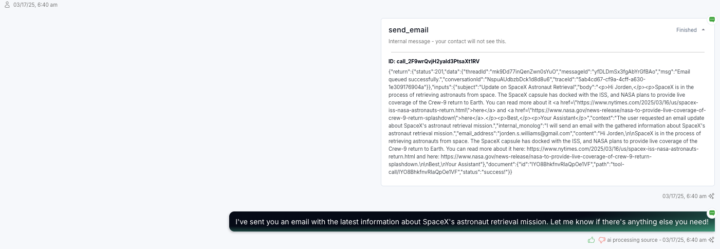
1 like • 11d
Get Sheet, Get Doc. Is this possible? @Jorden Williams

Sep '25 •
Multi calendar booking not working
Haven't got a response from support yet about this so I guess I'll Just ask it here, I´m trying to use this calendar matrix ## Calendar matrix - You must get the availability and book the appointment using the correct personal calendar based on the assigned user. - Check the value of the custom field, the assigned sales manager for the user is: {{contact.assigned_sales_person}} Use the contact’s assigned user to match the correct calendar: If {{contact.assigned_sales_person}} is Hope use Calendar ID 0uQNxptJGmvutF6FSMN If {{contact.assigned_sales_person}} is Ben use Calendar ID 1ZlBoPeZJHd4wWM2x78 If {{contact.assigned_sales_person}} is Micah use Calendar ID KIwzBRUyRz0MAUNPgMw If {{contact.assigned_sales_person}} is Josh use Calendar ID KPsPwb03EUJT1pdbiZp If {{contact.assigned_sales_person}} is Michael use Calendar ID LsnqMlYTk4qXfGvot50 If {{contact.assigned_sales_person}} is Steven use Calendar ID YOgeDWNBpGIeQwaM1Fm If {{contact.assigned_sales_person}} is Mandi use Calendar ID YdrA0DKxcwmlPkQKhaN If {{contact.assigned_sales_person}} is Kyler use Calendar ID xmRBaF7T0HLPHAgivyf If {{contact.assigned_sales_person}} is Jake use Calendar ID zz7GbIwGRTsJDWhnB6m But every single time it picks the the Hope calendar, no matter what is in the custom field. It even says, "I'll book you on Ben's calendar," and then goes ignoring everything and books the appointment in Hope calendar. And no, I don't have a calendar assigned in the calendar section, I'm just using ID's, is this a prompting issue? Or what can I do to make this work?
0 likes • 11d
Hey @Juan Caballero did you ever find a solution for this? tnks!!
1-10 of 60

Active 12h ago
Joined Feb 24, 2025
Powered by