Activity
Mon
Wed
Fri
Sun
May
Jun
Jul
Aug
Sep
Oct
Nov
Dec
Jan
Feb
Mar
Apr
What is this?
Less
More
Memberships
1Prompt Setter™
1.1k members • Free
AI Agents Academy
718 members • Free
AI Automation Nexus
57 members • Free
Lawyers + Robots
657 members • Free
Openclaw Founders
823 members • Free
Actual Tax Law
12.1k members • Free
OpenClawBuilders/AI Automation
494 members • Free
AI Automation First Client
1.5k members • Free
YouTube Automation Lab
14 members • $37/month
23 contributions to Brendan's AI Community

Jun '25 •
Meta Ads + GHL + Voice AI = 💰. What Worked
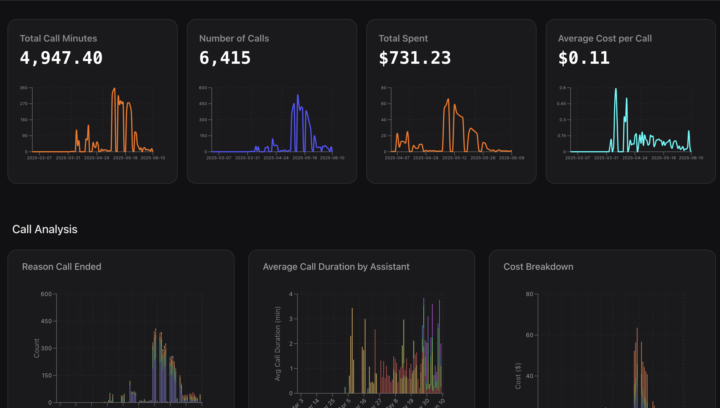
Hey guys, thought I’d share a quick case study from one of the voice AI builds I’ve been working on. Hopefully it helps anyone in here who’s building out voice AI flows or starting their own agency. This one’s been running for a little while now and the results have been solid, so figured it was worth sharing. Client came in after seeing one of my demos in a community (seriously, communities are low-key goldmines for lead gen...shhhh 🤫). It’s a US-based service business running Meta ads with five different offerings. Their audience is a mix of English and Spanish speakers, and they’re dealing with warm leads, not cold ones. People are actively filling out surveys and expecting a follow-up. The problem? Their human agents were drowning in other tasks and just couldn’t keep up with outbound outreach. Good leads were going cold fast. The Solution We trained a voice AI agent on their business and set it up to call leads around 5 minutes after opt-in. On top of that, we built a fully loaded follow-up system that spans the first 5 days post-opt-in. It supports both English and Spanish. Fun fact: Spanish-speaking leads picked up more than the English ones. No idea why, but hey, we’ll take the win. What Worked - Keep it simple: the agent handled FAQs and booking only. Anything beyond that? It politely said a team member would follow up - Voice AI alone is good, but combining it with AI SMS is where the magic happens. Multi-channel follow-up is king! Some people just prefer texting. - Sending a quick SMS like “one of our reps will be in touch shortly” before the call boosted pickup rates - Most people didn’t even realise they were speaking to AI, and when asked, it told them straight up - Yes, AI can call 24/7, but let’s not get creepy. People sleep. Just because your agent doesn’t need sleep doesn’t mean your lead wants to chat at 3am 😕 - Real talk: no matter how solid your flow is, the first 4 weeks will humble you 😅. One weird conversation and boom, time to rework your prompt. - Train your AI to detect voicemail and hang up! saves you couple bucks but trust me, it adds up. - We also added an appointment reminder voice agent that follows up 2 days before and on the day of the appointment. It carries context and helps confirm or reschedule as needed. This boosted appt show up rates
0 likes • Jun '25
@Nitts Mike thanks for your comment. Will keep that in mind.


0 likes • Nov '24
Use an iterator module if you need to

Oct '24 •
Need Help with VAPI Agent Data Retrieval via Webhook for Google Sheets
Hey everyone, I could really use some help with a VAPI agent I’m building. I’m trying to retrieve specific data (like user interests and emails) from a VAPI call callback to fill a Google Sheet via a webhook in Make.com. I’ve tried setting up functions and using different methods to pull the data, but I’m hitting a wall. The webhook doesn’t seem to show the data I need. I’m not sure if I’m missing a setup step or if there’s a trick to making the callback data accessible. Has anyone dealt with something similar? Any advice on how to troubleshoot this or tips for getting the data to display in the webhook would be amazing! Thanks in advance for any help! 🙏

0 likes • Oct '24
Are you getting the details from the caller and wanting to add it to a google sheet during the call?
0 likes • Oct '24
@Mahmoud Ghanem honestly the best thing to do here is to use the success evaluation section in the 'analysis' tab. Prompt the AI exactly how you want it and tell it to only output yes/no. That will come through to make.com with your end of call report webhook

Sep '24 •
Lead discovery voice agent tutorial
Hi everyone, I’ve been following Brendan's tutorial for a while now, and I finally built a voice agent myself! It's an assistant helps me with lead discovery. It can do the following: 🚀 Explain my offering to prospects 🔍 Ask them the right qualifying questions 📅 Automatically send them a link to book an appointment 📝 Store their information in my CRM Here’s the tutorial that I made on how I built it (Vapi x Make x Airtable): https://www.youtube.com/watch?v=u4Fi4cXsT1Q, would love to hear your thoughts on it! P.S: I’m currently open to AI voice agent projects. I specialize in Vapi and Synthflow, can build both inbound and outbound agents, and I'm proficient with Make for integrations. If you need support with a voice agent project, feel free to reach out!
1 like • Sep '24
@Faiz Nazerali If you're looking for more people for your startup, I build Voice Agents as well. Please see my builds below, thanks Outbound Inbound
Sep '24 •
Inbound Voice AI Agent Qualifies and Books Appt
This is for my UK people! The tech is getting better by the day! Watch here

1-10 of 23

@tobi-bm-1830
I build really great lead response and outreach systems!
www.strmflow.com
Active 10h ago
Joined Apr 30, 2024
Powered by