
Pinned

🍀
2d •
I Gave Opus 5.5 600,000+ Websites (The Results Are INSANE)
This video shows you how to use the Mobbin MCP with Claude Code and Claude Design to build landing pages, SaaS dashboards, and mobile apps that actually look professional. Instead of letting Claude design from memory, you give it access to 600,000 real app screens as reference inspiration. You'll follow a step by step tutorial covering Claude Code setup, connecting the Mobbin MCP, and building designs with and without references so you can compare the results side by side. Check it out!👇
Pinned
🍀
Jul 15 •
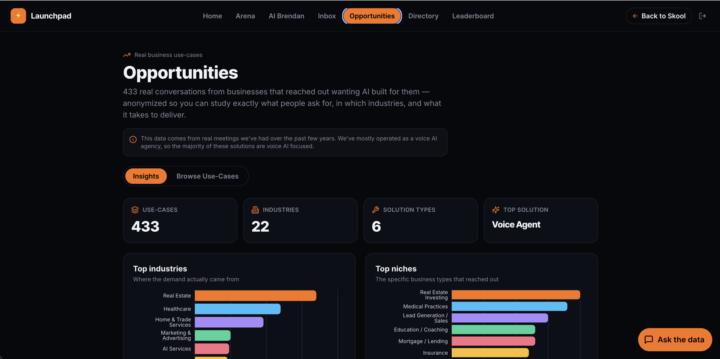
🚀 433 real business AI use-cases just went live in the Launchpad
Over the past few years running my agency, we had hundreds of real sales calls with businesses telling us exactly what they wanted AI to build for them. Every industry. Every use-case. Every "can you make it do this?" Most people never get to see what businesses actually ask for and pay for. They guess. So I took all of it, stripped out the names and numbers, and turned it into something you can explore. 433 real, anonymized business use-cases are now live inside the AI Launchpad: → See the top industries and niches actually buying AI right now → Browse and search every use-case by industry, solution and difficulty → Ask an AI assistant anything across the whole library ("what do med spas want built?", "voice agents in healthcare?") This is real demand from real businesses. Not theory, not trends I made up. It's the answer to "what do I build and who do I sell it to?" It lives in the paid Launchpad, alongside the Opportunities tab, the monthly build challenges, the lead inbox, weekly Q&As and the full course library. If you've been on the fence about going deeper, this is the stuff that turns "learning AI" into "getting paid for AI." Come join us 👇 https://www.skool.com/brendans-ai-launchpad (Heads up: we mostly ran as a voice AI agency, so a lot of these lean voice AI, but the patterns of what industries buy and how to scope it apply no matter what you build.)
Pinned
🍀
Aug '24 •
✅ GETTING STARTED 👉 (READ THIS)
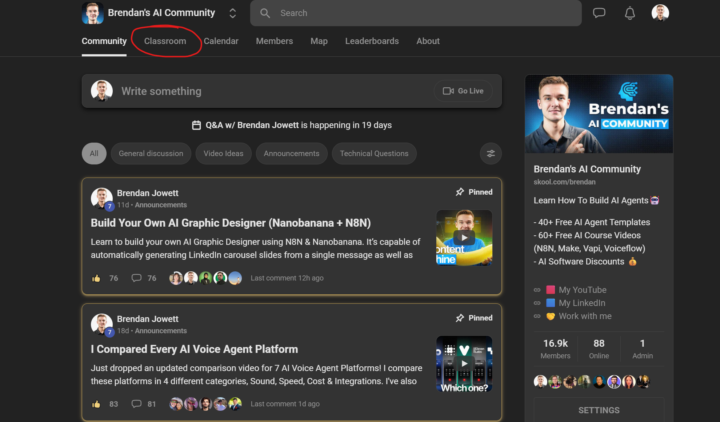
Hey there, Thanks for joining the community, it's great to have you here! It'd be great to get to know each other! You can use this simple format to make an intro post: Hey, I'm from ____________. For fun I like to _____________. Here's a pick of my workspace. ------ To access the resource hub, please click 'Classroom' at the top, then click 'Resource Hub'.

2d •
My AI Investment Analysis Workflow
I built an n8n workflow that analyzes investments automatically. The workflow: Google Sheets → Market Data → JavaScript → AI → Google Sheets It works by: 1. 📊 Reading the stock/ETF ticker from Google Sheets. 2. 📈 Getting historical market prices. 3. 💻 Using JavaScript to calculate indicators like SMA20, SMA50, and RSI. 4. 🤖 Sending the results to an AI model to explain what the numbers mean in simple language. 5. 📝 Writing the AI analysis back into Google Sheets. Right now, I run it manually with Execute Workflow. My next step is to add a schedule trigger so the workflow can run automatically. I’m learning how to combine APIs, JavaScript, AI, and automation to build practical tools—not just learning AI theory. 🚀


9d •
How I use n8n + Claude + KnockKnock + GHL together — missed-call-to-booking flow
This community is about Claude Code and n8n, so I figured it’d be worth sharing exactly how I’m using both in a production automation system. Setup: KnockKnock (AI SMS) + GHL (CRM/calendar) + n8n (orchestration) + Claude (intent classification) Here’s the full flow: Trigger (GHL): Missed call or form submit → GHL fires a webhook to n8n. First n8n check: query GHL to see if an active conversation already exists on this contact’s number. If yes → stop. Prevents double-threading when a lead calls twice. First message (KnockKnock): KK sends an SMS within 60 seconds. “Hey [Name] — saw you reached out about [service type]. Is that still something you’re looking into?” Short. Human. No pitch. Intent classification (Claude via n8n): When the lead replies, n8n passes the text to Claude with a simple system prompt: “Classify this SMS reply as HOT, WARM, or COLD. HOT = clear interest or booking signal. WARM = soft interest. COLD = not interested or wrong person.” Claude returns a single word. n8n routes via switch node. HOT branch: Send GHL booking link → appointment auto-creates in GHL calendar → pipeline stage updates → owner notification fires. WARM branch: Contact enters GHL 48-72hr nurture sequence. If they re-engage → back into HOT routing. COLD branch: Tag in GHL. Remove from active flow. Long-term drip. Write-back to GHL (every branch): n8n updates the GHL contact record: • Last intent: hot/warm/cold • Service mentioned: extracted from Claude’s output • Execution ID: [YYYY-MM]-[workflow-name]-[version] • Last message timestamp The Execution ID matters: query it at the start of every n8n run to detect duplicates. When debugging a specific contact, it gives you the exact execution to pull up. Stack summary: GHL → trigger, CRM, calendar, pipeline, notifications n8n → all logic: routing, Claude calls, duplicate detection, write-back KnockKnock → AI SMS layer Claude → intent classification (one clean word output = easy switch node routing)
1-30 of 7,565

skool.com/brendan
A free community for AI Voice Agents, Claude Code & n8n.
Join to learn, share ideas, and build real systems for the future.
Leaderboard (30-day)
1

+352
2

+248
3
+120
4

+119
5

+106
Powered by