Activity
Mon
Wed
Fri
Sun
Apr
May
Jun
Jul
Aug
Sep
Oct
Nov
Dec
Jan
Feb
Mar
What is this?
Less
More
Memberships
Lead Generation Secrets
22.6k members • Free
AI SEO Academy
3.1k members • Free
9 contributions to AI SEO Academy

Oct '25 •
How To Get ChatGPT To Recommend Your Brand
Are you trying to get your brand or product recommended by ChatGPT, but not sure how it actually works behind the scenes? In this video, I break down exactly how ChatGPT makes recommendations, where it gets its information, and what YOU can do to become one of the brands it mentions. Most of the tips floating around online about GEO/AEO wrong. I’ll show you what actually works by analyzing real queries, breaking down citation sources, and uncovering the exact strategies to help your brand get shortlisted and recommended. Strategies Covered: ✅ How ChatGPT finds and filters web pages ✅ Why only a few sources actually influence the answer ✅ How to reverse engineer those sources for your brand ✅ How to rank organically to increase citation potential ✅ How to use topical authority and backlinks to boost visibility ✅ Why shortlist citations matter more than general mentions ✅ Specific tactics to pitch or pay to get on curated lists ✅ Using long-tail and niche variations to break into competitive queries Key Takeaways: - ChatGPT uses a triage and filtering process, not just a simple crawl. - It references only the most relevant and authoritative sources to answer questions. - If you want to be recommended, you must be on the shortlisted citations. - Ranking high in Google still matters, most citations overlap with search results. - Smaller brands can still get featured by targeting specific use cases or long-tail queries. This video walks you through exactly what to look for, what to create, and how to get mentioned using real-world examples and data.

1 like • Nov '25
@Ajay Rokade Have you tried free Harrow backlinks?

Oct '25 •
❓Social Media Suite - Push New Articles to Platforms
Hi I'm looking to get my socials a bit more active. Are there any workflows that can take your new articles... 1) LinkediN 2) Convert to Video & Send to YT 3) Push to Twitter 4) Push to FB Page Has anyone seen anything that I could use to start this all off?
2 likes • Oct '25
@Alex Read You can automate posting new articles using tools like Zapier, Make (Integromat), or Buffer.These can share your content to LinkedIn, Twitter (X), and Facebook automatically.For video conversion + upload to YouTube, use tools like Pictory, Lumen5, or Repurpose.io in the same workflow.
Oct '25 •
Prompt Workflow Custom GPT
I have a few automations I want to build. I'm looking for a way to generate all the actual steps and outlines I can put into a GDoc. Are there any custom GPTs that can easily do this? E.g. I want to generate an automation that will 1) Identify the Top Facebook Pages in a Niche 2) Identify their Top 10 Posts in the Last 90 Days 3) Identify their Top 3 Posts in the Last 90 Days 4) Store to a Spreadsheet 5) Analyse & Identify Why They Succeeded 6) Let Me Update Status in Sheet 7) It Will Auto Create a New Version Using the Post as Inspiration 8) Post to My Facebook Page It would then flesh out all the intermediate steps, and check the order etc. Later I'd look for a tool to generate the JSON with the N8N modes. Maybe an MCP or something?
2 likes • Oct '25
@Alex Read ✅ Yes — you can build this using a Custom GPT to generate full workflow outlines (step-by-step), then export them to a Google Doc and later have it produce n8n JSON; just define the niche, structure the eight steps (page discovery → post analysis → sheet storage → content creation → posting), include validation sub-steps, and the GPT will output a clean, ordered automation plan ready for execution or conversion.
2 likes • Oct '25
@Jonathan Boshoff Correct — GPT can’t perform the actions, but it can generate structured workflows and even n8n JSON. Execution would happen via automation tools; GPT just accelerates the build phase.
Oct '25 •
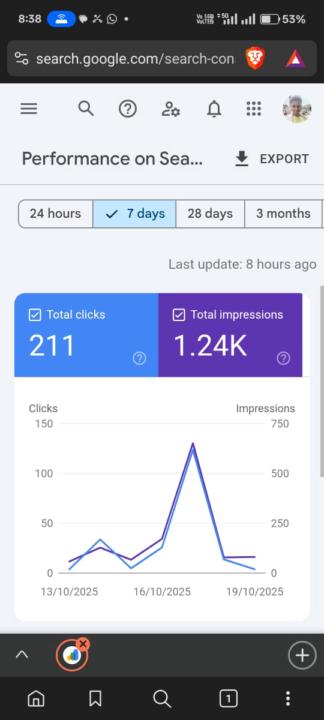
Hard Work Always Pays Off — My Small Success Story
Many people think that creating a website and doing its SEO is very difficult, but I made a website a little while ago and have already started working on it. Today, I checked the stats of this website, and now I’m even thinking about selling it. P.S.: My main reason for posting this is to say that nothing is impossible. Just try to put in the effort, and God will reward you for your hard work.
2 likes • Oct '25
@Sead Ali Hit me up a DM.
Sep '25 •
How To Get GSC Data In N8N
In this video, I’ll show you how to connect Google Search Console to n8n so you can start pulling live SEO data directly into your automations. You’ll learn how to: - Set up authentication in Google Cloud Console - Authorize and connect Search Console with n8n - Build and customize HTTP requests to pull clicks, impressions, CTR, positions, and more - Use that data to power AI agents and build optimization workflows I’ll also share a simple JSON example workflow you can import into your n8n account and start testing right away. Once your Search Console data flows into automations, you can scale insights, spot opportunities faster, and let agents do the tedious work for you. JSON: https://www.skool.com/ai-seo/classroom/33df8e01?md=f644fa4edce54088873492072874aa92
2 likes • Oct '25
@Daniel Calleja Make sure you're using the correct scope URL:https://www.googleapis.com/auth/webmasters (with the www.). Also, check that: - The Search Console API is enabled - The OAuth consent screen is set up and your account is added as a test user - You’re using OAuth 2.0 Client ID credentials If you're still stuck, feel free to share the exact error — happy to help!
1-9 of 9

@tanu-adhikari-2614
Off-Page SEO Specialist @ SaaS Monks | Backlink strategist | Helping brands grow with authority-driven SEO
Active 4d ago
Joined Oct 14, 2025
ISFP
Powered by