Activity
Mon
Wed
Fri
Sun
Mar
Apr
May
Jun
Jul
Aug
Sep
Oct
Nov
Dec
Jan
What is this?
Less
More
Memberships
Learn Microsoft Fabric
15.2k members • Free
21 contributions to Learn Microsoft Fabric

Aug '24 •
PySpark (Spark) vs Pandas vs Python in Fabric
Hello! Data ingestion and transformation from file sources such as CSV and JSON can be implemented in Fabric with Spark or Pandas or standard Python. What are the use cases for these different options? Moreover, it appears to me that Pandas dataframes cannot be written as Lakehouse Delta Tables yet, so even if we use Pandas, Pandas df needs to be converted to Spark dfs to save as Delta tables. Is this correct?
0 likes • Aug '24
Thanks @Will Needham and @Robert Lavigne . I have come across this experiment on MS Fabric that compares various Data Engineering python libraries. It appears that Polars is an alternative that has similar performance to PySpark Exploring Python Libraries for Data Engineering in MS Fabric: Pandas, Polars, DuckDB, and PySpark | by Mariusz Kujawski | Medium
0 likes • Mar '25
@Biaka Usigbe This link has code samples showing how to write Pandas dataframes to Lakehouse https://learn.microsoft.com/en-us/fabric/data-science/read-write-pandas

Jan '25 •
Fabric Losses?
There's a section here for Fabric wins, but could we have one for losses? Or misses? ha! I'm only half kidding. Wanted to share something that I have learned recently about Fabric, specifically related to deployment pipelines. We use deployment pipelines in most of our client projects. Typically, we follow dev, test, prod, but sometimes we use dev, test, qa, prod. We have really enjoyed and benefited from deployment pipelines the past several years before using Fabric. It works wonderfully with semantic models and reports. However, with Fabric data engineering items, not so much. Though, I'm told there's hope that there will be improvements soon. Things I've learned about fabric items when using deployment pipelines 1. dataflows don't work with deployment pipelines. You must manually export the json and import it in your next workspace. This means any changes you make in dev that are ready to move to test have to manually moved over. 2. data pipeline connections have to manually configured whenever you deploy from one workspace to another. There is not currently parameterized connections in pipelines, so you can't setup deployment rules to switch the connection like you can for other items (such as the lakehouse a semantic model points to or a parameterized connection string in a semantic model) 3. SQL tables will migrate from a data warehouse, but the data won't come with them. -- data will need to be manually loaded (or use a notebook or some other automation to pull in the data) 4. Similarly, manually loaded tables in a lakehouse don't get copied over. They will need to be manually created in the new lakehouse (tables created from notebooks can be set to auto create in the new workspace provided that you copy your notebook over as well) 5. shortcuts don't work with deployment pipelines -- they also need to be created manually I'm told that parameterization of data pipeline connections is coming in Q1 2025 and that dataflows are also set to start working in deployment pipelines in Q1 (though they were originally supposed to be available in Q4 2024).
1 like • Feb '25
Here is an interesting Fabric Loss (Reddit) MS Fabric destroyed 3 months of work : dataengineering
Feb '25 •
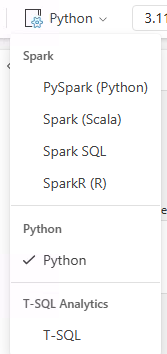
duckdb, polars available in Fabric Python. How to use?
Hello! "Python" Notebooks in Fabric have polars and pandas installed by default. Are there any templates for how to 1) read files from "Files" section of the and write to "Tables" section 2) read tables from "Tables" section and write back to "Files" section of a Fabric Lakehouse?
0 likes • Feb '25
@Antony Catella There aren't any step by step by instructions. This looks like work in progress to me. Let me know if you are able to use this and get a working template
0 likes • Feb '25
@Will Needham Looking forward to your video

Feb '25 •
What is the best practice for multiple devs working on a semantic model?
Imagine a team with 2-3 devs who need to work on the same semantic model and don’t want to move to using .pbip and git? One approach is for the dev to download the PBIX file from the service. Another is to checkout the PBIX from SharePoint, make changes and publish and n check in changes. Any other approaches that don’t break lineage or create new dataset ids?
0 likes • Feb '25
@Salil Athalye That's interesting and worrying. I wonder how Power BI semantic model would differentiate between two check-ins from the same person vs two check-ins from different persons.

Feb '25 •
DAX Help - Trailing average for the previous 12 weeks
Our team needs a little DAX help from any experts out there... We are looking to do for each row a trailing avg for prev 12 weeks for a metric lifts per hour = successful lifts / time on clock. I attached an image of the grid and put in what our DAX query looks like at the moment. Code: Trailing_12_Week_Avg_Lifts_Per_Hour = var CurrentDate = MAX(dim_date[event_date]) var PreviousDate = CurrentDate - 84 var Result = CALCULATE( [lifts_per_hour], DATESINPERIOD( dim_date[event_date], MAX(dim_date[event_date]), -84, DAY ) ) RETURN Result Any assistance would be appreciated!

2 likes • Feb '25
Do you want the 1) average for the period ie. SUM of all 'lifts_per_hour' DIVIDED by the number of days in the past 12 weeks with data? If this is what you want, you can test the correctness of your [lifts_per_hour] measure by restricting the source data to 12 weeks by either in Power Query or by adding a date period slicer and selecting a 12 week period. 2) or, if you want the "average of averages" (i.e. calculate the average per day, then average of the averages across the 12 weeks period), then the measure [lifts_per_hour] has to be written using an iterator function such as AVERAGEX or SUMX
1-10 of 21

Active 275d ago
Joined Mar 26, 2024
Powered by