Activity
Mon
Wed
Fri
Sun
Jun
Jul
Aug
Sep
Oct
Nov
Dec
Jan
Feb
Mar
Apr
May
What is this?
Less
More
Memberships
Cold Email Accelerator
850 members • Free
The Digital Marketing Bar
69.9k members • Free
4D Copywriting Community
64k members • Free
Stylist Success (Pro)
370 members • Free
AGENCY U
1.6k members • Free
Agency Growth
4.6k members • Free
Leads | Listings | Leverage
1k members • Free
Copywriting 101
2.4k members • Free
9 contributions to 4D Copywriting Community

Sep '25 •
Let me set up your email campaigns for free so I can get case studies!
Hey everyone! I’m growing my AI email marketing agency and learning as I go. I used to handle all the behind the scenes setup on my end and pay-per-call outreach, but now I’m moving toward consulting and helping businesses set up campaigns the right way. To make things easy, I’d love to offer a free email campaign setup to anyone in the community who wants to try it, no catch, no sales push. I’m just hoping to hear your feedback and build case studies as I figure out what works best in this model. A bit about me: I’ve worked in email marketing since late 2024. Most recently, I helped TenGap.com (a top web development company) get more qualified meetings each month, with deals as large as $2,000–$10,000. If you’re new to email outreach or curious to see what AI-powered campaigns can do for you and your agency, I’ll personally set up your campaigns for free. Just let me know if you’re interested or have questions. I'm here to help! Also, let me know any feedback. Thank you!
1
0
Jun '25 •
Biggest problems
Hey 4D copywriters, I’ve been struggling with lead generation lately, and I’m wondering what you all are finding most challenging in your copywriting journey.
Jun '25 •
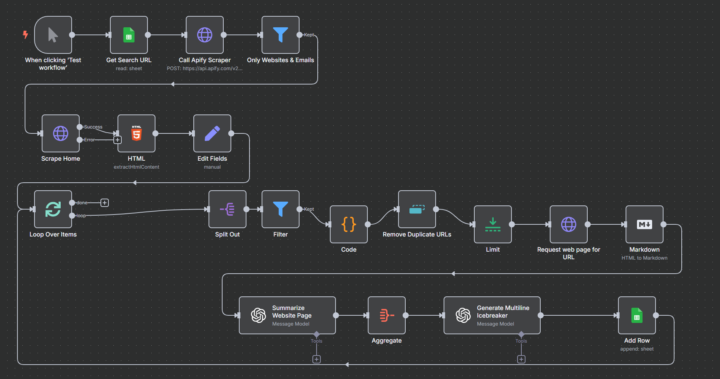
This cold email flow I got off Upwork booked 3 client calls last week
hired a guy off Upwork recently to help me build a cold email automation and it’s been kind of a game-changer. The idea was to stop relying so much on referrals and instead create a steady trickle of warm leads. Here’s what the flow does: Pulls a small list of dream clients from LinkedIn Auto-personalizes cold emails using info from their site/LinkedIn Sends a follow-up if there's no reply If someone responds, it pings me on Slack and books a Calendly call The result? Booked 3 calls last week from people I didn’t even know existed. I’m not technical, but seeing how this worked blew my mind a bit. Sharing it here in case anyone else is tired of relying on referrals or job boards Let me know if you have any questions or want help setting up!
May '25 •
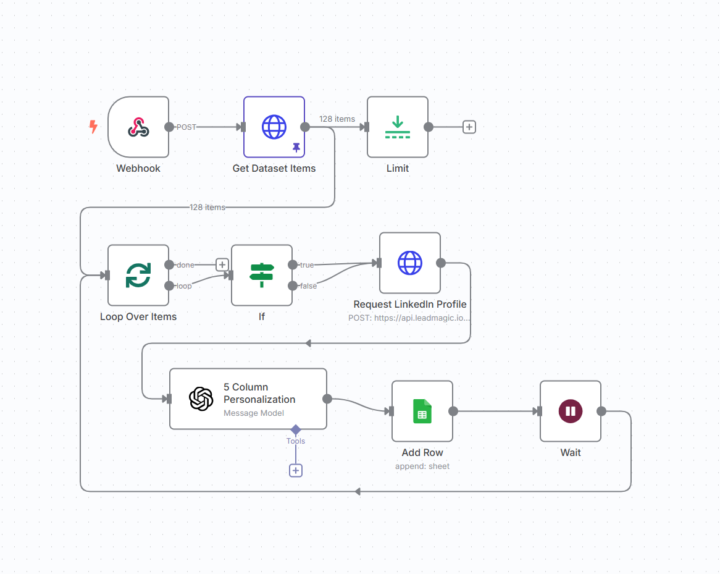
Automate LinkedIn Outreach Personalization for Cold Email (Step-by-Step Guide)
Hi everyone—I’ve been struggling with how to efficiently personalize cold outreach emails for lots of prospects without spending hours on manual research or paying for expensive tools, and I know a lot of people here have been too. I spent some time working through it last week, and here’s a simple way I solved it for around $10–$110 a month: 1. Set up n8n for workflow automation.n8n is a free, open-source tool you can self-host (on your computer or a free cloud server), so there’s no monthly fee. 2. Create a webhook in n8n to trigger your workflow.This lets you start the automation whenever you have a new list of LinkedIn URLs or prospect data. 3. Loop through your list of prospects.Use the “Loop Over Items” node in n8n to go through each contact one by one. 4. Enrich each prospect’s data using LeadMagic and Apify.Set up HTTP request nodes to send each LinkedIn URL to these tools. They return details like name, job title, company, and location.Stick to their free or low-cost plans to keep expenses down. 5. Extract and organize the data.Use the “Set” and “IF” nodes in n8n to structure the data—grab things like first name, company, job title, and other relevant info. 6. Generate personalized email content with OpenAI’s GPT-4o.Add an OpenAI node to your workflow and feed in the structured data. Prompt GPT-4o to create 5 custom sections for each email: - Subject line - Icebreaker - Elevator pitch - Call to action - PSKeep your OpenAI usage under $10/month by limiting the number of emails you generate. 7. Store the results in Google Sheets.Use n8n’s Google Sheets integration to automatically add each personalized email to a spreadsheet, ready for review or sending. If anything’s unclear, let me know—hope this helps! 🙏
2
0

May '25 •
Why entrepreneurship sucks for you.
For my first 8 months of entrepreneurship it was horrible. I didn't think it was going to be easy, but not so horrible to the point that I was: - Isolated - Burnt out - Incredibly sleep deprived - Groggy All of these, 24/7. Yet here we are. Another 12 - 16 hour day you just worked. Another night staring at the ceiling, brain spinning, too tired to work but too wired to sleep. My first 8 months of entrepreneurship were like this and it was the worst part of my life. And guess what? I made NOTHING at all. To make that even worse. SINCE THEN I've had the best 3 months EVER of my life (From February - March till now) Not just life, but business too. I'm now living a life I genuinely love living whilst working on my business. I've: - made over $10K+ online revenue (LTV) since then - been the happiest I've ever been - working 4 - 6 hours a day and making more progress than when I was working 16 hours a day - formed my own social circle of entrepreneurs in my city and built a popping social life And in this post I'm going to teach you how to do this yourself. STEP 1: Lack of Work Efficiency the cycle you're currently in: - You procrastinate → Stay up late to catch up → Sleep less → Wake up tired, groggy, and unfocused → Procrastinate again. It’s a hamster wheel, and the worst part? - you keep increasing work hours hoping it’ll fix itself. What changed my entire business was fixing this very cycle. I was stuck in it for 8 months. I was constantly tired and getting nothing done despite "working" 12+ hours/day. Here’s what actually works: - Plan tomorrow’s to-do list the night before (rank from highest → lowest priority) - Wake up and start working instantly - Hoodie + white noise + dark room = deep focus mode - Work in hour-long timed sprints - No more than 4–6 hours of deep work per day (unless big launch) - Block your day in Google Calendar like it’s law - Disable all notifications until your sprint is done This changed my life. I now get FAR more done in 4 hours than I used to in 14.
3 likes • May '25
thank you so much man this is really great advice and i relate
1-9 of 9

@salvador-santolucito-5830
SS Growth Automation and scaling in various businesses
Active 247d ago
Joined Jun 1, 2025
Powered by