Activity
Mon
Wed
Fri
Sun
Mar
Apr
May
Jun
Jul
Aug
Sep
Oct
Nov
Dec
Jan
Feb
What is this?
Less
More
Memberships
Learn Power Apps
2.5k members • Free
5 contributions to Learn Power Apps

Oct '24 •
Syncfusion components integrated with PowerApps
One year ago, I integrated a Syncfusion DataGrid component with a PowerApps application. While it offered some unique features, it also presented challenging errors. Therefore, I requested Syncfusion to integrate some of the most crucial components, which they have done now. 👋 The following components are now available for use: 1. DataGrid 2. Chart 3. Schedule 4. PDF Viewer 5. Pivot Table Blazor DataGrid Example | Grid Overview | Syncfusion Demos Blazor Charts Overview Example - Syncfusion Demos Blazor Scheduler Overview Example - Syncfusion Demos Blazor PDF Viewer (NextGen) Default Functionalities Example - Syncfusion Demos Blazor Pivot Table Example | Overview | Syncfusion Demos I have not yet checked how well this integration works, but if all the features in the components are usable, it is very impressive. You would be able to build amazing PowerApps applications with very limited effort. 😀 Regards Michael
1 like • Oct '24
@Elvis Eyobor Thanks! And note the Synfusion components are very, very impressive, so we can now build unique user interfaces in PowerApps with very limited effort. 👋 I do hope Synfusion will integrate all the other unique components they have. But I think they have seen the potentials.... after I asked them if they would do the integrations.
0 likes • May '25
If your interested pls have a look at this: GitHub - syncfusion/ej2-powerapps-components: This repository features Syncfusion PowerApps components built using the PowerApps Component Framework (PCF). These components offer rich UI elements such as Data Grids, Charts, Schedules, and more, designed to enhance the functionality and flexibility of PowerApps applications.
Apr '24 •
Advanced Grid and Pivot views for Power Apps
If you’re familiar with the impressive features offered by Syncfusion.com, you’ll be aware that I’ve specifically requested enhanced functionality related to Power Apps. This involves integrating some of their unique components with Power Apps. Notably, I’m particularly interested in their Grid and Pivot components. By incorporating these components, we’ll be able to provide basic Business Intelligence (BI) capabilities within Power Apps, enabling users to explore data in various ways. This enhancement is planned for release in June 2024. How flexible and customizable this integration would be is not yet clear, but as you can explore with below link the Grid component is very, very customizable. Blazor DataGrid Example | Grid Overview | Syncfusion Demos NB: I have created a simple PCF component, to test basic Grid view functionality before my request for this enhancement, which worked fine :-)
0 likes • Oct '24
@Savage Babajide Hi Savage 5 very popular components that can be used in PowerApps have now been released by Syncfusion. 😀 See here: https://www.skool.com/power-apps-community/syncfusion-components-integrated-with-powerapps?p=51847390 Regards Michael
Apr '24 •
PDF Viewer with static content
If you want to use the "PDF Viewer" component with static content (just one PDF-file), you will have to store the pdf-file in a database or SharePoint. You could try to upload a file to Power Apps Media, but Power Apps will refuse to upload a pdf file as it expects media files. 🤨 Hower; if you just rename the pdf file extension to .png, you could upload the file to Media and just use the filename in the Document property of the PDF Viewer component. Viola! It Works.... 😂

Apr '24 •
Notification or Message Box
coming from another BPA product K2, we would often use message boxes to show when something was triggered, as in user clicks or did something, bam! messagebox displayed with info etc what are people using in PowerApps for this? the notify command just showing that banner on the top isn't the greatest interested in hearing what people are using
2 likes • Apr '24
@Brad Johnson It is a part of the Power Platform Creator Kit, so please have a look here: Creator Kit - overview (preview) - Power Platform | Microsoft Learn
1 like • Apr '24
@Elvis Eyobor For Brad's requirement I think the Dialog component will be fine, so no need to create a new component (The Creator Kit is fine to standardize the user interface, so this is to my opinion the way to go 😀 )
Sep '23 •
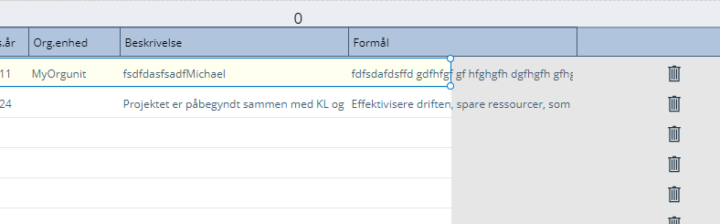
Gallery width restrictions or error
Do we have a width limitation in the Gallery as it seems to be restricted to the page size width. Not the Galley itself, but the rectangular box, where you put the controls? (note I use scrolling containers) Please check the attached picture, where you can see the last control (having header name Formål) is cutted as the rectangular box cannot be extended. (only visually as the control and the contents can be seen) Thanks!
0 likes • Sep '23
@Darren Neese Thanks! But I'm sorry, I don't think you got my point. The problem is still the max size of the Gallery box, where you put the ItemsSource controls. As long as we are unable to increase the size of this box, I will still have problems with the Templatefill as my picture shows. (and note if you increase the width of the Gallery this box will persist its width when we pass the max.)
0 likes • Apr '24
Please note a while ago Microsoft fixed this annoying issue after a very, very long support session, where they didn't really understand the issue :-)
1-5 of 5