Activity
Mon
Wed
Fri
Sun
Dec
Jan
Feb
Mar
Apr
May
Jun
Jul
Aug
Sep
Oct
What is this?
Less
More
CG Python Academy
1.4k
Free
6 contributions to CG Python Academy

Dec '25 •
Merry Christmas to all ...
Just want to wish you all a Merry Christmas. (I'm still spending all my time at the battery storage, just a few days off for now to calm down ... )
Nov '25 •
A addendum to today's (November 5th, 2025) coffee hangout
I know this post has nothing to do with Blender/Python. Thanks in advance to Victor Stepanov for understanding. 1. Regarding Artificial Intelligence - i'm afraid, there was a misunderstanding and i want to explain: The country where I live and work (at least for now...) is a member of the European Union (EU). When the EU enacts new laws (or regulations), these supersede national legislation. This means that national laws are irrelevant if there are specific EU laws for the respective area. The EU is known for viewing anything digital that doesn't originate within the EU itself as "evil," and AI is considered pure devil anyway. However, this is solely due to the fact that they themselves failed to set the appropriate course in education, trade, and industry in a timely manner. If I were to start acquiring the necessary knowledge in AI now, I would constantly have to reckon with the possibility that using AI would be prohibited by law the very next day. In today's Hangout, we talked a lot about AI, and I was surprised by how positively you all view it. I don't mean to belittle that, but from my perspective, it looks very different—if I have to expect that I might no longer be able to use AI at any time. Keeping this in mind, where is the sense for me to get the necessary knowledge about using AI? 2. To Robert McBride: I found your hints about physics (electrophysical?) very interesting. Since I'm new to this, could you perhaps explain the background/basics to me in a few short sentences? In a very general way? If so, thank you very much! 3. To Gregory Tada: Regarding your questions about solar energy, please send me one (or two) suggested times for a video call to markus@my-dwarf.com. I promise I'm not trying to sell you anything, just have a technical discussion. Finaly, again thanks to VIctor for understanding to use your platform for this issues.
0 likes • Nov '25
I wanted to get into Python scripting in Blender and connect with like-minded people – that's why I'm here. Instead, things like the following happening more and more, and robbing all my time: On Wednesday's coffee hangout, I briefly showed you the Blender file for the energy storage system; with its countless pipes and fittings, etc. All the fittings are individually created by myself in Blender as assets, precisely according to the manufacturer's specifications and datasheets. The individual parts are positioned with pinpoint accuracy because space is extremely limited. On a lot of positions it was a fight for every Millimeter. The real parts arrived yesterday morning. The delivery time was four weeks, and from today on we only have eight working days to complete the entire installation (November 19th is fixed powering up date). What can I say – not a single part matches the manufacturers datasheets. Almost all the parts are at least 0.5 cm and up to 2 cm (roughly 0.3 - 0.8 inches) larger. The 90 degree bend in the photo is supposed to have a center-to-center distance of 10.5 cm (total size by 14.2 cm) according to the datasheet of the manufacturer. The tape measure shows 11.8 cm. All the connections have to be replaced and most of them redesigned with the new dimensions. At least half the work has to be redone. This drives me crazy; the upcoming weekend is already gone - for corrections. Sorry for this rant, but i'm really frustrated at the moment.

Jun '25 •
Any Animation Suggestions?
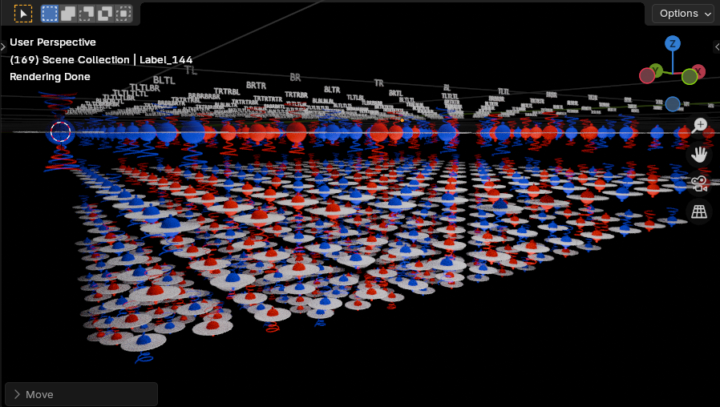
The script is written with Blender 4.4.3. Please pardon my many working errors. Victor, Thanks again for the ‘collections and instances’ script you provided. I had no understanding or appreciation for that possible project alternative till you suggested it. Since then, I’ve been slowly learning the subject matter and changing my code to work with stack instances. For example, the build_all_stacks() function’s instance names can also work as 3D text. I believe all my basic modeling requirements: 1. assembling 4 proton collections (shown co-located at (0,0,0) in the image) to form 144 proton stack instances; 2. adding up to 19 properly oriented and positioned stacks to make 1-90 atoms; 3. properly orienting and positioning atoms to make 3D molecules; 4. and including 1 or 2 bonding site stack swap out modifications; can all be accomplished with collections and instances instead of objects. The more atoms the merrier, with little to no increase in processing demands. Nevertheless the group collections, instances and 3D text included in the image seems massive to me. The addon is gone, but I can rewrite an improved version later. My next main consideration is animation. For starters, each and every proton group instance should contain constantly spinning left or right protons, electrons, and charge intake vortices. The proton instances will cast particle emissions outward from its equatorial plane while the instance is also spinning and moving linearly in space. Please note that my initial, brief Linear_and_Angular_Motion() function that operates on a proton group instance contains instructions from two of your tutorials. Given all that, I hope I’m not asking for too much, might you be able to make any further suggestions or recommendations on how I might go about implementing such animations?
1 like • Oct '25
I don't understand what this is about - but the screenshot looks really cool! 💯
Oct '25 •
Sorting Vertices on a path / 1st attempt to scripting
What I have: A mesh object in the form of a path. The indices of the individual vertices and edges correspond to the order of creation, but not to the direction of the path. What I want: The vertices and edges should be in the order of the path's direction. While playing around with KDTree(), I discovered that it doesn't take the path itself into account, but only considers the distances between the individual vertices. Unfortunately, that wasn't what I needed. So I put together my own script that proceeds as follows: 1. Create a list with (number of edges plus 1) entries. Each entry is 0, and the index corresponds to the index of the vertices of the unordered path. 2. Iterate over all edges and increment the value in the list corresponding to the index by 1. This gives me a list of all vertices, along with the value of how many edges are connected to each vertex. The two indices, each containing only the value 1, represent the starting and ending points. 3. Take the first index, which has the value 1, and determine the corresponding index of the edge. Since the index of one vertex is already known, the other vertex becomes the new starting point. 4. Iterate over all edges again, ignoring the first edge, and find the other vertex each time. Write the result in a new list. 5. Repeat step 4 for all remaining edges. 6. The new list contains the indices of the vertices in the direction of the path. From this, the coordinates can be read, and a new path can be created in the same order, with the vertices in the order of the path's direction. I'm sure there are much simpler and more elegant ways to do this. There may even be ready-made methods in Blender for this. This was my first attempt, and it actually works. But how can I do it more elegantly? What are things i should not do? (When I learned to program more than 40 years ago, spaghetti code was common—and that's exactly what my script looks like.)
1 like • Oct '25
@Victor Stepanov Thanks a lot VIctor, that was exactly what i was thinking about. (At a first read i was afraid when i see "BMesh", but after rewatching your YT-video about this topic it starts to get a bit more clear) I already integrated that in my script, it saved approx 30 lines. And i added to find the first vertex by itself, and the possibility to reverse the order.
3 likes • Oct '25
@Victor Stepanov Short answer: 1st: I wanna make a path (by extruding a vert). 2nd: Blender should do a handrail (for industrial environment) along this path and all the additional information i need: (a) a graphical representation (thats done by making the handrail) (b) a CSV-File for internal calculations (c) a part list for handing over to manufacturers for budgetary offers. Long answer: It's much more complicated ... i'm doing mockups for the factorys we are procedural providers. The sites are all over the world, and so there are endless laws/rules/standard specs. Additional there are local requirements, and a lot of other things. For now i'm using a really simple and basic script, which can do only a straight handrail (at a straight line by 2 vertices) by the most common specs (see attached script). But it didnt respect any of the different specs i need, and only work horizontally. (I build that script a few weeks ago, and while searching on how to do a script, i found your YT-Channel and from there this site here.) At a long view, as much as possible of all the objects you can see in the attached pictures should be automated by scripts. In my opinion, the handrails would be the easiest way to start and get more experience. I would also like to add: This is also a serious attempt to introduce Blender as a planning tool in the industrial environment in order to avoid the usual vendor lock-in.

Oct '25 •
Searching for the Closest Vertex with Blender Python
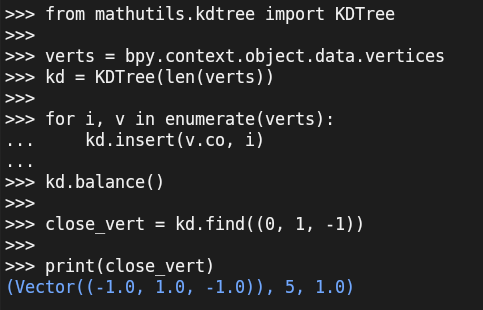
If you ever need to find the vertex nearest to a given point, Blender’s mathutils.kdtree makes it fast and easy. KDTree.find() returns the closest vertex position, its index, and the distance.
1 like • Oct '25
Thanks Victor, i'm already playing around with this!
1-6 of 6

@markus-kaufmann-9567
I'm an old and grumpy spaghetti coder from the mid 80's ...
Active 9h ago
Joined Oct 11, 2025
Powered by