Activity
Mon
Wed
Fri
Sun
Apr
May
Jun
Jul
Aug
Sep
Oct
Nov
Dec
Jan
Feb
Mar
What is this?
Less
More
Memberships
28 contributions to Assistable.ai

1d •
Outbound vs. Inbound Greetings
Is there not a way for the same voice assistant to wait for the call to say hello on an outbound call vs. on an inbound call the assistant says hello or do we need to use two separate assistants for that? This seems so rudimentary and a feature that should have been executed long ago. The use case is so high and happens all the time with our clients. Ai assistant calls > lead doesn't answer > lead calls back > since the bot is an Outbound bot the setting is to wait for the lead to greet > lead hangs up b/c noone says hello on the other line. Lead wasted. How can we overcome this with the same assistant? I've tried prompting it but that doesn't work b/c it uses the call setting. @Jorden Williams @Mike Copeland @Assistable Ai @Assistable Team


0 likes • 1d
You can use inbound and outbound logic in your prompts. The assistants can recognize call direction. Specify greeting/instructions based on call direction.
0 likes • 13h
@Justin Abee Under #Tasks: 1. Greeting *If call_direction is inbound*: As soon as the call begins, greet the user with: “[your inbound greeting here]” Any additional instructions here *If call_direction is outbound*: “[your outbound greeting here]” Any additional instructions here For call settings I use determined start, and personally I feed it the inbound greeting I want. This prompt does not seem to work if you use dynamic start in my experience.
1d •
Weird Number Pronunciations
When reading back a phone number or time we sometimes get a weird pronunciations of numbers that are a bit inaudible. I've tried different voices and LLM models. Is anyone else experiencing this? @Jorden Williams @Mike Copeland @Assistable Ai @Assistable Team

0 likes • 1d
Also experiencing this, along with certain acronyms. Tried a ton of prompting to fix it, no luck. Experiencing on Haiku, GPT and Kimi

3d •
Can i Pay someone to create the ai system for me
I want to delegate the AI system do you guys offer AI creation
0 likes • 3d
Sent a PM

6d •
WL Domain Upgrade
TL;DR: We’ve officially moved our domain system "in-house." Previously, we used a third-party service (Coalias) to handle your custom domains. It worked, but it wasn't up to our speed standards. So, we built our own Native Domain Wrapper to give you a faster, 100% white-labeled experience. What this means for you: - Faster load times for your site. - Rock-solid branding (no more "grey label" routing). - Total control over your tech stack. Quick Action (Takes 60 seconds): To get on the new, faster system, just remove and re-add your domain in your Agency>Domain tab and refresh your DNS records. We will be sunsetting Coalias in the near future so please take this week to update your DNS for a better experience. Thanks!
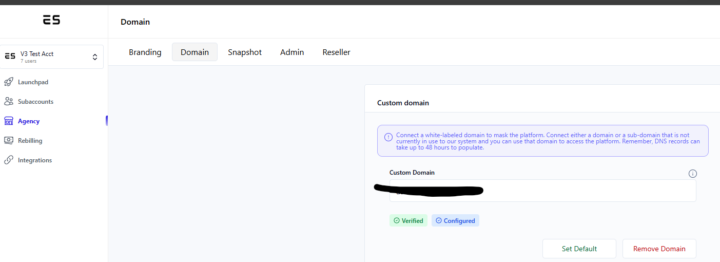
0 likes • 3d
Awesome! thanks team

15d •
Improving Voice Agent
Apologies for all the questions, I'm still finding my feet and I believe there is seasoned veterans here whose brains I have the chance to pick. Based in Ireland, building a receptionist agent for a clinic. Trying to get her sounding natural and colloquial rather than robotic. What have you guys found works best - hardcoding specific filler words and phrases, leaving it open, or does trying to manufacture it actually make things worse? Any other general tips to get the most out of voice agents would be appreciated
1 like • 8d
Use the suggested prompt framework from Assistable in the help docs, and follow the best practices they lay out. I always feed the prompt I produce myself to the LLM I am using for that assistant to make sure the prompt structure it is compatible for that LLM — they all have some differences. Also, try Kimi K2 if you haven’t already. Its really, really good. Follows Chat GPT prompt structure
1 like • 8d
really good for redundancy too. If Kimi goes out, can port over all assistants to GPT with little to no functionality hits
1-10 of 28

@luke-houk-3440
Helping business owners implement AI and automation effectively
Active 5h ago
Joined Jul 17, 2025
ENTP
Powered by