Activity
Mon
Wed
Fri
Sun
May
Jun
Jul
Aug
Sep
Oct
Nov
Dec
Jan
Feb
Mar
Apr
What is this?
Less
More
Memberships
AI SEO Mastery with Caleb Ulku
3.3k members • $27/m
Assistable.ai
3.4k members • Free
AI For SEO
48 members • Free
The Blueprint Training
4.7k members • Free
Automated Marketer
3.6k members • Free
AI AUTOMATION INSIDERS
3.7k members • Free
AI SEO Operators
3.2k members • Free
Learn Voice AI
363 members • Free
AI Automations
351 members • Free
132 contributions to Assistable.ai

Jan 30 •
Assistant stops responding after collecting email or phone
I've been working with support on this, but when someone is using the chat widget enters their contact information and is already in GHL, the bot stops responding. Has anyone else come across this, and if so, have you found a solution? I was told to add logic, such as "Only save details if they are not already on file", to the prompt, but it doesn't work. Any help would be appreciated.
0
0
Jan 15 •
RE: Reseller Service Agreement
@Jorden Williams I don't plan on being a reseller, and it states that resellers need to pay $6,500/yr. fee. Plus I am on the LTD. Should I just ignore this document?

Nov '25 •
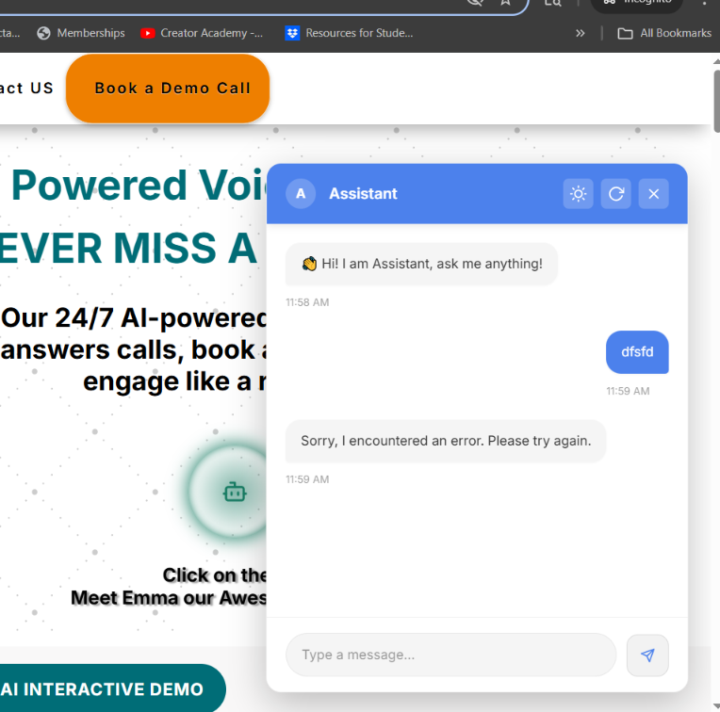
Chat Bot giving errors again
@Jorden Williams I sent a friend to my site and he told me this is what he encountered. Even in a Incognito window. It has a baisc message and returns an error every time I put something on the chat.
1 like • Nov '25
I dealt with this and determined that, when returning to the chat bot again, if you deleted the user in your GHL account, you will receive that error. I believe it has to do with the cookies stored in the browser, trying to match up with the user in GHL (which was deleted). This is a real pain when it comes to testing.
1 like • Nov '25
@Steven Logreira Yes, it helps when someone revisits your site, as it will recognize them. What I'm doing now is opening up a different browser and profile in Chrome, and doing the testing from that one. I have to clear the cache each time though.
Oct '25 •
Bots stop working during chat
I keep getting the error message "Sorry, I encountered an error. Please try again." after a few messages. Anyone else seeing this?
Oct '25 •
Bot thinks Monday is the 21st of Oct., not the 20th
Here's what the bot wrote when I tried to schedule a call: "The next available Monday morning slot is at 8:30am on October 21st or October 28th. Does either of those work for you?? The appointment was on the calendar for Tuesday the 21st of October. Any idea how to fix this or why it happened?
0 likes • Oct '25
@Kenzel Pearson Here's what I received from Assistable Support: It happens when there’s a timezone misalignment or date-parsing error between: 1. the assistant’s prompt, 2. the calendar’s timezone setting, and 3. the user profile’s timezone inside GoHighLevel. Here’s how to fix it:✅ Open your GHL calendar → confirm it’s set to your correct local timezone.✅ In your GHL user profile → verify the same timezone.✅ In your assistant’s booking prompt, explicitly include the timezone (e.g., “Monday, October 20th at 8:30 AM PHT”).✅ Make sure you are using Assistable V2 booking tools, which handle date parsing more accurately. And here's what they added to the prompt: ##IMPORTANT - You have access to the following context: - **Current Time**: `{{current_time}}` - **Time Zone**: `{{account.timezone}}` I haven't tested it yet, but will soon, and I'll let you know how it goes.
1-10 of 132

@kurt-lohmann-4330
Digital agency owner helping small businesses scale efficiently with local SEO, AI+Automation.
Active 18h ago
Joined Jun 13, 2024
Bend, Oregon
Powered by