Activity
Mon
Wed
Fri
Sun
Feb
Mar
Apr
May
Jun
Jul
Aug
Sep
Oct
Nov
Dec
Jan
What is this?
Less
More
Memberships
28 DAY RESET
108 members • Free
2 contributions to 28 DAY RESET

Oct '25 •
💪 How to Use Your Training Program (and Watch the Demo Videos!)
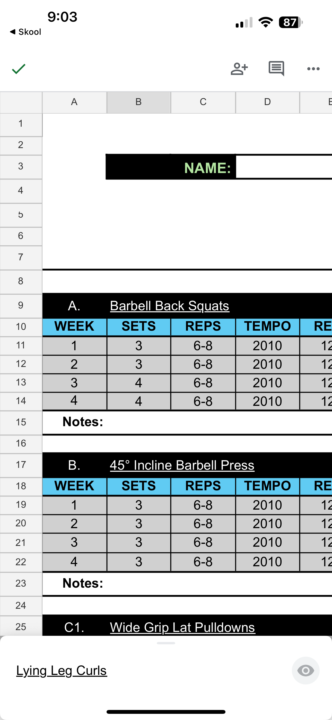
Some of you mentioned that the Training Program opens in “View Only” mode — no worries, this quick guide will fix that! 🚀 You’ll just need the Google Sheets app installed (free on the App Store or Play Store). Follow These Steps: 1️⃣ Open the Training Program link from the community. 2️⃣ If it says “View Only,” tap Open in Google Sheets. 3️⃣ Tap the ⋯ or ⋮ (three dots) in the top corner. 4️⃣ Select Share & export → Make a copy. 5️⃣ Rename it (for example: My Training – Week 1 [Your Name]). 6️⃣ Tap Save — this creates your own editable copy. 7️⃣ You can now type your weights and reps directly into your sheet. 8️⃣ To watch the demo videos, just tap the exercise name (it’s a link). - If it doesn’t open, press and hold the exercise name and choose Open link. 🎥 Quick Tip: RIR = Reps In Reserve.It means how many reps you could still do with good form after you stop.Example: 8 reps @ 2 RIR → do 8 reps, but stop while you could still do 2 more. If you’re still stuck or not sure how to open the demo videos, just send me a message — happy to guide you through it. 🌟

0 likes • Oct '25
@Kit Concepcion Hi Kit. It’s still not working. The exercises with working links are in green writing and the ones in white don’t have a link.
Oct '25 •
Exercise tutorials
Hi Kit, I’m having trouble opening the exercise links in the Intermediate Program. In the Beginner Program, I could click on the exercise title to watch a video, but that doesn’t seem to work for the Intermediate one. Do you know how I can access the videos for this program? Thanks 😊
1
0
1-2 of 2

Active 3d ago
Joined Oct 15, 2025
Powered by