Activity
Mon
Wed
Fri
Sun
Jan
Feb
Mar
Apr
May
Jun
Jul
Aug
Sep
Oct
Nov
Dec
What is this?
Less
More
Owned by Julie
Create Profitable Travel Communities & Convert Followers Into Travel Sales! ✈️
Worldwide Vacation Travel (4*, 5* & Extreme Luxury) 🇨🇦 Departing Canada - Unbeatable Sun Travel Deals & Exclusive Savings Connect, Learn & Share
Memberships
Mobility & Injury Prevention
144k members • Free
Skoolers
177.1k members • Free
AirLab
295 members • Free
Sales Navigator Secrets
239 members • Free
Creator Circle
620 members • Free
AI for LinkedIn - evyAI.com
1.5k members • Free
Women Helping Women Mastermind
10.5k members • Free
Accelerator University
10.3k members • Free
Kourse (Free)
114.9k members • Free
6 contributions to AI for LinkedIn - evyAI.com

May 28 •
This looks exciting but not for a LinkedIn beginner?
I love the look of evyAI and it seems like it will be very useful but I'm pretty much completely new to LinkedIn, other than the basic personal/company page set up. Where should I go, what community should I join, to understand the basics and set up a strategy for my business so that I can then use evyAI? TIA

1 like • May 29
@Tom Wells looking for something about using LinkedIn and not using evyAI. To begin with 😉
0 likes • May 29
@Rick Kloete looks exactly like what I need. Thanks!
May 25 •
free vs. premium vs. sales navigator version of LinkedIn?
Hey all! Julie from Toronto, happy to be here! I’m about to focus on LinkedIn and make it my primary source of much of what I do (get to that later in my intro post), and I’m wondering for those who are and who are not using EvyAI, what version of LinkedIn are your using? What do you like most of the version you’re using? Which works best with EvyAI? I could benefit I believe from both Premium Business and Sales Navigator. Is this addressed somewhere in this course's content? TIA

1 like • May 27
@Lori Howard Thanks Lori. That’s encouraging!
0 likes • May 27
@Joe Apfelbaum thanks Joe!

May 23 •
How to create a successful LinkedIn event that gets dozens of qualified leads to show up?
The Complete Guide to LinkedIn Event Marketing: How to Host Events That Actually Fill Up and Drive Business Based on a masterclass by Joe Apfelbaum, CEO of evyAI, with insights from @Murray Beaulieu and @Rick Kloete Why LinkedIn Events Actually Work (When Done Right) Most people think webinars are dead. Joe Apfelbaum used to think the same thing. But then he discovered the secret: it's not about webinars - it's about bringing the right people together for the right reasons. Here's proof it works: Murray hosted an event and got 240 people to register. Rick did his first event and called it a "smashing success." Joe once had only ONE person show up to an event, and that person became a $5,000/month client. The lesson? Even if just one person shows up, it's worth it. You get content, practice, and potential business. The 3-Step Framework for LinkedIn Event Success Step 1: The PPP Method (Plan, People, Promise) Plan: Know exactly who you're targeting - Don't try to serve everyone (event planners AND CEOs AND job seekers) - Focus on one specific group with one specific problem - Examples: Marketing directors, software founders, LinkedIn beginners People: Identify your ideal attendees - What problem keeps them up at night? - What would make them excited to give up 30-60 minutes? - Where do they hang out online? Promise: What transformation will they get? - Not just information - what will they be able to DO after? - Make it specific and actionable - Example: "Turn your LinkedIn connections into a dashboard to track opportunities" Step 2: Test Before You Invest The Curiosity Test (Do this BEFORE setting a date!) Send this message to 100 connections daily for 10 days: "I'm thinking of hosting an event about [topic] in the next couple weeks. Would you be interested in attending? Just trying to gauge interest." What to look for: - 20% response rate = good topic - 50+ people saying "yes, keep me in mind" = great topic - Mostly "no thanks" = find a different topic
2 likes • May 25
I’m excited to host one in my future, simply from reading this post!

May 23 •
💥"Social Proof" Bus. Dev. Party Major "Ah-ha" takeaway⁉️
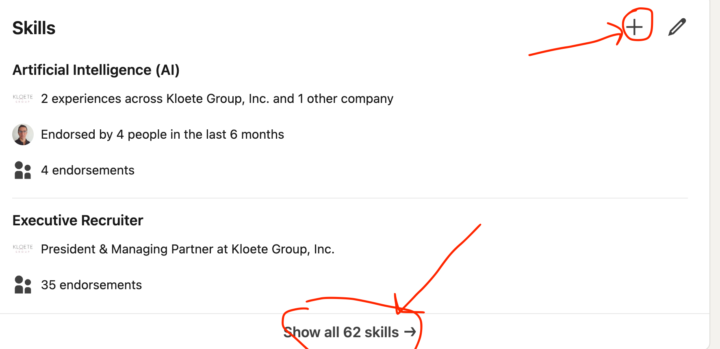
For those who attended our inaugural 1st ever Social Proof Party, THANK YOU! I truly appreciated the great attendance and support.😀 For those that missed it, we covered how to give and receive recommendations and also how to endorse people quickly and easily whom you want to stay top of mind with and THAT is the "Ah-Ha"! When you endorse people you're connected with (You MUST be connected to both endorse and recommend), they get a message that you've endorsed them for a skill or skills! This puts your name in front of them, and that's when it hit me. WOW! If someone has 43 skills listed, then I could endorse them for 1 or 2 skills over then next year by once a week simply endorsing them. Since I believe that it's not Who you Know, or What you Know, but "WHO KNOWS YOU" that counts, this is an amazing easy way to stay top of mind with those you want to develop real relationships with. When you go to someone's Profile scroll down until you see their Skills section, and click on "Show all 62 Skills" and it will give a list of them all with an "Endorse" button next to each. All you do is click Endorse and they get the message that you endorsed them. How simple is that. If you click on the + sign on your profile in this section you can Make a Recommendation, or Requestion a recommendation and a field will show up where you can type their name. GOOD LUCK Everyone!
1 like • May 25
So excited to learn about things like this and the power of LinkedIn.

2 likes • May 25
I love this and it’s also mortifying. If I contacted everyone in my Gmail (I’ve seen him recommend the same with email), that I’ve had since Gmail’s inception I’d have many many thousands, many cringe worthy I’m sure from young and stupid party days lol. But…since everyone travels, and one arm of my business sells vacations, well yep, I’d have a huge business! Lol. How bad do I want it, right?!
1-6 of 6

Active 33d ago
Joined May 25, 2025
Toronto, Canada
Powered by