Activity
Mon
Wed
Fri
Sun
Jul
Aug
Sep
Oct
Nov
Dec
Jan
Feb
Mar
Apr
May
Jun
What is this?
Less
More
Memberships
CG Python Academy
1.3k members • Free
6 contributions to CG Python Academy

May '25 •
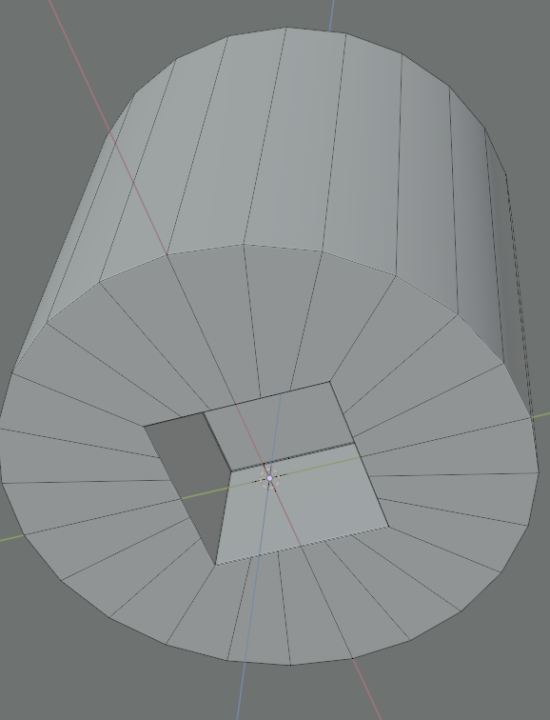
Making squares in circular faces
Hi all, I am working on modeling a wrench socket and know my topology just isn't going to cut it in the long run or make my materials look terrible. This is currently what I have but I don't like how the cut to the square is done. Is there a better method that I need to use to go from circle to square so that there are proper supporting topology for when my mesh gets more complex?
Mar '25 •
Effective Selection of Edge loops code review
I am working on a script that takes a cylinder, creates a solidify modifier, performs a few extrusions and bevels certain edge loops. I am pretty sure how I am selecting the loops is super inefficient and seeking some guidance on how to properly do things. Especially when the vertex count goes into the 100000s things start to become very slow. I have attached some questioning methods that I wrote. def get_outer_verts_z(inner_group, round_value = 4): Will get a numpy array of all the vertices that form the outer part of the mesh, inner_group is a collection of the solidify modifiers Output Vertex Group which forms the inside of my mesh def get_inner_group_indices(): Gets the inside vertices of my mesh based on the Output Vertex Group of the solidify modifier def select_edge_at_z_by_group(edge_z, indices_to_consider, is_inner_group, append_selection = False, index_rounding = 4): This will perform an edge loop selection of all the edges that contain vertices at the given edge_z value. The is_inner_group will determine which vertices to check, inside or outside of the mesh Although this code works and performs all the things that I need things are quire slow, and when I alter the mesh I have to rerun get_inner_group_indices() to get a fresh copy of the verts if I need to select new edges. What is the optimum way to work with edges of a mesh or how can I improve my code for better workflow here. I also included a rounding factor as I have found that not all the verts have the exact Z position, some are off my a fraction and won't be selected. Is this a known issue when working with these coordinates? Also, is this an effective way to get my mesh data to be refreshed bpy.ops.object.mode_set(mode='OBJECT') bpy.ops.object.mode_set(mode='EDIT')
2 likes • Mar '25
Thanks Victor, the KDTree looks like it can improve things for me but will take some re-coding, I will do more research into that this weekend. As for the demo, I will put together a sample file together in the next few days
1 like • Mar '25
@Victor Stepanov Here is an example blend file with a script that will select two outer edge loops of my mesh based on the Z Axis. If the mesh is very complex with large amounts of verts it can be sluggish in the selections.
Mar '25 •
Details of MESH_OT_loopcut
Hi all, I am working on a script and performing loop cuts. After some tinkering, I managed to get things working and established the minimum call needed to perform the cuts. I have this api call which works: bpy.ops.mesh.loopcut_slide(MESH_OT_loopcut={"number_cuts":8, "falloff":'INVERSE_SQUARE', "object_index":0, "edge_index":edge.index, }, ) My question is, does anyone know if this parameter MESH_OT_loopcut is documented anywhere. I found that if I do not provide "object_index:0" nothing happens but can't find an explanation of what all the properties are. 0 might have some significance and magically works with my mesh but want to understand what this actually does.
1 like • Mar '25
@Victor Stepanov Thanks for pointing this out
Mar '25 •
Blender Addon Version Support
Hi All When making add-ons and extensions for Blender, what is the general practice to support old versions, is there a rule to support "x" versions behind the latest one? Without knowing if there is a breaking change in the API I would have to install multiple versions and test them there or to see what is the minimum version my script will work on Any thoughts on this?

Nov '24 •
Introduce Yourself
Make sure to create an Introduction post. 🥳 I would love to say hello! 👋 I created an introduction template post for you if you need some help https://docs.google.com/document/d/1NL4RUnbrlplwKCTnrdos3IgyJbTMmO_EcLD6QmegG8w/edit?usp=sharing

1 like • Mar '25
Thanks @Aaqil Ilyas , once v2 is ready I will share the updated link
0 likes • Mar '25
Welcome to the community @Mattia Ranfagni 👋
1-6 of 6

@jhonny-bravo-8787
Programming runs through my veigns. Lets make the world beuatiful throught 3D art...
Active 396d ago
Joined Mar 7, 2025
Powered by