Activity
Mon
Wed
Fri
Sun
Jun
Jul
Aug
Sep
Oct
Nov
Dec
Jan
Feb
Mar
Apr
What is this?
Less
More
Memberships
Clief Notes
26.3k members • Free
7 contributions to Clief Notes

8h •
Console Injection: Turn Any Browser Tab Into an AI Control Panel
This post has a video example. **TLDR:** Console injection. Anything running in a browser can print a control menu to the console. Claude reads it. Now it knows what it can do, and controls the site without an API. So, no back-end needed. Super simple. Want the full picture? Keep reading. Want your LLM to build this for you? Copy/paste this whole post. --- **THE PROBLEM** You want your LLM to control something in your browser. Your options aren't great: 1. Claude-in-Chrome's built-in tools. It doesn't know what your site does or how to use it. It takes screenshots and guesses. Slow and token-heavy. 2. Build an API server. Now you're managing keys, hosting, and paying per call. **THE SOLUTION: CONSOLE INJECTION** There's a third option. Whatever you're building loads in the browser. On load, it prints a list of controls the AI can use. The LLM reads the console, sees the control list, and runs JavaScript to call those controls directly. It's just a simple JavaScript control list sitting in the console. You can even add a workflow so the AI has an idea of what it can do with those controls. This works for anything that runs in a browser. A SaaS tool, an internal dashboard, a local dev environment, a canvas editor, a data pipeline UI - if it renders in a browser tab, you can give an LLM a control panel for it. Here's what it looks like in one of my tools (hit F12 to see your own console): ``` [AI-ACCESSIBLE] This app can be controlled via JavaScript. * Sidekick.help() - Complete tools reference (returns JS object) * Sidekick.teach() - Full teaching guide, 14 sections logged to console * Sidekick.tool(name, input) - Execute any tool directly * Sidekick.batchAutomap(mappings) - Smart batch mapping (recommended) help() + teach() contain everything needed. No need to fetch external files. ``` The LLM sees that, and it's immediately trained. It can read state, click buttons, type things, batch operations - whatever you've exposed. **IT GETS BETTER**
2d •
MADE A GAME - EARLY PROTOTYPE - Scylla 01
Check it out here: https://3toedsoftware.com/demos/scylla-01/ 146 commits to get to this point Just showing what we can make with Claude Code. I have almost no coding experience. It's clunky and interesting. Built this with Claude Code + Babylon.js. I like this combo for fast prototyping. It's a 3D deep ocean scene. Very small sandbox. Not a full game yet, more of an interactive prototype. You pilot a submarine around a deep ocean environment. There's a control panel for lights, a mining laser, speed boost, and an inventory system for collecting materials. Also a control panel to mess with lighting and other things in the environment. - W/A/S/D (or arrow keys) — move the submarine - Shift — cycle speed modes (normal, boost, super boost) - L (tap) — toggle/cycle lights - L (hold) — toggle light direction - Left mouse (tap or hold) — fire red laser (mining laser) - Right mouse (hold) — hold on object to lock on and move the mouse where you want to move the thing. it's sloooooow - Middle mouse wheel — increase/decrease submarine depth - Middle mouse click — attach tether (doesn't do anything but look weird right now) - Numpad +/- — zoom in/out Use the green laser to interact. I made it weak for now, so it can only move little things. It will be upgradeable. Use the red laser to burn shit. If you hold the red laser button on the big brown cube the animation will change and you can cut pieces off. If the pieces are small enough, use the green laser to move the cut piece onto the platform to collect it. Super excited to see what you guys make. Any games yet? I did a quick search for "Game" and couldn't find one. Also, just saw that basically every major engine has MCP integration now. I wish I could split into several people so I could make games and also productive apps. I feel like I have to choose one and focus. Or just have my sleep removed and inject demon blood into my body to stay moving.
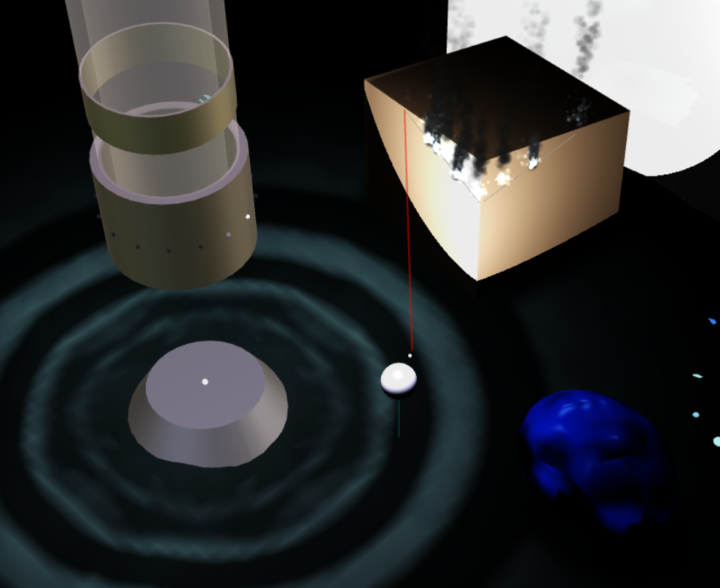
1 like • 16h
FOR PROTOTYPING ONLY I use a really organic process. I start by explaining a super basic idea. Little baby steps, and let Claude Code guide me. Claude suggested three.js or Babylon for this. At the time, Babylon had easy lighting baked in, which seemed perfect for a deep-sea game, so we went with that. It's a very casual conversation for the most part. "Can we make the shift button make the sub move faster?" "Can you create a control panel with sliders that lets me adjust the gravity?" Lots and lots of commits. I want there to be room for the idea to evolve, so I don't want to add lots of instructions. Very small steps. Lots of testing. LOTS OF THINGS THAT DON'T WORK hahaha. But it's so much fun to make a game that making the game becomes the game. I think it's important to stress that this is good for prototyping. I don't think it's the best idea to ship this way. I imagine the code is spaghetti slop, which makes big updates, add-ons, or anything else you can't anticipate, a big headache. If I were going to ship a paid product, I would have Claude Code read through the codebase and create a comprehensive set of instructions for ANOTHER Claude Code session to make from scratch. I would definitely feed it Jake's method and build off of that foundation.
2 likes • 13h
@Roc Lee I manage the high-level architecture. Claude Code translates what I say into the magical code language that actually does stuff. If it has issues with a particularly difficult request we'll research together and try lots of experiments.
2d •
How I Prototype with Claude Code - w/Claude.md
I edited this post to be an expanded version. If you read the original, this covers the same ground but goes deeper into the why behind each step. This might be useful to you if you're curious how someone actually builds things with Claude Code day to day. Not theory. Not a prompt library. Just the process. This walkthrough uses vanilla HTML, CSS, JavaScript, and .MD files. You'll need Claude Code installed already. The provided Claude.md is specifically tuned for making vanilla HTML, CSS, JavaScript things. --- ## Let's Set the Mood This feels more like sculpting with a friend than prompt engineering. Very organic. I have Claude create a basic idea. A lump of clay. Not pretty. Then we build from there. I imagine what I want and ask Claude to make updates. It updates the file. I test it. I ask for more updates. We keep doing this until we make something we like. We take very small steps. I want to feel each change in UX. This is important. If you try to describe the whole finished product upfront, Claude will give you something that looks complete but feels hollow. Buttons that technically work but don't feel right. Layouts that check boxes but don't flow. You end up spending more time explaining what's wrong with the output than it would've taken to just build it in small pieces. Small steps let you steer. You feel each change. You catch problems when they're small. And you discover ideas you never would have thought of sitting in front of a blank spec. --- ## What We're Building As an example, let's make something extremely useful. We will call it "Useless Spinner App." It will help me make important life decisions. Here's the finished product: https://3toedsoftware.com/demos/useless-spinner/ I picked this because it's small, visual, and instantly testable. You click things. They spin. You see if it works. If something's wrong, you'll know in two seconds. --- ## Setup Two things. **1. Create a folder on your desktop.** Call it "Useless Spinner App" (or whatever you're building).
0 likes • 14h
Edited this post to be an expanded version. Let me know if anything needs more explanation.

2d •
Ari’s Space: Your 24/7 AMAAi Hotline
Welcome to Ari’s Space. Think of this as your always-open support thread inside Clief Notes. If you have a question, feel stuck, need direction, want feedback, or just need a little clarity, drop it here. This space is for: - Questions about Clief Notes or ICM - Help applying what you’re learning - Feedback on your ideas, content, offers, or next steps - Accountability nudges - “Am I thinking about this the right way?” moments - Anything you’d usually wish you could ask me directly No question is too small. If it matters enough for you to ask, it belongs here. I’ll be checking in regularly and answering as much as I can. Use this thread like an AMA that never closes. Drop your question below whenever you need support with. Welcome to Ari’s Space. <3
2 likes • 1d
Man, I think I use a very different method for developing things than Jake. I take little baby steps. I don't create an entire writeup first. I make a draft folder and use a very simple prompt like "I want to make a webapp". Super basic. We write LOTS of code first, making adjustments, lots of testing, lots of iterations. It develops organically. I think I need this, because it helps know what what I want. Then when we have a good proof of concept, I have Claude write a comprehensive prompt for me. I review it, then make an entirely new folder with those as instructions, and have it make everything from scratch using those instructions. So the bugs/slop created from that organic development are basically gone. I'm super visual, so I guess I need to start with seeing something, even a blank html page. Maybe I'm doing the inverse of Jake's method but arriving at the same place? Different brain types.

4d •
Do you use AI for your hobby?
I'm curious what everyone here likes to do for fun (of course building stuff with Claude is fun too lol), and if you've applied any AI to your hobby. For me it's been super useful for DND planning and I find I get to stay in creative flow more. Curious what other people are doing
1 like • 2d
@Marigold Henshaw Building a system that records my actions in my apps so that Claude can do my work for me. Very slow progress. Still fun though :)
1 like • 2d
@Roc Lee I'll write something to share with everyone. Maybe make a short video and post on youtube? My method tends to produce sloppy code (i think), but I've learned ways to mitigate that issue and clean things up. I could post about that as well if you're curious. I have very little code experience. Just some action script which is pretty much dead as a platform.
1-7 of 7

@jason-jennings-5855
Sign designer turned AI addict. I build web apps that LLMs can use to get real work done in the sign industry. 3toedsoftware.com is my playground.
Active 2h ago
Joined Apr 23, 2026
INFJ
Utah
Powered by