Activity
Mon
Wed
Fri
Sun
May
Jun
Jul
Aug
Sep
Oct
Nov
Dec
Jan
Feb
Mar
Apr
What is this?
Less
More
Memberships
AI Automation Network
4.7k members • Free
Voice AI Business Academy
43 members • $34/m
Anthony's AI Circle
236 members • $59/month
The AI Advantage
120.1k members • Free
AI Automation Society
344.8k members • Free
WavyWorld
48.1k members • Free
Brendan's AI Community
24.3k members • Free
Voice AI Academy
1k members • Free
AI Automation Agency Hub
313.1k members • Free
5 contributions to Brendan's AI Community

Aug '25 •
Where are you finding the most success with client acquisition right now
I’ve been seeing a lot of talk in the AI automation space around cold email, LinkedIn outreach, and cold calling — and of course some people are landing clients through warm leads and referrals too. I’m curious to hear from everyone here: What’s working best for you right now when it comes to landing new clients? Is there a particular channel or method that’s been giving you the highest ROI lately? I’m just trying to do a bit of a pulse check. I want to make sure I’m not overlooking something that could strengthen my outreach strategy, and I think it’d be valuable to hear what’s actually working from people actively in the field. Appreciate any insights you're willing to share. Looking forward to learning from everyone.
1
0
May '25 •
Help Please🙏
Hey everyone, I’ve been working on a voice assistant using VAPI that collects a caller’s name, phone number, and call summary, then sends that data to Make via a webhook to update a Google Sheet. However, I’ve been running into several frustrating issues, even though my lead_capture tool is being triggered successfully (confirmed in the logs): Timestamp Issue The timestamp value being sent in the payload is stuck showing an old date from 2023 instead of the current call time. I’ve added instructions in the prompt to generate a dynamic ISO timestamp, but it’s still not updating with each new call. Data Not Extracted in Analysis Section Even when the tool is called and I see values like caller_name, caller_number, and call_summary in the logs, the Analysis tab just shows "N/A" under Data. This makes it hard to confirm that the assistant is properly capturing variables. Google Sheets Not Updating Although the payload reaches Make (confirmed in the webhook log), the spreadsheet doesn't reflect any new entries. I suspect the field names might have mismatched casing or weren’t properly refreshed in Make, but reinitializing didn’t solve it. Lead Capture Tool Is Being Called I’ve confirmed from the logs that the lead_capture tool is being called, and the payload structure looks valid. But somehow, none of the data seems to be making it through to the final spreadsheet. If anyone has dealt with this kind of issue — especially around dynamic variable capture, timestamp generation, or Make not updating despite receiving a payload — I’d really appreciate any advice or insights. Thanks!

1 like • May '25
@Sam Ha I’ll definitely give it a try. I eventually got the tool to work as intended I had thought about just switching to retail earlier, but I didn’t like the feeling of giving up as soon as an obstacle shows up so I stuck with vapi.
0 likes • Jul '25
@Rimas Jukovic I ended up using retell for this use case because it was easier for me to be able to book apointmwnts
May '25 •
Voice Agent Booking Over Busy Times Even Though They're Marked as Busy
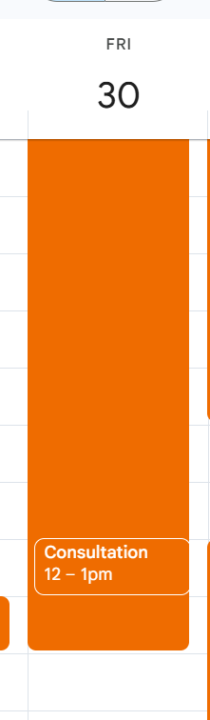
Hey everyone, I’m building an inbound AI voice agent using Vapi, Make.com, and Google Calendar. The agent acts as a receptionist for pool contractors, qualifying leads and offering available times to book a strategy call with our team. Right now, I’m running into a major issue where the agent is offering and booking times that are already marked as busy on the calendar. The Core Issues 1. Agent is Booking Over Busy Times In Make.com, I’m using the Google Calendar "Get Free/Busy Information" module. It correctly returns busy blocks, and I can see those times are marked as unavailable in the output. Despite this, the agent still suggests and confirms appointments during those busy times. For example, if my calendar is busy from 12 AM to 2 PM on May 30, the agent will still say “You’re available at 11 AM” and book that time. 2. Returned Time Zone is Incorrect The times returned by the agent seem to be in UTC, but the agent says them as if they’re in Eastern Time. This causes the agent to say things like “1 PM Eastern” when it’s actually several hours off. I think the time values need to be formatted in Eastern Time before being spoken. 3. {calendar_availability} Tool Is Not Filtering Out Busy Times The calendar module returns the correct busy periods, but I don’t think my Make scenario is comparing those to the time options being passed back to Vapi. Right now the webhook response just includes available options, but it doesn’t actually exclude any overlaps with the busy[] array returned by Google Calendar. Screenshot Here’s a screenshot showing Google Calendar correctly marking the time from 12 AM to 2 PM as busy. But the agent still sees that time as available: What I’m Hoping to Solve How can I properly filter out busy time blocks in Make.com before the agent sees them as available? What’s the best way to convert UTC time to Eastern so the agent speaks the correct local time? If anyone has experience with this setup or a working calendar logic they’d be willing to share, I’d really appreciate it. Thanks in advance.
May '25 •
Help Connecting Lead Capture Tool (Make.com) to Vapi Assistant
Hey everyone — I’m currently building a receptionist-style voice agent in Vapi and could really use some help. The main issue I’m facing is connecting my Make.com lead capture tool to Vapi. I want the agent to collect a caller’s name and number, then send that info to Make so I can store the lead — but I’m not sure how to properly pass those variables into the tool or trigger it from within the conversation. I was considering building this logic out in the Workflow tab, but when I use that method, the agent starts to sound noticeably more robotic. I also noticed I don’t seem to have any options to change the voice provider (like switching to ElevenLabs), which limits the natural feel I’m going for. If anyone has experience solving this or can share how they set up a smooth Make.com → Google Sheets flow with a natural-sounding voice agent, I’d really appreciate it! Thanks in advance 🙏
1
0
May '25 •
Is it better to just build in vapi?
So I’m currently building my first agent for a client, which is basically just an AI receptionist that answers general knowledge questions about the business and at the moment I’m building it using voiceflow but connecting my vapi account for the voice agent as of now there’s no workflow in Vappi it’s just using the Voice flow workflow to function . I’ve been running into a lot of issues doing this so I just wanted to know if it would make more sense just to make the entire thing in vapi?
1-5 of 5