Activity
Mon
Wed
Fri
Sun
May
Jun
Jul
Aug
Sep
Oct
Nov
Dec
Jan
Feb
Mar
What is this?
Less
More
Memberships
LeadIndicator.ai
560 members • Free
Assistable.ai
3.3k members • Free
TheTechStack.ai University
403 members • Free
Nexis AI w/Jason
501 members • Free
The Chatbot Challenge
1.5k members • Free
423 contributions to Assistable.ai

7d •
Redo OAuth connection this morning
All bots were disconnected this morning, re-do OAuth and it should fix it.
0 likes • 7d
@Mike Copeland

9d •
Scheduling without user picking time
Anyone experiencing this? This as been a real issue has of late. Wondering if anyone else is experiencing this also. I’m guessing it’s an issue that is popping up when they are moving to V3.
1 like • 8d
Same, lots of issues right now.
15d •
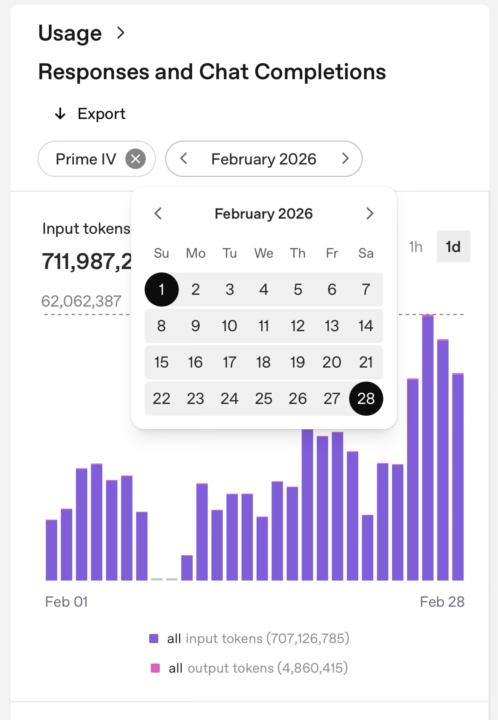
OpenAI usage has doubled this month.
Hey @Mike Copeland @Assistable Ai @Assistable Team My usage has doubled this month and nothing hasn’t really changed. Did anything change on the backend updating the system? This is a big deal for me. Also, Jorden did you add the ability to add the kimi api to the accounts? Thanks @Jorden Williams @Bernie White
0 likes • 8d
@Loyd Hale same
1 like • 8d
@Loyd Hale sadly no
Feb 11 •
Which models are the most accurate right now? | URGENT
4.0 is being depreciated on 2/13/26. In my opinion, its the best model due to the least amount of errors on dates given for appointemnts. What other models are people using, have tested, and are working? I've tried 5.2, gives wrong dates over chat Haiku, gives wrong dates over voice Any other insights into other models?
0 likes • Feb 13
@Jorden Williams
0 likes • Feb 16
@Alexa Briggs indeed
Feb 3 •
What AI model is best for voice vs Chat
What AI models are producing the best results for Chat vs Voice as of 2/1/26?
1 like • Feb 3
@Mike Copeland
1 like • Feb 3
@Alexa Briggs what is different about it?
1-10 of 423
Active 7d ago
Joined Nov 10, 2024
Powered by