Activity
Mon
Wed
Fri
Sun
Sep
Oct
Nov
Dec
Jan
Feb
Mar
Apr
May
Jun
Jul
Aug
What is this?
Less
More
Ooga Booga Game Devs
3k members • Free
10 contributions to Ooga Booga Game Devs

Oct '24 •
6 days of progress (v3)
Here's all the work that went into the next version of the game. -> Commits Lemme know what you think of me doing a more overview-style of the progress. I'm not diving into the code as much and am starting to focus a bit more on the game design. After all, I think that's the more important part now. Putting all focus towards the question: How do we make a fun game?

1 like • Oct '24
I really enjoyed this video! It was fast-paced while showing many of the new features you implemented. It didn't feel like a 25-minute, more like a 10-minute video.
Oct '24 •
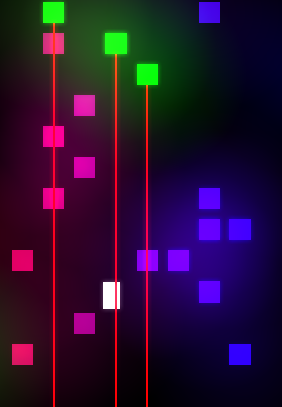
Bloom Implementation in our game😍
I added bloom with the new update to Ooga Booga Engine to our game. I use point lights along with the bloom shader to achieve the effect!
Poll
18 members have voted
Oct '24 •
draw_text_in_frame + bloom.c not working (SOLVED)
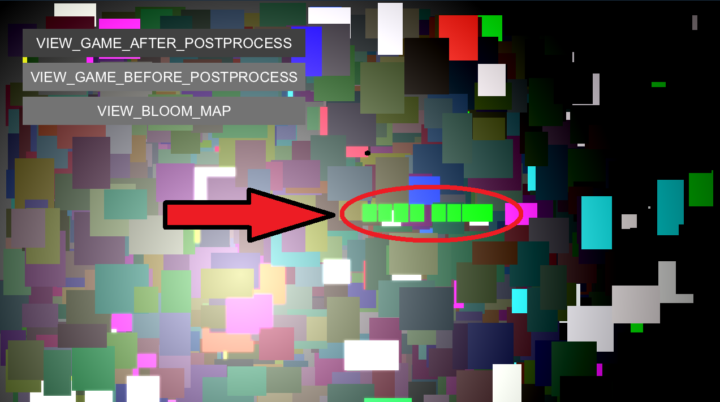
SOLUTION: In your bloom shaders, you want to add this "if statement". To correctly draw the text. if (input.type == QUAD_TYPE_TEXT) return color; QUESTION: I'm currently halfway done with implementing Bloom in my game. I have a problem with text, when using the draw_text_in_frame it renders a rectangle instead of the text. I will attach an image example: It would be nice if the text could be rendered with the bloom shader. My current workaround is to draw_text after the shaders are done. Like how the buttons in the example are rendered.

Sep '24 •
0.01.009 - Bloom, Better shaders & Audio fixes
Another version of oogabooga is shipped, including an example implementing a bloom post-process effect using the new shader extension system. See changelog.txt for a full list of changes.
1 like • Sep '24
@Thomas Randall I will 😈
Sep '24 •
Bloom Shaders Effect in Oooga Booga?
I'm working on implementing a bloom effect using the Ooga Booga game engine, but I'm having trouble. Specifically, I need to capture each frame before the gfx_update() call to apply the bloom filter to every pixel. I will attach the .hlsl shaders file that ChatGPT cooked up. --- UPDATE --- I got a function that can separate the screen's dark and bright areas using the float4 color in hlsl. The remaining problem is how to implement the blurring of the screen. To blur something we need the neighbouring pixels to the pixel we are working with... Hopefully, someone smarter than me knows how to do this. (I have updated the shaders.hlsl to the one that i'm currently working with)
0 likes • Sep '24
@Charlie Malmqvist Am I supposed to temper with with gfx_impl_d3d11.c file to achieve this???
0 likes • Sep '24
@Charlie Malmqvist Thank you so much, I hope this will be useful for other people as well!
1-10 of 10

@gustav-benkowski-1456
Programmer and electrical engineer from Sweden. Currently pursuing a master's in embedded systems.
Active 113d ago
Joined Aug 15, 2024
ENFP
Uppsala, Sweden