Activity
Mon
Wed
Fri
Sun
Jan
Feb
Mar
Apr
May
Jun
Jul
Aug
Sep
Oct
Nov
Dec
What is this?
Less
More
Memberships
Home Lab Explorers
1.1k members • Free
3 contributions to Home Lab Explorers

May 30 •
Two Reverse Proxies behind one Fixed IP
Hey all, I have a quesiton..............(maybe two) I currently use NGINX Reverse Proxy to manage traffic to several lab hosted assets using a domain via cloudflare. I now have a second domain and would like top route traffic for that domain to a pangolin reverse proxy. Will this work if I only have one fixed IP address for ingress to my lab? I can forward traffic to the secon proxy server IP address, but will this route correctly? Ps: The Pangolin RP will hit a VPS before my homelab @Brandon Lee what do you think? thoughts?

1 like • Jun 21
you cannot forward the same port (most likely 443) to different reverse proxies on the same IP. your firewall is not aware of the DNS name, only protocol and port TCP 443 in this example. however, with cloudflare you could create a zerotrust network with them, a docker running cloudflared would be able to connect one (or both) of your reverse proxies to your cloudflare hosted DNS. This solution basicaly creates a VPN between your network and clourflare. Meaning they can pass traffic to you without the need to open up your firewall. I strongly recomend this approach since you get an additional layer of protection from cloudflare WAP and other features. and no one would be able to access your service directly ands end malicious packages your way.

Jun 17 •
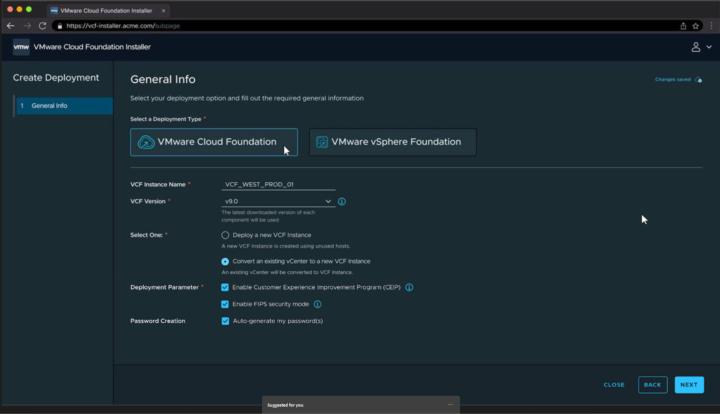
VMware VCF 9.0 and vSphere 9.0 just landed
https://www.virtualizationhowto.com/2025/06/vmware-cloud-foundation-vcf-9-0-released-new-features/
1 like • Jun 18
Do they have the homelab tier?
May 23 •
🔥 Challenge Series #2: Go Beyond the Basics!
🚀 Home Lab Challenge #2: Monitor It, Automate It, Scale It! In the last challenge, you laid the foundation — whether that was your first Proxmox VM, your first Docker container, or even deploying Nginx Proxy Manager for routing apps. This week, we’re kicking things up a notch with new challenges focused on observability, automation, and scaling your home lab stack. This round of challenges is designed to take your setup from "it works" to "I can see it, automate it, and scale it." Pick your tier, declare it in the thread, and share your progress all week long. And remember, this is a group mission. Ask questions. Post screenshots. Drop tips. Let’s level up together. 🟢 Level 1 – Beginner: “Know What’s Happening” Challenge: Set up container-level monitoring - Install cAdvisor and Node Exporter in Docker - Use Prometheus + Grafana or just a basic Prometheus dashboard to monitor CPU, memory, and container usage - Bonus: Add an alert rule to notify if a container crashes or hits a memory limit Goal: Start seeing inside your containers and get comfortable reading resource metrics. 🟡 Level 2 – Intermediate: “Automate the Boring Stuff” Challenge: Automate app deployment with Docker Compose or Ansible - Convert one of your existing manually-installed apps to a docker-compose.yml stack - Or, write a basic Ansible playbook that installs Docker and deploys an app on a remote host - Bonus: Set up automatic updates using Watchtower or Shepherd Goal: Get repeatable deployments and start thinking like a DevOps pro. 🔵 Level 3 – Advanced: “Make It Resilient & Scalable” Challenge: Add high availability or resilience to your apps - Use Docker Swarm to deploy an app across multiple nodes - Or use Kubernetes to create a deployment with multiple replicas and a LoadBalancer or Ingress - Bonus: Test what happens if one node goes down — do your apps stay up? Goal: Learn the building blocks of HA setups and resilience strategies.
1 like • Jun 18
@Ken Pryor Works like a charm with the cleanup feature turned on. Finally I can stop worrying about remembering to update my images :)
1-3 of 3

@goran-rundberg-3010
Aspiring full stack developer passionate about building modern web applications. Continuously learning and growing in both front-end and back-end
Active 189d ago
Joined Jun 18, 2025
Powered by