
Write something

Jun '25 •
🔥Video on ProxmenuX is out! MacRimi great work!
It seems to really be striking a chord with many! Check it out. @Pedro Rico

30d •
ClawedBot VM in Proxmox
I was just wondering whether anyone has successfully deployed an Ubuntu based ClawedBot VM in Proxmox. I have seen a few videos around this. It seems very versatile with the ability to interact directly with the hypervisor, good or bad idea? Anyway just asking if anyone has tried this? @Brandon Lee maybe a future video idea 💡??????.

29d •
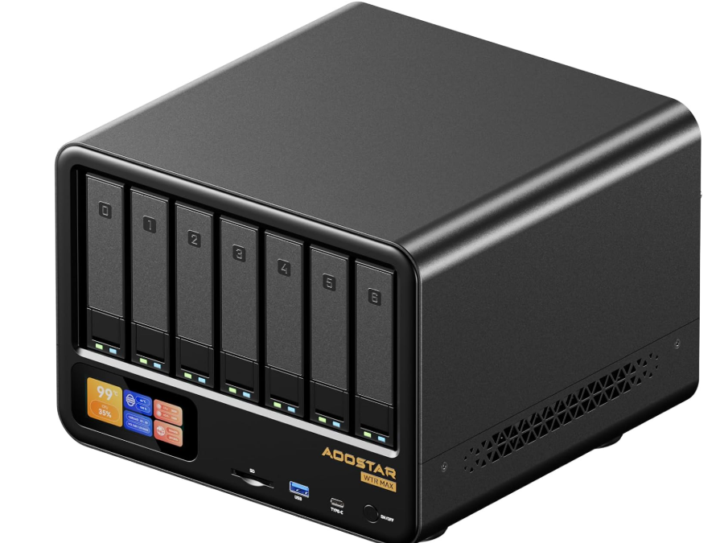
Aoostar WTR Max 8845 part three enable IGPU for Plex/Jellyfin
Step-by-Step Guide: AMD Radeon 780M iGPU Passthrough to Unprivileged LXC (Proxmox 9 / Kernel 7.0.6-2) Phase 1: BIOS Configuration (AOOSTAR WTR Max)Before Proxmox can interact with the hardware, the motherboard firmware must be configured to allocate sufficient resources to the iGPU.Boot into BIOS: Power on your AOOSTAR device and repeatedly tap the Delete or F2 key.Enable Virtualization:Navigate to Advanced > CPU Configuration.Ensure SVM Mode (Secure Virtual Machine / AMD-V) is set to Enabled.Configure iGPU Memory (UMA Frame Buffer):Navigate to Advanced > AMD CBS > NBIO Common Options > GFX Configuration.Set iGPU Configuration to UMA_SPECIFIED.Set UMA Frame Buffer Size to 4G (Highly recommended for 4K HDR transcoding and VPP tone mapping headroom on RDNA3).Save and Exit: Press F10, confirm saving changes, and reboot into Proxmox. Phase 2: Proxmox VE 9 Host ConfigurationProxmox 9 utilizes modern kernel architectures where firmware handling is streamlined. Do not install external Debian graphics packages to avoid system conflicts.SSH into your Proxmox Host (or use the Proxmox Node Shell).Update Proxmox Firmware: Ensure the host has the latest official firmware packages which include native support for AMD RDNA3 chips:bash apt update && apt install -y pve-firmware Verify iGPU Hardware Detection: Run the following command to verify the system sees the graphics controller:bash lspci -nn | grep -i vga Expect an output containing: Advanced Micro Devices, Inc. [AMD/ATI] Phoenix1 (rev c1) or similar.Identify GID (Group ID) for Video and Render: Check the device files and identify their host group ownership IDs:bash ls -l /dev/dri Take note of whether your system uses card0 or card1. Next, get the exact numeric group IDs:bash stat -c "%g" /dev/dri/card* stat -c "%g" /dev/dri/renderD128 Standard Proxmox VE 9 hosts usually output 44 for video and 993 for render. (We will use 44 and 993 for the rest of this guide; substitute yours if they differ). Phase 3: LXC Container Configuration & GID Mapping because the container is unprivileged, Proxmox 9 strictly blocks hardware access via cgroups by default. You must explicitly allow the hardware pass-through and configure unprivileged user/group ID mapping.Shutdown your Plex/Jellyfin LXC container if it is currently running.Authorize ID Leases on the Host: Allow the host root user to map the hardware groups into an unprivileged namespace by running:
Jun 2 •
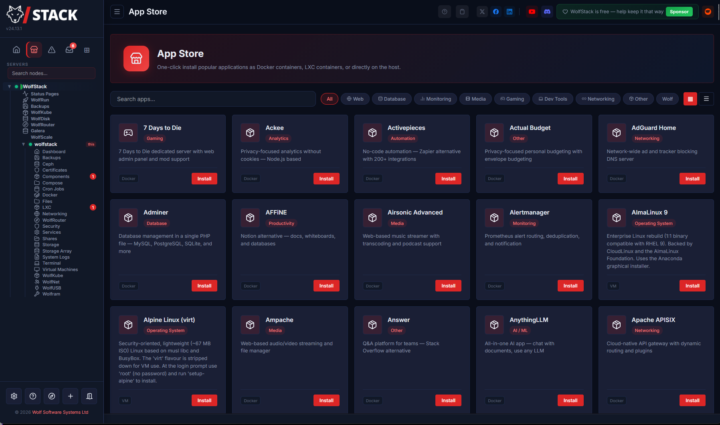
Anyone here tried WolfStack in their Home Lab?
I saw this mentioned in a comment on one of my posts and decided to try it out. Glad I did, very cool solution! Read my detailed post here: I Tried WolfStack and It Might Be the Simplest Way to Run a Home Lab https://www.virtualizationhowto.com/2026/06/i-tried-wolfstack-and-it-might-be-the-simplest-way-to-run-a-home-lab/

May 28 •
Proxmox Datacenter Manager 1.1 was released
Some of the highlights - Integrated automated installation workflows - Centralized management of subscription keys - Unified Ceph cluster monitoring - Enhanced infrastructure visualization - Central guest and snapshot management - Based on Debian 13.5 “Trixie” with Linux kernel 7.0 as new stable default - includes ZFS 2.4 for reliable enterprise-grade storage. Upgraded and can say they are going in the right direction with PDM.
1-30 of 61

skool.com/homelabexplorers
Build, break, and master home labs and the technologies behind them! Dive into self-hosting, Docker, Kubernetes, DevOps, virtualization, and beyond.
Leaderboard (30-day)
1
+69
2
+45
3
+12
4

+12
5

+7
Powered by