Activity
Mon
Wed
Fri
Sun
May
Jun
Jul
Aug
Sep
Oct
Nov
Dec
Jan
Feb
Mar
Apr
What is this?
Less
More
Memberships
THE VFX ROOM
167 members • $19/m
ArtFx Videography Community
8.7k members • Free
Resolve School
270 members • Free
8 contributions to Resolve School

Dec '25 •
How I Build a Base Project in Resolve
Shoutout to @Mona Weathers for the great question on my last video. She asked about presets and mentioned that she really wanted to understand how to set up a solid base project. That is something I lean on every time I start an edit, so I recorded a quick ten-minute walkthrough for everyone here. In the video, I break down how I build a clean starting point, how the project settings are structured, and why each piece matters for long-form editing. You can follow along and build your own from scratch, or if you want to save a little time, I dropped my exact base project template in case you want to download it and start using it right away. It is just a couple of dollars and can be opened in seconds. The video is attached below. Let me know if you have any questions or if you end up tweaking the template for your own workflow.


1 like • Dec '25
@Andrew Farmer I see. So, if you want to make a final adjustment (after Final Cut is ready to export), I assume you make them in A-Roll timeline and then copy/paste them into Final Cut to override them. Is this correct?
1 like • Dec '25
@Andrew Farmer Ahh I understand now. Wow, I didn't know you can use a timeline as a copound clip to insert into another timeline. That's a very smart idea to speed up final tweaks as you said! Thanks!
Dec '25 •
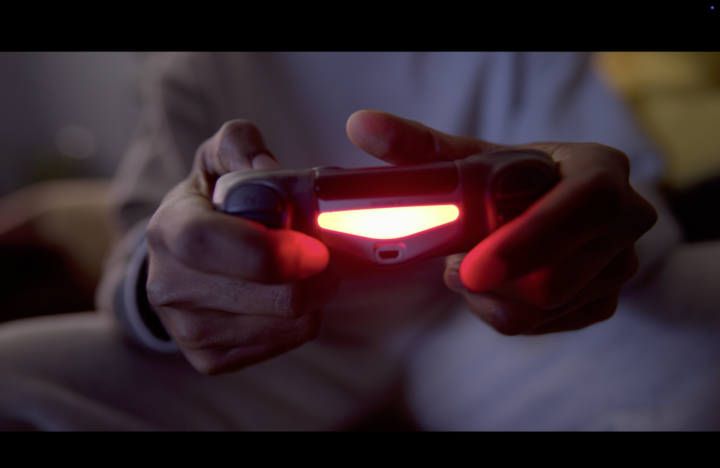
Tricky clip to grade 🤯
Hi everybody, I am facing some chanllenges with this clip. Firstly, I am not able to recover as much detail as the professional version on the red-lit fingers, without burning them. Secondly, is there a better approach to correct the color skin than using curve mas + tracking? Is the only way I found to avoid picking the darkness area of the image. Thanks! Btw, 1st pic is the clip after DWG conversion; 2nd is the professional grade, 3rd is my grade.

Dec '25 •
Hello world!
Hi, my name is Tomasz! So nice to join this group of fellow Resolvers :) I have only started using DR about a year ago and using it as creative outlet on my "experimental" YT account ;) Looking forward to learn more and to see other's work for inspiration and motivation! 🤞🏻🤜🏼🤛🏼
2 likes • Dec '25
Welcome Tomas to the community!

🔥
Dec '25 •
Love today’s video.
Thanks for making this video @Andrew Farmer ! It’s super helpful. I’ve been lazy about learning Resolve but this got me pumped to start learning it again. Question. How do you make a preset?
1 like • Dec '25
Awesome video, I've never thought about to have created and named the timelines!
Dec '25 •
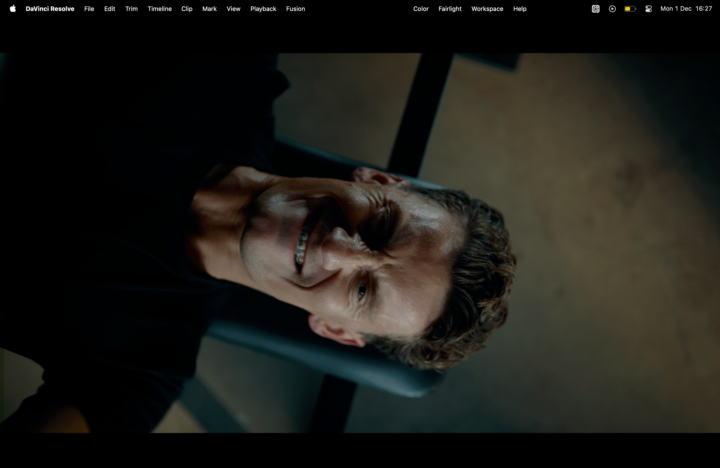
Doubt about matching colour grading.
Hi community! I am trying to replicate the same colour as a learning path. But as you can see I am not able to... (mine is the centre one). In the Internet versión (left), the skin is softer and has a much better colour; but also there is a blue cast in the bench and in the floor that I am not able to replicate without contaminating the rest of the floor. Right now, I mostly use primaries RGB (no HDR, log just sometimes), masking/keys for skin and highlights, qualifiers, curves, and vignettes. Could you share what steps you would exactly follow to edit this shot? Maybe I am missing or mixing something in my flow. Btw, the right picture is without editing. Thanks!
1 like • Dec '25
Thank you! @Andrew Farmer. Btw, do you want that frame in a clip ProRes 422?
1 like • Dec '25
New edit version, I am a bit closer than yesterday, but still far from the goal version. Btw, I believe the version I like the most is @Andrew Farmer one!
1-8 of 8

@francisco-reina-1646
📸 Professional photographer in London
🤑 Interested in learning marketing strategies, personal branding and audience growth.
Active 6d ago
Joined Nov 26, 2025
London