Activity
Mon
Wed
Fri
Sun
Feb
Mar
Apr
May
Jun
Jul
Aug
Sep
Oct
Nov
Dec
What is this?
Less
More
Memberships
Learn Microsoft Fabric
14.7k members • Free
12 contributions to Learn Microsoft Fabric

Oct '25 •
Loading Multiple Files From SharePoint
Hey everyone, I wanted to know if anyone can provide some advice to a problem I have encountered. Scenario I conducting a review our institutions recruitment campaigns. To do this I have been given access to a SharePoint folder which contains a daily extract of recruitment data. These extracts are csv files and are around 50MB. Every day at around 5am a csv extract appears with yesterdays recruitment data. I want to create from these files a simple dataset, with the application, offer and new registration numbers for each date and possibly show this with some other dimensions, like domicile country etc. Data Flow Gen 2 won't work as it can't handle such a large volume of data. I thought a data pipeline would work as if I can perform the aggregation to one csv extract I could then use the for each loop to perform this on all of the other extracts. Any help please?

1 like • Oct '25
@Krishan Patel You need to process single file on daily basis, So you need to store somewhere that this date/time is processed. And filter the files after that date. If you process all file on daily basis it will be a costly preposition.

🚀
Oct '25 •
Winners of free access to Fabric Dojo 🏅 September Leaderboard Winners! 🏅
Congrats to our top contributors for the month of August. Each of you has earned a free Fabric Dojo pass for October 🥇 @Pavan Kumar (becoming a regular face in the Dojo now 😀) 🥈 @Raphael Peltzer (welcome back to the Dojo) 🥉 @Abdelhak ㅤ(congrats again!) 💬 Drop a comment: what are you working on, and what do you want to get out of Dojo this month? Every month, the top 3 on the 30-day leaderboard win Dojo access for the next month. Thanks to everyone who contributed; if you want to be a winner next month, read this! October's leaderboard starts now 🚀 best of luck.
1 like • Oct '25
Congratz.......

Oct '25 •
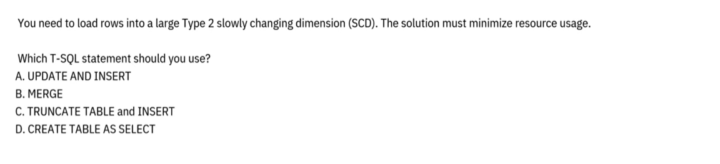
Type 2 SCD
Hi Will, please guide as to what will be the answer for this Qs? Will it be UPDATE or INSERT or Option B (MERGE) ? Please help
2 likes • Oct '25
Answer is A Reason is "Slowly changing dimension type 2" is a data warehousing technique that tracks changes to dimension data over time. When a value changes, the system creates a new record with a unique identifier while keeping the original record. This approach preserves a complete history of all changes, so you can see exactly what the data looked like at any point in time. In Type generally you identify the changes to add new records and update existing ones in the dimension table. If you use merge, it will delete records as it will perform 3 operation Update existing, insert new and purge which are not there. For SCD delete operation is not generally performed Option C and D can only be used if you are always loading the data fully, but for incremental load option A is better.
Sep '25 •
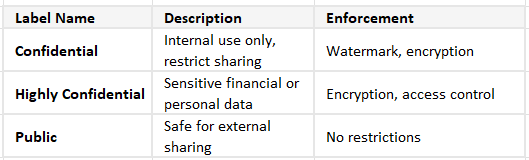
Data Sensitivity in Fabric
Fabric integrates with Microsoft Purview Information Protection to allow labeling of sensitive data. These labels help enforce data loss prevention (DLP), encryption, and access control. How to Apply Sensitivity Labels: - Where: You can apply labels to datasets, reports, dashboards, and dataflows. - How: Labels are created and published in Microsoft Purview (formerly part of Microsoft 365 Compliance Center). Once published, they appear in Fabric for users to apply. Users with appropriate permissions can assign labels via the Fabric UI (e.g., in the dataset settings). Examples of Sensitivity Labels:
2
0
Aug '25 •
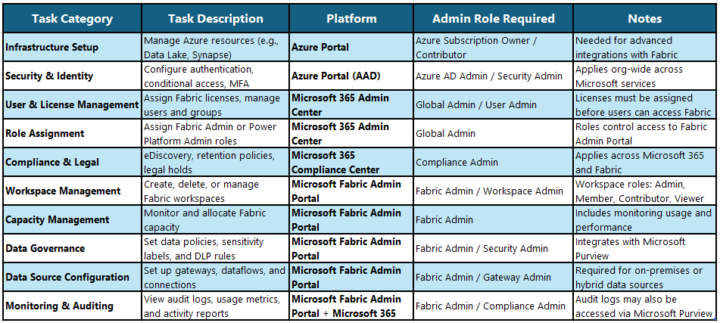
Some Administration Tasks, and Portal associated with them.
The exam will include a few questions related to specific tasks and the corresponding portals required to complete them.
1-10 of 12
Active 61d ago
Joined Jul 23, 2025
Powered by