Activity
Mon
Wed
Fri
Sun
Jun
Jul
Aug
Sep
Oct
Nov
Dec
Jan
Feb
Mar
Apr
May
What is this?
Less
More
Memberships
Peak System Builders
811 members • Free
AI Automation Society
354.7k members • Free
HIGHROLLER AGENCY COMMUNITY
2.1k members • Free
7 contributions to AI Automation Society

Nov '25 •
Hosting/connection Difficulties
Hey everyone! I’m having some connection issues with the n8n server and I have no idea how to fix it. I’m currently using Coolify, and ever since the latest update it’s been showing “no server connection.” 😬 Maybe someone knows what to do? I’d be super grateful for any help or advice!
0 likes • Nov '25
@Lukas Reimold I don´t have it in railway. But it´s pretty simple to update
0 likes • Nov '25
@Noel Doe thanks

Nov '25 •
Help Connection Lost
Hey everyone I’ve been struggling with a persistent “Connection Lost” issue on my self-hosted n8n instance (running on a Hostinger VPS). Here’s what I’ve found so far: The server is running fine — no crashes or Docker errors. The n8n UI connects normally on my phone, but on my laptop it constantly shows “Connection Lost”. I’ve already: Disabled my antivirus and firewall. Removed all browser extensions (AdBlock, VPNs, etc). Tried Chrome and Firefox — same issue. Checked WebSocket connections → it instantly disconnects on my PC.
0 likes • Nov '25
Try switching the browser to chrome

💎
⭐
Aug '25 •
🚀New Video: This Workflow Auto-Posts to 9 Different Socials
In this video, I walk you through a ready-to-use n8n automation that lets you post to Instagram, TikTok, X, LinkedIn, Facebook, Threads, Bluesky, Pinterest, and YouTube—all from one place. Simply provide your content, add a caption, sign into your accounts, and you’re ready to go—no messy HTTP requests or complicated setups. I’ll even give you the exact template for free, so all you need to do is connect your Google Sheets account. Plus, when you pair this with an automation that creates content for you, you can grow your audience on autopilot and keep your channels active without lifting a finger. Code NATE30 for 30% off Blotato for 6 months
3 likes • Nov '25
Love it

Nov '25 •
The biggest lesson I learned from client number 5
This Friday I got a reply from a person on Upwork who wanted me to create a fully automated social media content machine. So I offered to make a free MVP within 24 hours, just to check that what they were asking for was possible and to show proof of work, you know. When I delivered the MVP on Saturday, they were satisfied with the results. So I started hacking away the entire weekend. But here’s where things started to take a turn. As I’m building out the entire system and sending updates, I’m realizing that there are some red flags going on. First of all, the scope keeps changing. And while the client thinks it’s plug and play, the APIs and apps he wants to use are not connected in any way whatsoever. So today, Monday, I’ve completed what I think is 70% of what he wants. And I’m damn happy for keeping up and completing the work so fast. Until I send over a Loom, and then the client says that we can’t use any other tools other than the ones they’ve picked. Okay, no worries. We can manage. I have a few workarounds. But there’s one problem, and that is that the client wants to use Canva. But why Canva? Because Canva lets you create 5 AI clips a month. So because of that, the client wants Canva to receive the prompts from GPT and then create AI clips. So that we can merge the content with clips from Pexels or Pixabay that we get via the API. If you’ve ever touched Canva, you know that Canva has no such endpoint that lets you automatically create AI content. It’s at this point I have the full picture of what they actually want: Send AI prompts from GPT → To Canva to create AI content → Export it to DaVinci Resolve and use a Python script to edit the video → Then upload it to all social media platforms → And finally keep track of all analytics. So what’s the lesson I learned from this? 1. Push for the call. The client didn’t want to meet on a call, but calls help avoid miscommunication. And when it comes to automation, understanding what people want and how they want it is 90% of the work. 2. Map out all the steps, every single one of them. When we know what the steps are, we can automate things. Nothing should be unknown, as there can be hidden issues there.
1 like • Nov '25
I get it man

Nov '25 •
Built my First N8N agent... Looking for a New Challenge
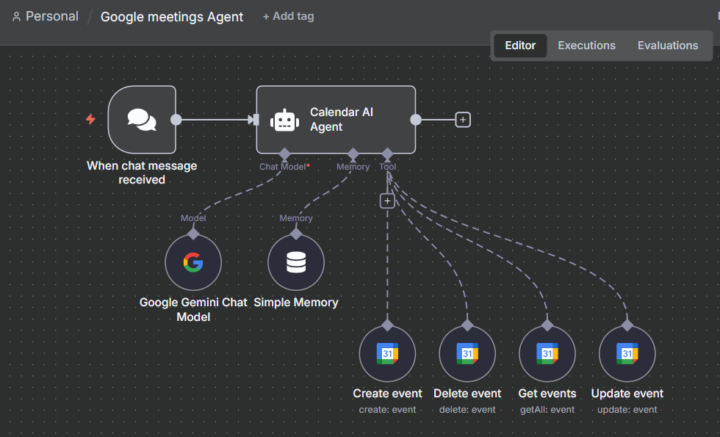
Hi Guys, I am new to this community. This week i built my first N8N Agents for automating Google calendar and an expense tracker. I'm looking for a new challenge that will push me to think and explore. So requesting you guys to help me out in the comments on what should i try to Build next.
3 likes • Nov '25
Nice
1-7 of 7
@christoph-bernhard-8952
Ich erstelle komplette Website-Systeme. Ich bin dankbar für den Austausch und gegenseitiges Lernen.
Active 15h ago
Joined Jul 18, 2025
Powered by