Activity
Mon
Wed
Fri
Sun
May
Jun
Jul
Aug
Sep
Oct
Nov
Dec
Jan
Feb
Mar
Apr
What is this?
Less
More
Memberships
AI SEO Operators
3.2k members • Free
5 contributions to AI SEO Operators

Oct '25 •
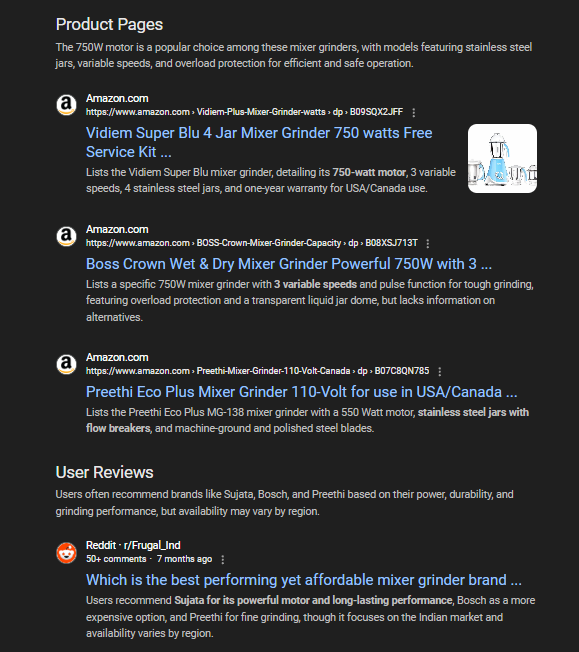
New Google SERP Result types
While analyzing Google Search for keyword behavior, I noticed that Google seems to be testing a new way of displaying results. Now, search results are being grouped into different categories such as User Reviews, Official Information, Product Specifications, Buying Guides, Types & Uses, and Product Pages. This gives us valuable insight into how Google is fetching and presenting information from the content we create. It also highlights the importance of structuring our content in ways that can fit these categories. P.S. To see and analyze these new results yourself, make sure the Web Guide is activated in Search Labs. For context, Web Guide is an experimental feature in Google Search Labs that uses AI to organize search results into topic clusters instead of a single list of links. It leverages Google’s Gemini model to understand a query and groups relevant web pages into categorized sections with AI-generated summaries, making it easier for users to navigate complex or open-ended searches.
Oct '25 •
High Impressions, Low Clicks - Normal?
Hi Everyone, I've been monitoring GSC (Google Search Console) for 3-4 months now across different projects, and I've noticed an interesting pattern that I'd like to discuss. My observation: Aside from brand queries, I'm seeing that keywords with the highest impressions are getting very few clicks, while keywords with lower impressions are receiving most of the clicks. This pattern is consistent when I filter the data by month. Has anyone else noticed this trend in their projects? I'm curious if this is: - A common pattern others are experiencing - Related to search intent or SERP features - Something specific to my niche/industry Would love to hear your thoughts and experiences!
Oct '25 •
Need Help: Google Search Console Product Schema Error - "Either 'price' or 'priceSpecification.price' should be specified"
Hey everyone! I'm running into a confusing Product schema markup issue and would love to get your thoughts on the best approach. I have an e-commerce product page for "Premium Braided Cords" that comes in multiple color options (Red, Blue, Gold, Silver, etc.). Each color variant has a different price ranging from $79.75 to $88.25. Current Setup: - Single product page (not separate pages for each color) - Dropdown selector for color options - Price updates dynamically when customer selects a color - All variants share the same product name and description The Problem Google Search Console is throwing this error on my Product structured data: "Either 'price' or 'priceSpecification.price' should be specified (in 'offers')" My Current Schema Code { "@context": "https://schema.org/", "@type": "Product", "name": "Premium Braided Cords", "sku": "PBC-500", "url": "https://www.example.com/premium-braided-cords/", "description": "Available in multiple colors with brass or nickel finish...", "image": "https://www.example.com/images/braided-cords.jpg", "offers": { "@type": "Offer", "priceCurrency": "USD", "minPrice": "79.75", "maxPrice": "88.25", "itemCondition": "https://schema.org/NewCondition", "availability": "https://schema.org/InStock", "url": "https://www.example.com/premium-braided-cords/", "priceValidUntil": "2026-10-02" } } My Questions 1. Why doesn't Google accept minPrice/maxPrice in a regular Offer? These properties seem perfectly logical for products with price variations based on options. 2. What's the correct way to structure this schema? Should I be using a different @type for the offers section, or is there a property I'm missing? 3. Has anyone successfully resolved this for similar multi-variant products? What schema structure did you end up using? 4. If I use a single price value, which one should I choose? The lowest price? The most popular variant? Won't that create a mismatch when users see different prices on the actual page? 5. Should I consider creating separate product pages for each color variant instead? (Really hoping to avoid this as it would mean managing dozens of additional pages) 6. Will this error affect my eligibility for rich results in search? The products are showing fine now, but I'm worried about future impact.

1 like • Oct '25
@Jonathan Boshoff What's your thought on this?
2 likes • Oct '25
@Jonathan Boshoff Can we do it the same for the size and feature variations as well.

Sep '25 •
Connect With Fellow Members!
There are a lot of smart, talented people in this group. Drop your socials here so others can connect with you across platforms. That way, members can follow you, and you can build new connections too. Example: LinkedIn: https://www.linkedin.com/in/jontyboshoff/ YouTube: https://www.youtube.com/@boshify X: https://x.com/boshify Website: https://jonathanboshoff.com/

5 likes • Sep '25
LinkedIn: https://www.linkedin.com/in/chinmay-daflapurkar/
Sep '23 •
Introduce Yourself Here
Add a comment here to say hi and tell us a little about yourself! (If you're up for it)

2 likes • Jul '25
Hi, This is Chinmay. I'm an SEO Specialist for almost 5 years now. My goal is to know more about AI and SEO and how I can implement it in my life.
1-5 of 5

Active 82d ago
Joined Jul 21, 2025
Powered by