Activity
Mon
Wed
Fri
Sun
Jun
Jul
Aug
Sep
Oct
Nov
Dec
Jan
Feb
Mar
Apr
What is this?
Less
More
Memberships
AI Money Lab
71k members • Free
The RoboNuggets Network (free)
46.8k members • Free
Nousify
130 members • Free
WeScale Free Course
29k members • Free
Women Build AI
3.4k members • Free
Poster Print on Demand
5.7k members • Free
Online Income Club
1.7k members • Free
Applied AI Club
2.6k members • Free
AI Art Sellers Collective FREE
7.7k members • Free
2 contributions to Poster Print on Demand

5d •
FRAMES ARE LIVE - Everything You Need to Know!
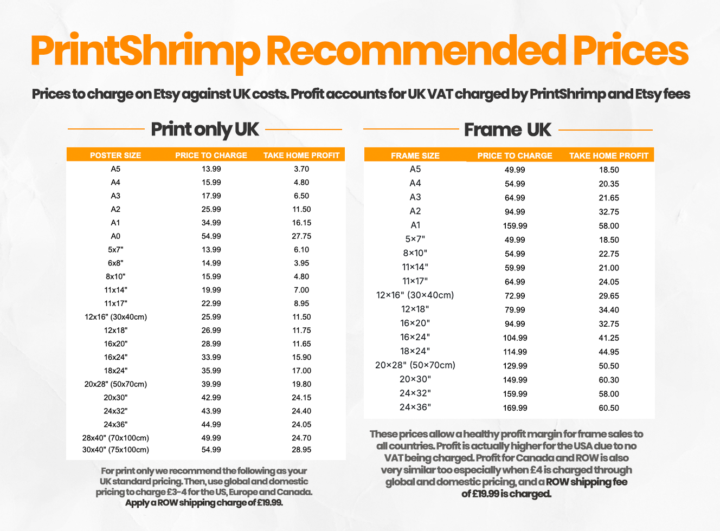
Hey guys, Happy Thursday! We are thrilled to announce that we have FINALLY launched framed prints on PrintShrimp!! Those of you that have been around for a while honestly have probably given up hope, but I promise we have been working so hard behind the scenes to get these live 😆 Frames are available in 3 finishes (Oak, Black and White). All frames arrive ready to hang. Please view the attached pdfs for images and more details. So, what do you need to do? Obviously, frames don't automatically appear for sale on your Etsy shop. Before you start panicking about how much it will be to add frames to all of your listings - don't worry! We have built a couple of tools that allow you to add frames to all of your listings (and yes you can use them for free) These will create your listings so they are set up with variation options for Print Only Black Frame Oak Frame White Frame Attached is a screenshot of what your listings will look like after adding them with the tool Head to your portal and click on the new tab 'Frame Launch' Please please please watch the YouTube videos (and pay attention lol) that go through how to add frames to your shops. It's a simple process but there are a few things you need to do to add frames, and the videos explain it all to you very clearly. The two main things you need to do are: Edit your listings to have one SKU: For us to edit your listings and add frames, we need all of your listings to have one SKU per product. We have built a tool that will identify where your listings differ and clean them up for you. You will need to do this as step 1 if your products have multiple SKUs (i.e. an SKU for each size variation) Actually edit your listings to add framed variations: This is where the magic happens. You need to do a few things such as disable global and domestic pricing, so please watch the videos that details all of this. We have our recommended pricing built into the software that will apply to all of your listings, for frames and print only. This includes some modifications to print only recommended pricing we had before (which means higher profits for you guys compared to before). I have attached a guide with the new recommended pricing below! Here you can get a snapshot of the expected profits from selling frames! This is based on UK prices and accounts for UK VAT when charged and Etsy fees.

0 likes • 5d
dude this is amazing, i'm working on the frames for my app, maybe we should collaborate!

Feb 3 •
Upscaling (upscayl)
Interested to know what everyone’s process is for upscaling up to A0 poster size. Currently I was thinking something alongside the below but keen to hear opinions/what’s working best for others 1. Downloading from midjourney 2. Using upscayl x4 before importing the image in canva 3. Exporting in canva pro to the correct size once design is finished Should I be “upscayling” again after exporting from Canva Pro too ? Thanks in advance!
0 likes • Feb 28
Would you possibly be interested in a tool that upscales to the exact pixels required for 300 DPI? Because when I started my journey, I found upscayl etc. and the 2x, 4x options seemed random to me, so I'm working on something that is just for print on demand art.
1-2 of 2
@caroline-bogart-9317
PrintPrep.art: resize, upscale, and mockup your printable art files in two minutes.
Active 1h ago
Joined Feb 10, 2026
Manchester, New Hampshire
Powered by