Activity
Mon
Wed
Fri
Sun
Apr
May
Jun
Jul
Aug
Sep
Oct
Nov
Dec
Jan
Feb
Mar
What is this?
Less
More
Memberships
AI Automation First Client
1.3k members • Free
AI Automation (A-Z)
136.9k members • Free
AI Automation Agency Hub
299.6k members • Free
AI Automation Society
277.9k members • Free
19 contributions to AI Automation First Client

6d •
The EU E-Invoice Deadline That's Creating $2,400 Projects on Autopilot 🔥
Belgium went mandatory January 1st. France follows September 2026. Businesses are panicking. I landed 3 clients last month who had zero automation. Now they have zero choice. THE OPPORTUNITY: EU e-invoicing mandates are rolling across Europe. Every B2B transaction needs structured XML invoices. Businesses stuck on manual PDF processing face fines and rejected invoices. THE DISCOVERY: German logistics company reached out. 340 invoices monthly. All PDFs. Their EU clients started rejecting non-compliant invoices in January. "We need this fixed by end of month or we lose contracts." THE BUILD: Node 1: Email trigger catches incoming invoice PDFs Node 2: PDF Vector extracts all invoice fields Node 3: Validates against EU e-invoice schema requirements Node 4: Converts to compliant XML format Node 5: Routes to accounting system plus archive Build time: 6 hours Setup fee: $2,400 Monthly maintenance: $180 THE REPLICATION: Same workflow. Different countries. Different compliance deadlines. France (September 2026): 4 prospects already in pipeline Spain (2026-2027): 2 inquiries from accounting firms Italy (ongoing rollout): 1 signed client THE MATH: 6 clients using same template Average setup: $2,200 Average monthly: $160 Total setup revenue: $13,200 Monthly recurring: $960 Time per deployment after first build: 90 minutes THE POSITIONING: I do not sell "automation services." I sell "EU e-invoice compliance before the deadline." One has urgency. One does not. What compliance deadline could you build a business around?

🔥
2 likes • 5d
Nice
16d •
The Scope Document That Prevents 90% of Project Problems 🔥
Every project problem I have had traces back to unclear scope. Now I send this document before every project. Problems dropped 90%. THE SCOPE DOCUMENT STRUCTURE: PROJECT SCOPE FOR [CLIENT NAME] 1. PROJECT OVERVIEW What we are building in one sentence. 2. INCLUDED IN THIS PROJECT Specific deliverables with details. 3. NOT INCLUDED IN THIS PROJECT Explicit exclusions to prevent assumptions. 4. TECHNICAL REQUIREMENTS What client needs to provide. 5. TIMELINE Specific dates for each milestone. 6. INVESTMENT Pricing and payment schedule. 7. SIGN-OFF Client signature confirming understanding. THE INCLUDED SECTION EXAMPLE: INCLUDED IN THIS PROJECT: - Automation of vendor invoice processing - Email trigger monitoring invoices@company.com - Data extraction: Vendor name, invoice number, date, line items, total - Validation: Math check, required field verification - Output to QuickBooks Online (expense entry creation) - Slack notification on processing completion - Error handling with manual review queue - 2 rounds of revisions within scope - 30 days post-launch support THE EXCLUDED SECTION EXAMPLE: NOT INCLUDED IN THIS PROJECT: - Purchase order matching - Multi-currency conversion - Approval workflow routing - Historical invoice migration - Additional document types - Integration with systems other than QuickBooks - Custom reporting or dashboards Each exclusion can be quoted separately if needed. THE POWER OF EXCLUSIONS: Client: "Can you also add purchase order matching?" Me: "That is listed as out of scope for this project. Happy to quote it as an add-on. Usually runs $600-800." Document protects both sides. THE TIMELINE SECTION: TIMELINE: - Day 1 (Mon): Receive sample invoices and QuickBooks access - Day 2-3 (Tue-Wed): Build and test automation - Day 4 (Thu): Client review call (30 min) - Day 5 (Fri): Revisions if needed - Day 6 (Mon): Go live with monitoring - Day 7-30: Support period THE SIGN-OFF: "By signing below, you confirm understanding of project scope, timeline, and investment. Changes to scope require written change order."
🔥
2 likes • 15d
This is such a practical but overlooked part of project success. Clear inclusions and exclusions with formal sign-off not only prevent scope creep but also elevate how professional the whole engagement feels. The change-order flow is especially smart for keeping projects clean and profitable.
🔥
19d •
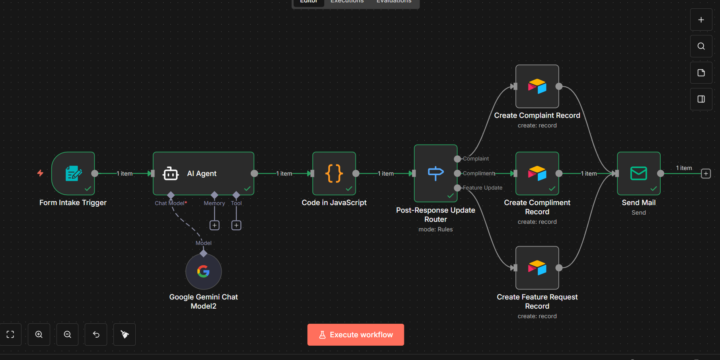
AI-Powered Customer Feedback & Support Automation System
Client: Sharda Fashion Mall Built with: · n8n · AI Agents (Gemini) · JavaScript Logic · Airtable · Email Automation Project Value: $300 Ongoing Maintenance: $50/month The Automation I Built (n8n + AI) Form Submission → AI Understanding → Smart Routing → Record Creation → Automated Response 1. Customers submit feedback through a form 2. AI Agent analyzes and identifies intent 3. Custom logic structures the data cleanly 4. Feedback is automatically categorized into: Complaints, Compliments, Feature Requests 5. Each category is saved as structured records in Airtable 6. A professional email response is sent instantly to the customer Key Use Cases ✅ Customer support automation ✅ Complaint tracking system ✅ Product improvement feedback ✅ Service quality monitoring ✅ Faster and consistent responses ⚡ Business Outcomes ✔ No manual sorting of feedback ✔ Faster customer communication ✔ Centralized feedback database ✔ Better customer experience ✔ Scalable support process Why This Matters for Retail Businesses Retail brands like Sharda Fashion Mall depend heavily on customer experience. This automation ensures every customer voice is captured, acted on, and responded to professionally — without increasing operational workload.
🔥
2 likes • 19d
@Karan Nagle Thanks a lot! Keeping the system structured and scalable was a key design priority.
22d •
The Pricing Anchor That Makes $2,000 Feel Cheap 🔥
Client asked for pricing. I used to say "$2,000." Now I say something different. Close rate doubled. THE OLD APPROACH: Client: "How much?" Me: "$2,000 for setup plus $150 monthly" Client: "Let me think about it" Close rate: 34% THE NEW APPROACH: Client: "How much?" Me: "Let me ask - how much is manual processing costing you annually?" Client: "I do not know, maybe $15,000 in staff time?" Me: "So my $2,000 setup pays for itself in about 6 weeks. Then you save $15,000 every year after that." Client: "That makes sense. Let us do it." Close rate: 71% THE PSYCHOLOGY: $2,000 alone sounds expensive. $2,000 versus $15,000 sounds cheap. This is called anchoring. THE ANCHORING PROCESS: STEP 1: Calculate their annual cost Hours monthly times hourly rate times 12 months STEP 2: State that number first "Based on 40 hours monthly at $30/hour, this costs you $14,400 annually" STEP 3: Present your price second "My setup fee is $2,000 with $200 monthly maintenance" STEP 4: Show the comparison "So you invest $4,400 in year one and save $14,400. Net savings of $10,000." THE CALCULATION CONVERSATION: Me: "Walk me through your current process" Them: "Staff spends about 10 hours weekly on invoice entry" Me: "So 40 hours monthly. What does that staff time cost you?" Them: "Maybe $25-30 per hour?" Me: "Let us say $27. That is $1,080 monthly. $12,960 annually. Just on typing data that could happen automatically." Them: "I never thought about it that way." Me: "My setup fee is $1,800. Pays for itself in less than 2 months." THE ANCHOR VARIATIONS: TIME ANCHOR: "You are spending 520 hours annually on this. That is 13 full work weeks. My system gives you those weeks back." OPPORTUNITY ANCHOR: "What could your team accomplish with 40 extra hours monthly? That is basically another employee's worth of capacity." RISK ANCHOR: "Manual entry has about 3% error rate. On 500 invoices, that is 15 errors monthly. What does fixing each error cost?" GROWTH ANCHOR: "You mentioned planning to double next year. That means double the manual work. Or the same automated work."
🔥
2 likes • 21d
This is a great breakdown of value-based pricing in action. Shifting the conversation from “cost” to “return” completely changes perception, and the anchoring examples make it very practical to apply in real sales calls.
23d •
The Slack Channel Strategy That Keeps Clients Forever 🔥
Average client stays 14 months. Industry average is 6 months. Here is why. THE SETUP: Every client gets dedicated Slack channel. Just me and them. Real-time communication. Instant support. THE PSYCHOLOGY: Email feels transactional. Slack feels like partnership. Email: "Dear vendor, I have an issue..." Slack: "Hey, quick question about the invoice flow" THE CHANNEL STRUCTURE: Channel name: #clientname-automation Members: Me + their key contact Pinned: Quick reference guide, support hours, escalation process THE COMMUNICATION RHYTHM: Week 1 after go-live: Daily check-ins Month 1: Every 2-3 days Month 2+: Weekly summary Ongoing: Available for questions anytime THE WEEKLY SUMMARY MESSAGE: Every Monday, I send: "Week in review for [Client]: - Processed: 47 invoices - Success rate: 98.9% - Flagged for review: 2 - Issues: None All systems running smoothly. Anything on your end?" Takes 2 minutes. Shows I am paying attention. THE IMMEDIATE RESPONSE RULE: Client messages during business hours: Respond within 2 hours Client messages after hours: Respond by 10 AM next day Fast response builds trust. THE ISSUE HANDLING: Client: "Invoice from ABC Corp did not process correctly" Me: "Looking into it now" (5 minutes later) Me: "Found the issue - unusual format. Fixed and reprocessed. Should be in your system now. Let me know if you see it." Total time: 8 minutes Client perception: Immediate, professional support THE PROACTIVE ALERTS: I message them BEFORE they message me: "Heads up - noticed processing volume doubled this week. Everything working fine but wanted to flag in case this is unexpected." "Quick note - your API key expires in 2 weeks. I will handle renewal but wanted you to know." THE RETENTION IMPACT: Clients without Slack: Average 6 months Clients with Slack channel: Average 14 months More than double the lifetime value. THE REVENUE MATH: Average monthly maintenance: $220 Without Slack: 6 months = $1,320 lifetime With Slack: 14 months = $3,080 lifetime
🔥
2 likes • 22d
This is such a smart retention play. Turning support into a real-time partnership instead of a ticket-style email thread makes a huge difference in trust and lifetime value. The weekly summaries and proactive alerts are especially powerful - simple, but they show real ownership of the system.
1-10 of 19

🔥
@anish-khan-1984
Curious learner, exploring the world of tech, data, and innovation. Always looking to learn and grow
Active 3h ago
Joined Dec 14, 2025