Activity
Mon
Wed
Fri
Sun
Jan
Feb
Mar
Apr
May
Jun
Jul
Aug
Sep
Oct
Nov
Dec
What is this?
Less
More
Memberships
Brendan's AI Community
22.2k members • Free
¡Manifiesta tu Abundancia! ✨
3.8k members • $10
sydluiaskool
173 members • Free
Rubin Automatizaciones IA n8n
2.3k members • Free
MonetizIA (gratis)
2.6k members • Free
DominIA Academy
105 members • $59/month
The AI Blueprint
4.5k members • Free
Agencia IA desde 0 (Starter)
745 members • $25/m
AI Automations by Kia
21.8k members • $1/month
11 contributions to Learn Power Apps

Jul '24 •
Who All Uses Notion Here?
@Jason White have you seen this? - Notion (Independent Publisher) - Connectors | Microsoft Learn


1 like • Jul '24
yes and i develop solution and automatizacion on it
Feb '24 •
🧨Never Ever Use Choice Fields in Power Apps! 🔥Never‼️
🚫 Are you struggling with choice columns in SharePoint or Power Apps? Look no further! In this comprehensive video, we delve deep into the pitfalls of using choice columns, regardless of whether you're working with SharePoint, Dataverse, or SQL Server. 🔍 What You'll Learn: Understanding Choice Columns: Get a clear explanation of what choice columns are and why they're commonly used in different data sources. 🥲 The Problems with Choice Columns: Discover the long-term issues, including data integrity and delegation problems, that arise from using choice columns. Direct Data Modification Risks: Learn why allowing users to directly modify data in choice columns can lead to significant data integrity issues. ➡️ Practical Alternatives: Explore effective alternatives to choice columns, including the use of single lines of text and database tables for dynamic choices. 💜 Dynamic Department Information Handling: Gain insights on managing dynamic information, like department changes in a startup, using relational database design principles. Ensuring Data Integrity: Understand the importance of maintaining data integrity by avoiding redundant data storage across multiple locations. 👨💻 Who Should Watch: SharePoint and Power Apps Developers Database Administrators IT Professionals dealing with data management Anyone interested in efficient data structure design 📌 In this video, we not only highlight the issues with choice columns but also provide practical solutions and alternatives. Whether you're building from scratch or dealing with existing systems, these insights will help you make informed decisions for your data management strategies. 💡 Key Takeaways: Learn why choice columns might be an easy setup but a poor long-term choice. Discover how to use single lines of text and dropdowns in Power Apps as alternatives. Understand the role of database tables in managing dynamic choices effectively. Get tips on maintaining data integrity in your database design. 📢 We love to hear from you! If you have any questions, need clarifications, or have experiences to share about choice columns and their alternatives, drop a comment below. Your input helps us create content that's even more relevant and helpful for our community.
2 likes • Feb '24
back to old days, when use of 4 types basic of fields, char or text, date, integer or boolean, anything could be done with this and the use of rules of normalization
0 likes • Feb '24
@Kurt Larson yes !! back to the basics,
May '23 •
Access All Content for Free
Hi guys! How do you level up here in this community? You simply post and become active and engage. Any post or comment you make here in Skool can be liked. Each like adds points! If you introduce yourself, and comment on the things that interest you, you'll level up in no time. 😊👍 To find out where you're at, click here: https://www.skool.com/learn-power-apps-9036/-/leaderboards - 🟡At yellow belt (level 2), you will earn the Crash Course. - 🔵At blue belt (level 5), you will earn the JumpStart Kit. - 🟤At brown belt (level 7), you will earn the Ticketing App Course. - ⚫At black belt (level 9), you will earn 12-months access to the Accelerator Program! Once you guys reach the level, post a comment below and I'll get you all set up! Thanks for bringing this community alive with your engagement! If you've already purchased these, you can gift one to a friend.

2 likes • Sep '23
@Darren Neese thanks man

Sep '23 •
Dataverse UTC ,local user or time independent vs canvas app time
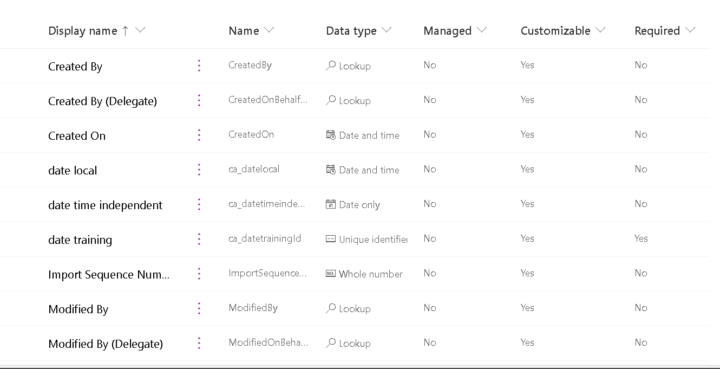
Hello Guys Really most confusing subject in the power platform is the date So was experimenting inorder to understand but still its confusing So i created an app with a form, and in the form i created 2 dates , both are UTC Also in my dataverse i created 2 date columns ,one with user local and one time independent and the surprise is it gives completely strange results :), i am in uae so UTC+4 so as you can see when i was writing/recording this post, it was 18/9/2023 and around 7:50 pm But the dataverse and power apps made it 17/9/2023 4:00 AM ??? i didnt understand why it gave this result If my form is UTC means the date in dataverse so be 18/9/2023 11:50 pm as the one of the date columns is user local which means UTC+4 and the other column which is time independent to my understanding should not change, but both are changing I think am misunderstanding this behaviour, can anyone explain? i Also included small recording for my issue https://catallah-my.sharepoint.com/:v:/g/personal/chahineatallah_catallah_onmicrosoft_com/ES_IxCgP20dFpxeL3QxFN7EBl2W9-3XaU3jrOoEBD5sdHw?nav=eyJyZWZlcnJhbEluZm8iOnsicmVmZXJyYWxBcHAiOiJPbmVEcml2ZUZvckJ1c2luZXNzIiwicmVmZXJyYWxBcHBQbGF0Zm9ybSI6IldlYiIsInJlZmVycmFsTW9kZSI6InZpZXciLCJyZWZlcnJhbFZpZXciOiJNeUZpbGVzTGlua0RpcmVjdCJ9fQ&e=Lse8q2
1 like • Sep '23
my friend i used to have a problem with dates and the sharepoint where it resides all list had diferent utc zone and mi computer another in dataverse check the powerapp admin page
Sep '23 •
POWER AUTOMATE
i have 2 issues, 1) i have 2 sharepoint list one have record of car registrstion but i field is a fk of other list when a make power automate to make a report in excel file how can i put the field on the first list,? 2) when a patch a date field it put the date 1 hr ahead but when i make the create cvs table the date come in zulu time
2 likes • Sep '23
i made the correction with the timezone well it print in zulu time 7 hours ahead example the regsister was created 09/10/2023 11:00 am, the field at the moment of the report is 09/10/2023 04:00 pm
2 likes • Sep '23
@Darren Neese thanks man, but i think i dont explain correctly, i put image to explain, one is the struccture of the tables,, 2 the info inside the tables 3) the report that i need to send in a cvs format, well i want to sustitude the idcasa of one table with the corresponde value of the other table, btw i don use lookup colums, still dont know that advantage or disavantage of doing either way
1-10 of 11

@andres-giannakis-2234
Take care of whats important, You can automate the rest
Active 8h ago
Joined Jul 18, 2023
ESTJ
Powered by