Activity
Mon
Wed
Fri
Sun
Jan
Feb
Mar
Apr
May
Jun
Jul
Aug
Sep
Oct
Nov
Dec
What is this?
Less
More
Memberships
Learn Power Apps
2.5k members • Free
6 contributions to Learn Power Apps

Sep '23 •
Dataverse UTC ,local user or time independent vs canvas app time
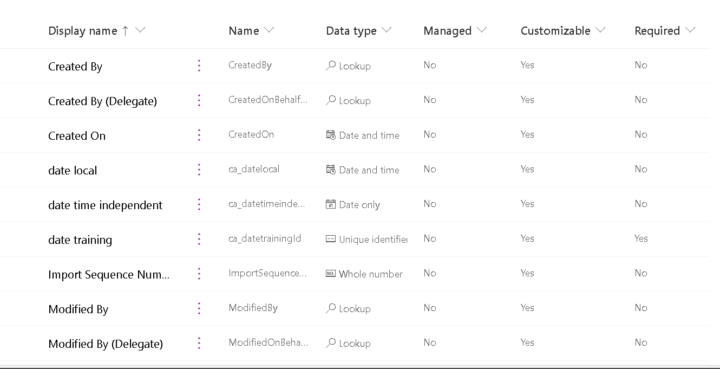
Hello Guys Really most confusing subject in the power platform is the date So was experimenting inorder to understand but still its confusing So i created an app with a form, and in the form i created 2 dates , both are UTC Also in my dataverse i created 2 date columns ,one with user local and one time independent and the surprise is it gives completely strange results :), i am in uae so UTC+4 so as you can see when i was writing/recording this post, it was 18/9/2023 and around 7:50 pm But the dataverse and power apps made it 17/9/2023 4:00 AM ??? i didnt understand why it gave this result If my form is UTC means the date in dataverse so be 18/9/2023 11:50 pm as the one of the date columns is user local which means UTC+4 and the other column which is time independent to my understanding should not change, but both are changing I think am misunderstanding this behaviour, can anyone explain? i Also included small recording for my issue https://catallah-my.sharepoint.com/:v:/g/personal/chahineatallah_catallah_onmicrosoft_com/ES_IxCgP20dFpxeL3QxFN7EBl2W9-3XaU3jrOoEBD5sdHw?nav=eyJyZWZlcnJhbEluZm8iOnsicmVmZXJyYWxBcHAiOiJPbmVEcml2ZUZvckJ1c2luZXNzIiwicmVmZXJyYWxBcHBQbGF0Zm9ybSI6IldlYiIsInJlZmVycmFsTW9kZSI6InZpZXciLCJyZWZlcnJhbFZpZXciOiJNeUZpbGVzTGlua0RpcmVjdCJ9fQ&e=Lse8q2
Aug '23 •
Import data from excel to dataverse
Trying to import from excel into an existing dataverse table, it doesnt show any error, and everything is ok, but the data doesnt get uploaded into dataverse why is that? anyone encountered such issue video showing whats happening
Jul '23 •
choices function when using sharepoint /dataverse
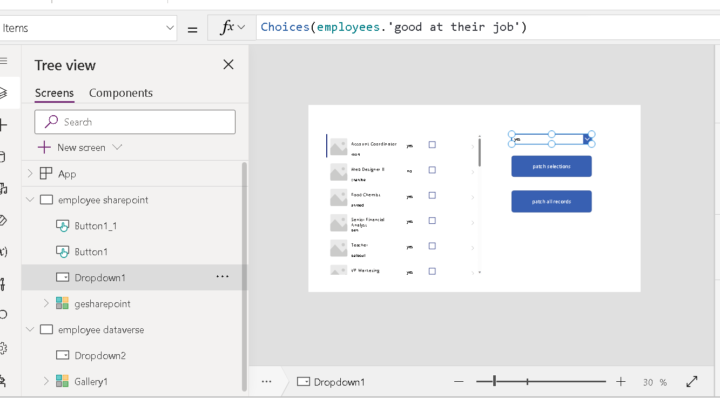
Hi I have a sharepoint list employees with choice column "good at their job", now when i use a drop down and use choice function , i write it in this format table/list.columnname (photo attached) where as same choice function with dataverse choice function , i just write the column name and it automatically detects it (also photo below), is this normal or i miss something here
Jun '23 •
Some tips when exporting from access /excel to sharepoint
Hello Just wanted share some tips on exporting data to sharepoint 1. what i realized that sometimes when you are exporting from access to sharepoint, you get "contact list", this list cannot be visible in power apps, so my suggestion is export to excel, then import to sharepoint, but again here, if directly importing in sharepoint, display name and internal column names wont match which will make a problem as you wont know which column name to use inside power apps 2. Better to export excel files in excel app, first create a table of your data, then go to table design tab, then "export table to sharepoint", this way your column name and internal name in sharepoint will be matching which will be easier to work with in power apps 3. Thats it, hope you will benefit from these small tips
Jun '23 •
sharepoint list not appearing in powerapps
Hello everyone I have sharepoint list which i exported from access, i can see list in my sharepoint, but when i go to powerapps, i cant see the list! is there any solution for that? Thanks
1 like • Jun '23
@Darren Neese hi darren, actually what i was doing is following your video of importing lists from access to sharepoint, but the customer list is not appearing when am connecting data in power apps lol, very strange, video attached (my recording)
1-6 of 6

@chahine-atallah-6781
Basically am senior electrical engineer, who is interested in datanalytics and power platform
Active 653d ago
Joined Jun 25, 2023
Powered by