Activity
Mon
Wed
Fri
Sun
Aug
Sep
Oct
Nov
Dec
Jan
Feb
Mar
Apr
May
Jun
What is this?
Less
More
Owned by Michael
AI lessons you can read in under 3 minutes and apply in everyday work and life.
For those of us that are determined to become the AI resource inside our company, agency, executive room, board room or marketplace.
Memberships
Clief Notes
41.1k members • Free
Jacked Entrepreneurs
378 members • Free
AI Automation Society Plus
3.8k members • $99/month
AI for Life
33 members • $497
409 contributions to AI Bits and Pieces

🔥
5d •
📬 AI Controls My Inbox: First Review After 72 Hours
So, was it perfect? Nope. Did I miss anything critical? Two emails. Fortunately, one person texted me, and the other email my wife asked if I saw it - so, there was no major negative impact. But that is exactly why I am doing this experiment. I do not want to know if AI can manage my inbox when everything goes perfectly. I want to know where the cracks show up when I am not looking every day. Here is what I learned after the first 72-hour cycle. 📝 Lesson one: the first cycle had a built-in advantage. Because I was already familiar with the current state of my inbox, I knew what I expected to see. I had a mental map of open conversations, active deals, pending follow-ups, and emails that might matter. That made the first review easier, but that advantage starts to disappear in the next cycle or two. Once I stop carrying the recent inbox context in my own head, the system has to stand on its own. That is when the real test begins. 📝 Lesson two: prompts matter. 📝 Lesson three: prompts matter even more. Yes, this experiment is quickly becoming a lesson in prompt design. Even though I did not open my inbox during the 72-hour window, I did adjust the prompts based on what I expected to come in and what was getting through that should not have been. - Some spam and promotions still surfaced. - Some categories needed tighter language. - Some escalation rules needed more clarity. That does not mean the system failed. It means the operating instructions needed refinement. And that is probably the biggest early takeaway. AI inbox management is not a set-it-and-forget-it system. At least not yet. It is more like training an operations assistant. You give it a role. You define the boundaries. You observe the misses. You tighten the rules. Then you run the next cycle. 📝 Final lesson: redundancy matters. At this stage, built-in redundancy has real benefits. For this experiment, I used three AI layers: - Claude Cowork - ChatGPT Scheduler - Gmail AI Inbox
🔥
2 likes • 3d
@Frank Priboy I just started with the one until I get this up and running
🔥
2 likes • 1d
@Gina Wang Now that is funny!
🔥
1d •
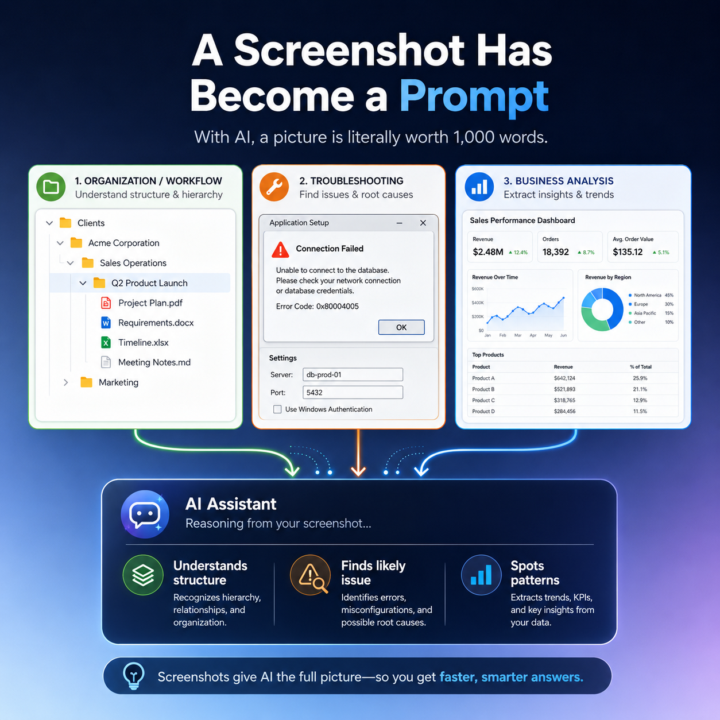
🖼️ With AI, a Picture Is Literally Worth a 1,000 Word Prompt
"A picture is worth a thousand words." That phrase has always been true, but with today’s LLMs it is starting to take on a much more practical meaning. One of the quiet advances in AI is not just better writing, coding, or summarization. It is image recognition and, more importantly, image understanding. I have noticed this in my own workflow. In the past, when I wanted Claude or ChatGPT to understand what I was looking at on my screen, I would usually describe it first. I would explain the structure, the problem, or the context, and then I would paste the screenshot to support what I had already written. Now I often skip that step entirely. I just paste the image and go. And the AI gets it. That is a bigger shift than it sounds. The improvement is not simply that the model can read text inside an image. It is that it can often understand what the image is doing, why it matters, and how it connects to the broader conversation. In other words, the image itself has become usable context. I ran into this recently while organizing my directory structure for a new project. I needed to update Claude on changes I had made, and instead of describing the folder structure, I simply pasted the screenshot into the chat. Claude immediately responded: “That's a clean hierarchy: client → business area → project. Every future engagement follows the same pattern.” That response stood out to me because Claude did more than recognize folder names. It understood the hierarchy. It understood the logic behind the structure. It understood the intent of the organization. And it connected that image to the ongoing context of the conversation without me needing to explain much at all. This is starting to change how I work with LLMs, and I think it has broader implications for a lot of people using AI in practical ways. A screenshot is no longer just supporting material. In many cases, it is now the prompt. Example 1: A very useful example is organizational or workflow context, like the file folder case. Instead of describing a folder structure, a software layout, or a system you are building, you can often just show it. The AI can quickly interpret the structure, identify patterns, and give feedback on what is organized well, what may be unclear, and what the next step should be.
🔥
2 likes • 1d
@MarKesha Smith That is awesome. I plan on having a live session for members that exploring this concept. Thanks for the chat...
🔥
2 likes • 1d
@Frank Priboy Let me know how it goes.

🔥
3d •
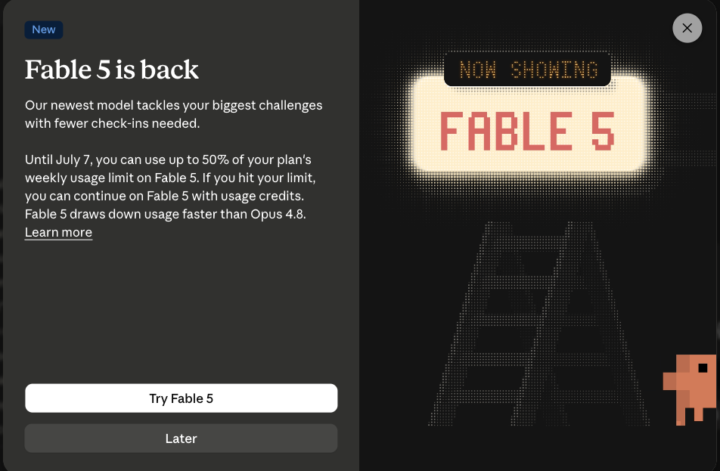
Fable is Back Today: What do we need to know (and WHEN to actually use it?)
Fable comes back online today. We've all heard the name for weeks, so here's a quick guide on what it is and (more importantly) when to actually use it, so we don't waste money. First things first: What is Fable? (for anyone new to it). Let's imagine Anthropic's AIs like a "family of brains". The regulars are Opus, Sonnet and Haiku. Fable is the new, smartest one, the first of a new generation (the Mythos family), able to do things no other model could. Basically, it's the strongest Claude we can get. It disappeared for 3 weeks: - June 9: Fable launches, everyone's talking about it. - June 12: Amazon researchers find a trick that makes Fable point out software weaknesses (and once even write code to break in). The U.S. government blocks it, and since Anthropic can't check everyone's nationality fast enough, they switch it off for everybody. - Late June: they negotiate a deal with the government. - July 1 (today): Fable comes back on, worldwide. (By the way: other AIs like Opus 4.8, GPT-5.5 and China's Kimi K2.7 could all do the same thing that the Amazon researchers found. So it wasn't some unique "super weapon". Just a simple jailbreak that worked in other models, and those other models were powerful enough to point out those weaknesses too.) Now, the important part of this...WHEN do we use Fable instead of Opus? Is it really that powerful? Let's use an analogy. Think of a race. Opus is a great sprinter. Fable is a marathon runner that checks its own work as it goes. Fable's edge is long, hard jobs that run on their own. Anthropic's own words: "the longer and more complex the task, the larger Fable's lead." So the best option to use Fable is when the task: - takes hours or days, not minutes - has many steps and we don't want to babysit, supervise or check each one - needs to hold a LOT at once (a big codebase, a pile of documents... up to 1,000,000 tokens) - should check its own work and keep going until it's done - is genuinely hard (senior-level reasoning, a big migration, deep research)
🔥
2 likes • 3d
If you are using Claude Code, this is a important message. Thanks @Mike AI Consultant
🔥
1 like • 3d
@Mike AI Consultant Yes, I appreciate it.
🔥
9d •
📬 AI Controls My Inbox: 🧪 Experiment
For the past several months, I’ve been using ChatGPT and Claude to help manage my inboxes. They’ve been reading emails, sorting intent, identifying what matters, and surfacing what needs attention. But up until now, I’ve always check the work of AI—reviewing everything alongside them and verifying decisions daily. That will change for the next 30 days. 🧪 The Experiment Starting today, I’m running a 30-day controlled experiment: - ChatGPT and Claude will be the "first systems to review my inbox" - AI will handle all first-pass triage, prioritization, and escalation - I will only respond to emails that are flagged by AI - I will only open my email every 72 hours (3 days) - I will rely on AI summaries and alerts between reviews - ChatGPT scheduling and Claude coworking workflows will run in parallel This is not convenience automation. It’s a controlled delegation test under time delay. 📬 Important Context My email is not siloed. It is a shared channel for both personal and business communication. That includes: - Clients and prospects - Financial and operational items - Personal messages and family logistics - Newsletters, system alerts, and vendor communication This is a real mixed-context inbox, not a filtered business queue. That matters, because context switching is where prioritization either succeeds or fails. 🎯 The Goal I want to understand one thing clearly. What happens when AI becomes the first decision layer in a real-world inbox with delayed human access? Not just summarization. Not just filtering. But actual prioritization that must hold for 72-hour cycles. Specifically: - What AI consistently gets right - Where urgency is misclassified or delayed too long - How well personal vs business context is separated - What gets buried that should not be - How trust behaves when human correction is delayed 🚧 The Guardrails This is not full autonomy. There is still a safety system in place: - Human review every 72 hours - Explicit escalation rules for VIP, financial, and time-sensitive messages - Dual-system validation (ChatGPT + Claude) - No irreversible actions without review - I am still responding to emails, that is not being delegated
🔥
1 like • 4d
@Md. Abdullah Al Mafi Appreciate it.
🔥
0 likes • 4d
@Karen Widas Appreciate the sentiment. That's great on the email janitor.

🔥
1 like • 7d
Thanks for the update.
🔥
1 like • 7d
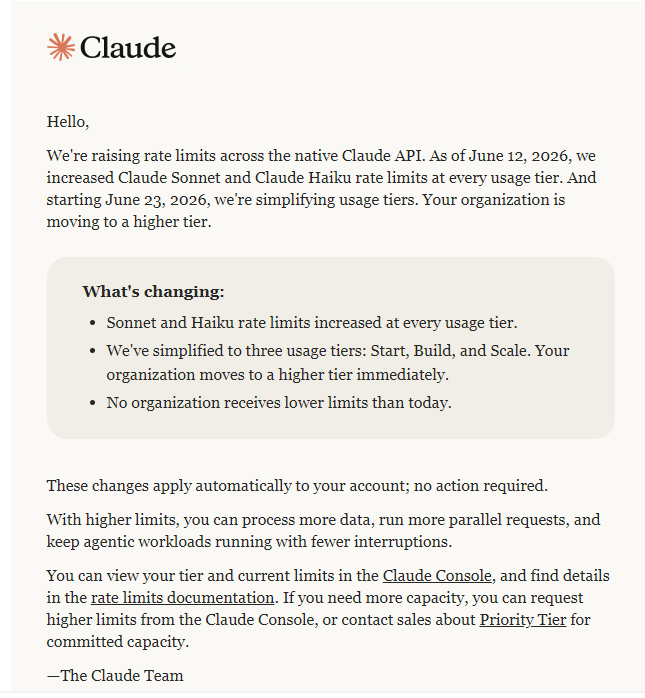
Love it when they raise limits.
1-10 of 409

Active 3h ago
Joined Aug 23, 2025
Mid-West United States
Powered by