Activity
Mon
Wed
Fri
Sun
Aug
Sep
Oct
Nov
Dec
Jan
Feb
Mar
Apr
May
Jun
Jul
What is this?
Less
More
Memberships
AI for LinkedIn - evyAI.com
1.8k members • Free
17 contributions to AI for LinkedIn - evyAI.com

Mar 14 •
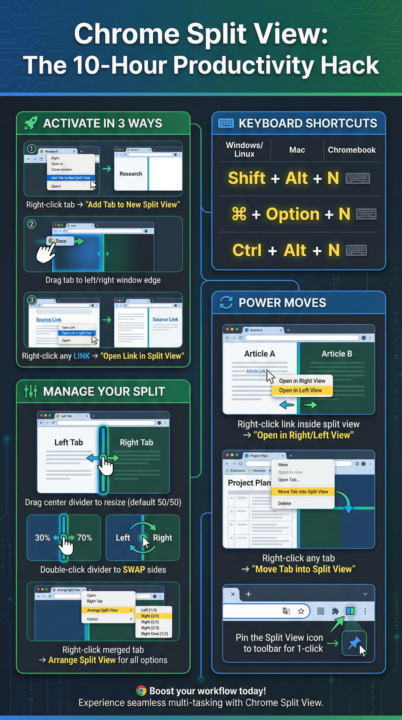
Split View Productivity Masterclass.. Wanna join?
I realized that learning the right productivity hacks can save you 10 hours a week. SOOO Im planning a 2 hour splitview masterclass for those interested in attending. I plan on charging for it and giving our clients a discount for the class. If you want to see 10 case uses for using splitview and mastering it with lifetime access to the replay, Im putting together a small group to join this masterclass in April right after passover. My time is PACKED in april but this is important enough for me to carve out 2 hours to create a masterclass. 1,200 times per day the average worker toggles between apps & tabs 4 hrs lost per week just reorienting after switching — that's ~9% of your workday 23 min average time to fully regain focus after a significant interruption (UC Irvine) 40% productivity drop from chronic context switching (Psychology Today / APA) $450B annual economic cost of lost productivity from context switching in the US alone 10 pts temporary IQ drop from heavy multitasking — worse than a sleepless night 3 min typical knowledge worker stays on one screen before switching (Microsoft Research) What if you knew how to manage your tabs and use the new SPLIT VIEW feature that just came out a few days ago? If you toggle between tabs 1,200 times/day, and each switch costs just 30 seconds of re-orientation, that's 600 minutes = 10 hours per week. Even cutting that friction by 50% with Split View = 5 hours back. Pair it with better workflow habits and 10 hours is absolutely achievable. Research tracking 137 workers across Fortune 500 companies found they toggled roughly 1,200 times each day, which adds up to just under four hours each week reorienting themselves — roughly 9% of their time at work According to a study from the University of California, Irvine, it takes 23 minutes and 15 seconds to return to your original task after deviating. Three context switches a day, and you've lost over an hour of productivity. Context switching consumes up to 40% of productive time and costs the U.S. economy an estimated $450 billion annually

1 like • Mar 16
Count me in hermano!

Jan 26 •
WORKSHOP ALERT! How to Sell Through Value, Not Pressure in 2026
You can register for tomorrow´s workshop https://evyai.com/webinar, you don't want to miss it! Feel free to invite your friends too. Sales is changing fast and the old pushy tactics no longer work in 2026. The most successful professionals are selling through value, not pressure. Buyers are more educated, more cautious, and more resistant than ever before which means your ability to educate, inspire, and connect matters more than your ability to “close.” In this powerful session, we will show you how to use AI, empathy, and strategy to sell authentically while building long-term relationships that lead to repeat business and referrals. You’ll discover the frameworks top sales professionals are using to position value so clearly that prospects want to buy before you even pitch. Whether you’re a coach, consultant, or B2B pro, this training will help you stop chasing deals and start attracting them. Don’t miss this high-energy session that will transform the way you approach selling in 2026 and beyond. Key Takeaways ✅ How to position your offer around value and outcomes, not price or pressure ✅ The new “education-first” sales strategy that makes prospects trust you instantly ✅ How to use AI to identify what each lead values most and tailor your pitch around it ✅ Why the psychology of decision-making has shifted (and how to adapt fast) ✅ Real examples of sales messages that turn curiosity into conversion ✅ The step-by-step framework for selling authentically while building loyalty 👉 Reserve your spot today! You can register for tomorrow´s workshop https://evyai.com/webinar, you don't want to miss it! Feel free to invite your friends too.

3 likes • Jan 26
I am so looking forward to it!
Dec '25 •
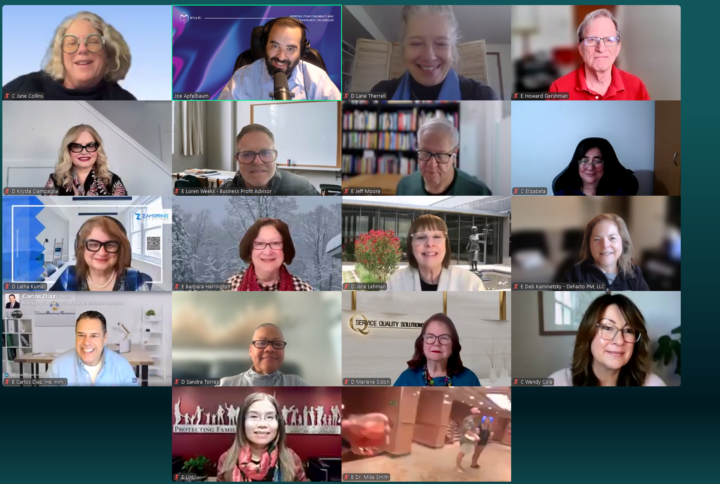
What did you think of the GOAL setting MASTERCLASS 2026?
Would you want to do it in JAN 2026 if we did it again? Let me know what you got out of it? What would you say to other people thinking about joining the class. Why is doing such a class important to you?
11 likes • Dec '25
What an amazing experience. It was really a great session that totally exceeded my expectations. I would definitely do it again in the New Year. So much information and content was shared that it will take me days to digest it all.
6 likes • Dec '25
@Wendy Cole I agree with you it being insiprational. That's the one word I had left out.
Nov '25 •
Simple Engagement List Helper: User Guide
Put your Linkedin URL in the comments if you want to be added to this list. https://strategy.evyai.com/engagement <<< Save this and engage with all our most engaged members weekly/daily.. Please dont be a taker and instead GIVE GIVE GIVE! This tool is designed to help you power through your daily LinkedIn engagement list efficiently without getting overwhelmed by dozens of open tabs. 🚀 The Main Feature The most important part of this tool is the big green OPEN NEXT button at the top. - Click it once, and it immediately opens the next profile in your list in a new tab. - It automatically marks that person as "Opened" so you never lose your place. ⏱️ Automatic Mode (Optional) If you prefer a steady pace, use the Start Timer button. - The tool will automatically open the next link every 15 seconds (or whatever time you set in the "Wait Time" box). - You can pause this at any time if you need more time on a specific profile. ⚡ Pro Tips for Power Users - Keyboard Shortcut: Press Alt + W (on Windows) or Option + W (on Mac) to instantly click the "OPEN NEXT" button without using your mouse. - Reorder Your List: You can drag and drop names in the list to change their order. The tool will remember your new order for next time. - Track Your Progress: The green bar at the top shows how far through your daily list you are. - Don't Lose Your Place: If you close the tool and come back later, it remembers exactly who you need to engage with next.

1 like • Nov '25
https://linkedin.com/in/CarlosLuisDiaz
Nov '25 •
🔥 Prospecting Bootcamp 2026
If you are serious about growing your business, you might need to add prospecting to your networking efforts. Most people don’t even know where to begin when it comes to prospecting effectively. So we’re doing a 4-session Prospecting Bootcamp in Q1 of 2026. We’re going to teach prospecting techniques, processes, and systems that actually get people on calls with prospective clients. Not coffee chats. Not tricks.Real conversations that turn into real opportunities. Networking is great — but it’s not predictable, and you can’t control the outcome. If you want to make more than $100K a year, adding a layer of prospecting can be game-changing. And if you want to build a million-dollar business, it’s essential. Prospecting is a science more than an art. You need: ✅ The right list ✅ The right message ✅ The right outreach ✅ The right conversations ✅ The right follow-up You also need technology, systems, processes, and strategy. And even if you have all that — getting support when you don’t have the time to do it all yourself is critical. If you want to learn more about this Prospecting Bootcamp, we’re limiting the spaces — and once they’re full, doors close. This is a powerful mix of strategy, tech, hands-on support, and real-world experience. I’ll be doing live prospecting sessions and inviting all participants to join — so you can see, in real time, how I close deals. Imagine having access to every step I took to build 3 million-dollar businesses. 👉 $100K is doable with networking. But millions come from prospecting with intention. Too many people leave opportunities on the table because of fear. We’re going to shed that fear — with process. Frameworks Questionnaires Processes Assessments Stages Automations Sequences Enrichment Templates Checklists Cheat Sheets Playbooks Let’s go on this journey ❤️ together. It begins the day you decide you want in. So tell me — are you interested in learning more? #prospectingbootcamp2026

5 likes • Nov '25
Joe, I'm interested to learn more. Time with you is always well spent.
1-10 of 17
@carlos-diaz-6207
IT Professional who's team, manages the technology of privately-held business owners. Let my team handle your IT, so you can focus on your business.
Active 2d ago
Joined Jan 31, 2025
ENFJ
Kew Gardens, New York
Powered by