Activity
Mon
Wed
Fri
Sun
Feb
Mar
Apr
May
Jun
Jul
Aug
Sep
Oct
Nov
Dec
Jan
What is this?
Less
More
Owned by Danny
Memberships
WavyWorld
43.7k members • Free
Resolve School
127 members • Free
4 contributions to Resolve School

5d •
Can I feature your Resolve workflow?
I’m gathering real examples from Resolve School members so beginners can see how other creators are actually using Resolve in real life, not polished tutorials, just honest workflows. If you’re open to being featured, drop a comment and share • What type of videos you edit • Your current experience level with Resolve • One thing that still feels slow or clunky in your workflow This isn’t about being advanced or perfect. The goal is learning from real setups and real constraints. Appreciate you all 🤗


2 likes • 4d
My main experience has been video game guides/tutorials + documentaries, but I've also been working to expand what I can do beyond this niche. I'd say I'm pretty experienced in using Resolve, but mainly in the context of non-IRL things. I don't really have any real experience with color grading, but I'm very comfortable with making motion graphics with Fusion. My work often involves taking complex ideas and making them into something simple, so I'd say I know enough in Resolve to do what I need for that. The most clunky part about using Resolve mostly has to do with making changes that affect multiple clips. For example, if I need to change a Fusion composition that appears in a lot of places but is slightly different for each one, my workflow feels far from ideal.
2 likes • 4d
@Andrew Farmer Thanks for saying that part about being strong in some parts but not others. I think it's a bit of a trap for many beginners (at least for myself back then) to feel like you need to know how everything works before you start building on real projects. But that's not true, often what you're working on only requires knowing a couple things, not everything. Where it does come into play is when your taste starts to elevate, but you don't have the knowledge or tools to execute on your vision. I think that's when you become much more aware of the aspects you lack.

Nov '25 •
Video Enhancement
Greetings my fellow editors, I have a question. I am in the learning process of how Resolve works. I love this program. What I am looking for help with. How do I make clearer a video so that the video is as mentioned clearer from its original 'look'? I will be happy to answer any questions that the group has to better serve my question. Thank you
2 likes • Nov '25
Can you provide an example of what kind of video you're trying to make 'clearer'?
2 likes • Nov '25
No easy way to do it as far as I'm aware. It's real life footage that looks quite old, where the way it's recorded hinders it the most. You could try some AI tools and see how well it does it, as I've seen it work decently for cartoons.
Nov '25 •
A tiny Fusion thing that clears up a lot of confusion
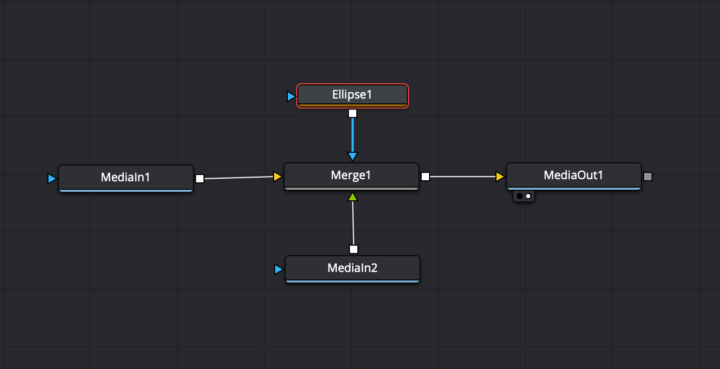
Shoutout to @Tobi Bambida for sparking this one. He posted a screenshot from Fusion and mentioned having trouble getting his circle pop animation to actually show up when connecting nodes to Merge and MediaOut. That is one of the most common Fusion roadblocks, and it almost always comes down to one tiny rule. In Fusion, every Merge has two sides. Yellow is your background, green is your foreground. If something disappears, clips behind something else, or refuses to show in MediaOut, it is usually plugged into the wrong side. A super quick checklist ✅ Background goes into the yellow input. ✅ The thing you want on top goes into the green input. ✅ Make sure the chain flows left to right into MediaOut. ✅ Preview the Merge node in the viewer, not just the individual nodes. This alone clears up a lot of those early Fusion headaches. If anyone else is running into weird Fusion behavior, toss a screenshot in the comments. Happy to help break it down.
1 like • Nov '25
I'll also add a couple rules of thumb that helped me tremendously: - Every merge needs something connected in the yellow node, otherwise the resulting MediaOut node won't show anything. This can even be a background node with Alpha set to 0. - The blue node applies to the green node. So if you connect a rectangle in the blue node (as a mask), it'll affect the green node only. These in addition to what Andrew listed above will be a great help!
Nov '25 •
If you could learn one thing in Resolve this week, what would it be?
Your answer might turn into the next community tutorial!

1 like • Nov '25
@Andrew Farmer Just to add onto this as well, agreed with color grading. I myself have only ever touched saturation values, but never really done anything with curves or that sort. Any time I've tried playing with contrast or brightness values, I tend not to like the final product.
1-4 of 4