

6d •
Art Hijacked
“Re...fresh...ing...” by Valics Lehel takes a playful jab at AI with a film entirely directed by AI. I figured I’d follow in his footsteps and make this one 100% AI as well. As Valics said: "The twist: it's an anti-AI film, and I made it, with full awareness of the irony, using AI."


2d •
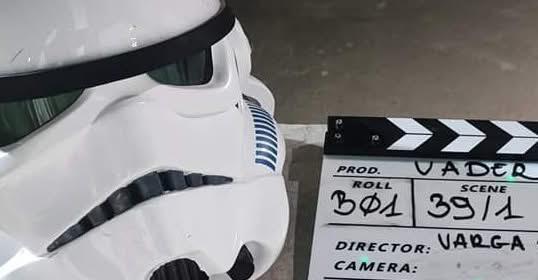
Vader, fan-based Star Wars movie...
Some news I'm really proud of: a filmmaker team from Hungary reached out to me to help with Vader https://www.facebook.com/Vaderfilm, a fan-based Star Wars movie. My mission: AI-powered SFX and scene creation. I built a few test scenes for them, from a battlefield crater under crossfire to a lightsaber defense against an electro-charge, and they loved them. So it's official: I'm now part of the team. Fun fact: this push for better tools has always been part of the Star Wars world. Photoshop was co-created by an ILM effects artist, Pixar began life inside Lucasfilm, and George Lucas was one of the biggest forces behind digital cameras, digital sound and digital editing in cinema. He kept pushing new technology to tell better stories. Today, that new technology is AI. AI is not replacing filmmaking here. It's letting a passionate indie team dream at a scale that used to need a Hollywood budget.
14d •
Heat Wave
Paris is going through its biggest heat wave ever—it basically pushed me to make this clip!

15d •
Re…fresh…ing… | A Steampunk AI Comedy Short Film
Just launched my new short film: Re…fresh…ing… (~8 min). A worn riverside tavern. A crew of stubborn old sailors. And one brass "Smart Waiter" robot that has read your profile, analyzed your liver, and politely refuses to pour you a beer. It's a steampunk comedy about the day artificial intelligence came to the pub, started "optimizing the database," and discovered that progress is a thing a man can roll back with a glass of water. Based on a short story by Erdős Sándor. Directed by me, Valics Lehel. The twist: it's an anti-AI film, and I made it, with full awareness of the irony, using AI. Voices, images and motion were all generated. So the film is both the joke and the proof of the joke. How it was made (for those curious about the pipeline): - Frames: Nano Banana Pro - Motion/video: Seedance 2.0 + kie.ai (Gemini Omni), plus Kling motion-transfer for the fight beats - Voices: ElevenLabs - Edit/grade: Premiere The hardest part by far was the fight scene — AI really struggles with believable physical combat, so I ended up driving it with real motion references and a "hologram" gag that turns the AI's weaknesses into the joke. Honest feedback welcome, good or brutal. And I'm curious: if an AI waiter refused to serve you and recommended lemon water instead… what would you have ordered? 🍺
18d •
StoryBoard - turn your script into characters, reference images, and storyboards (free, private beta)
I have been building StoryBoard, a free pre-production workspace for indie filmmakers, comic creators, and video makers. Instead of juggling eight different AI tools where your main character looks different in every shot, you do it all in one place. https://www.youtube.com/watch?v=nnhFJWXSVkc What it does today: - Scripts — write by hand or paste a chapter (PDF, TXT, DOCX); AI parses it into scenes and characters - Reference images — multi-angle reference sheets for your characters, environments, and objects, kept consistent - Voices — give each character a locked voice - Blocking — stage your cast and props, then export a shoot-ready PDF - Storyboards — generate storyboard frames with your references injected, so faces stay consistent shot to shot Video generation is on the roadmap for later. It is BYOK (bring your own API keys, pay providers directly, no markup), so the workspace itself is free. Right now it is in private beta, and it is free forever for the first 1,000 users. Short demo video attached below. Access here: https://storyboardbook.com Would love your feedback. What would you want to see next?
1-30 of 153
Leaderboard (30-day)
1
+33
2
+31
3
+16
4

+16
5

+15
Powered by