Write something

🔥
3h •
Create your own comic and ...
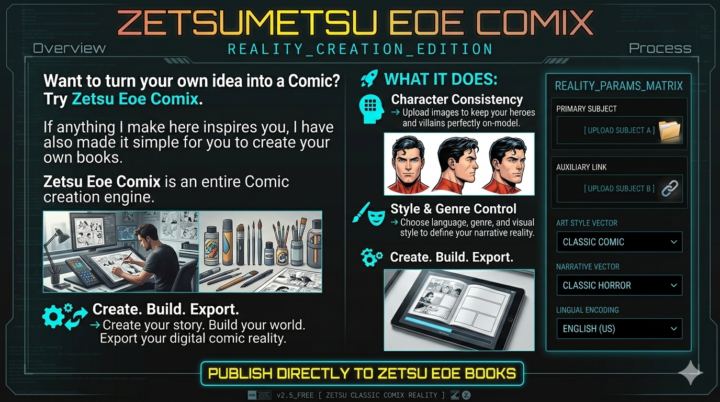
Add the pdf to Zetsu EOe Books Zetsu Eoe Comix is an entire Comic book creation engine Zetsu EOe BOOKZ is a structured digital archive for finished works inside the Zetsu ecosystem. Lets see what happens, leave a comment to get your link.
1
0
🔥
3h •
🖊️ Comic Update — 13 Character Rebuilds #"The Rest" lol
ZETSUMETSU EOe Character Rebuilds Indeed i didn't make my personal deadline here .. but! That doesn't mean i stopped .. Here are the rest of the pages I'm finishing up this weekend.. I like the way they are coming along .. we had the one "Mother at Church" image giving me trouble but its ok, i was still able to finish up some of the others to get them prepped for inking. A quick recap for the new ppl.. Type the number 13 into the search bar... Once they are done, they will be cleaned up and look more like the first image. But... First, I draft all the characters in pencil then then, i will ink them before moving the images to the pc. The pc versions will be digitally colored. The real world versions will get further work done with the backgrounds and total scene renders for the print release.
1
0

🔥
2d •
Make Money May | $5K/Month - The Structure Most People Never See
STORY TIME WITH | MAY | MAKE MONEY MAY | A CASE STUDY - THE MONTHLY YEARBOOK This months goal will be a fun one, why, because completing your goals is fun and that's what we do here. Seriously, this month i will be perfecting the newsletter.. A new edition to the whole of Zetsu to help organize the ecosystem for both its current and new users. Now this is not only about a newsletter, its about structure. A format that insures engagement, retention and most importantly… sales! Now for those of you who haven't made a single dollar online yet. Do this for practice .. pick a thing charge a dollar post about it all the time. Lets pretend the thing is skool, charge a dollar for entry and make sure its active. Those are literally the only steps, the same applies to ebay or shopify or anywhere else. The reason this works is because most things that cost a dollar are gonna automate themselves as they are fairly niche to begin with. Once we move into bigger numbers things begin to shift. Lets look at some numbers… First lets imagine we have the product already, the only thing we need to do is sale that thing 7 times a day for about $17. Think about that for a second… 7 sales/day × $17 = $119/day $119 × 30 = $3,570/month To hit a flat 5k we can add a $24 up sale that's like a tutorial or 1 on 1 session So since its short of $5K. The $24.99 upsell is what closes the gap. Now how many of those 7 daily buyers need to take the upsell to hit $5K? About 58 upsell sales a month, thats how many! That may seem like a lot but, it really means only 1 in 3 buyers need to take the tutorial offer to hit $5K. Which brings me back to the newsletter, and the goal of this month... not only reorganizing the structure of the presentation but monetizing it. Here's a quick version of the general idea . A FREE NEWS LETTER THAT GIVES AWAY TIPS, TOOLS or SERVICES WITH 10$ -17$ PRODUSTS AND a 24.99 up sale. The up sale is either a tutorial/ walkthrough or a full version of the service Amazing and unique right..lol know, i know, this is the same system that's been around, but there's a reason for that!


🔥
5d •
So much can be done with just a bit of data..
@Manda Jackson Its a page that loads the posts from the backpack. So once its done it will essentially be a site builder that loads your skool info AUTOMATICALLY...No ai just pure code here. Links everything automatically and I'm sure i can find a way to set up mini shops for you guys and link that to the payment system here.. sounds like a task... Thats exciting.
1-30 of 275