
Pinned

🔥
1d •
SkoolMagazine Issue 05 Now Available
👉 Read SkoolMagazine 👀 Made by Skoolers for Skoolers The latest issue of SkoolMagazine is better than ever before and it's ready for you to dive into Enjoy! Contents: - Feature Article: Rise of the Auto Mod - Be an Asset in Every Community You Join - Skool Games Winner: @Éva Raposa - Skool Growth Milestones - 4 Communities to Watch - Skool News Roundup - Skooling While Sick - Fun & Games Read SkoolMagazine Here

Pinned
🔥
19d •
Explore > Expand > Experience = Upgrade your WISE Skool Building!
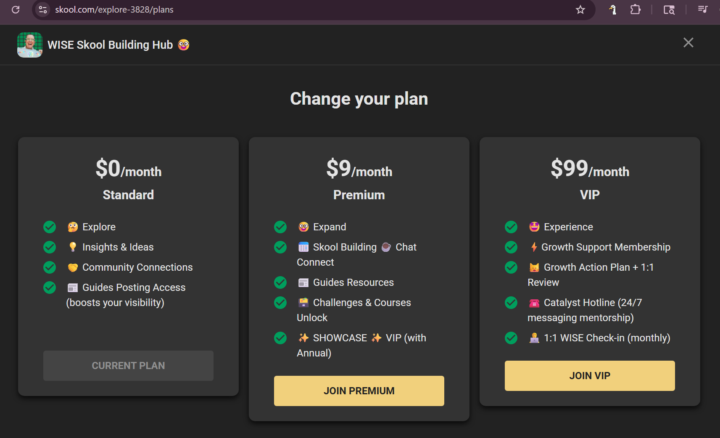
Why drift into scrolling & content consumption when you could supercharge your success? !!! UPGRADE !!! https://www.skool.com/explore-3828/plans $0/month Standard 🤔 Explore 💡 Insights & Ideas 🤝 Community Connections 📰 Guides Posting Access (boosts your visibility) $9/month Premium 🤓 Expand 📅 Skool Building ☕ Chat Connect 📰 Guides Resources 🗃️ Challenges & Courses Unlock ✨ SHOWCASE ✨ VIP (with Annual) $99/month VIP 🤩 Experience ⚡Growth Support Membership 😺 Growth Action Plan + 1:1 Review ☎️ Catalyst Hotline (24/7 messaging mentorship) 🧑💻 1:1 WISE Check-in (monthly) There's no better time than now to get growing! ❓🤔 Questions? 🗨️ Comment, DM or https://skoo/ly/connect 📲
3
0
Pinned
🔥
Nov '25 •
🏁 START HERE 🏁 Welcome to Explore WISE Skool Building
This is the public forum where you can explore, learn a few things, and see how Skool can support whatever you’re building without constant content or a tons of tech. It's also your gateway to the Wiseman Integrative Skool Ecosystem (WISE) Simple, friendly, useful and inspiring No commitment, no pressure. - explore how skool works - see example use case scenarios - pick up skills you can use right away - get ideas for what kind of community you might want This is for anyone curious about: - starting a community - improving your current Skool - keeping things simple both work/life - ditching the overwhelm and reducing stress - wanting a better way to connect with people Ideal for: Local + online small businesses Wellness practitioners Coaches & creatives Community leaders Action takers How to use this community: 1. Say a quick hello below. 🗨️ Where you’re from, what you’re building, whatever you want to share. 2. Check the pinned posts. 📌 They’ll give you the basics without making it complicated. 3. Follow the posts from Guides + members.💡Lots of ideas to spark your own. 4. Enjoy the free #1️⃣ - Start Here! 🥳 Welcome Challenge 5. Book a 1:1 Welcome call with Wendy (me 🤓) so you can get clear on your next step. Freemium and Upgrade options here in Explore WISE Skool Building Plans: https://www.skool.com/explore-3828/plans === 🤔 Explore === $0/month Standard Tier - 📰 Guides: Promote your Skool - 🗃️ Challenges, Courses, & Connections in the Community ===🤓 Expand === Premium - 📅 Monthly Masterclass - 🎟️ Special Events Access - 📰 Guides: Resources & Training === 🤩 Experience === VIP - 📲 Catalyst Hotline DM/Text 24/7 Access - 📅 Weekly WISE Session & Monthly 1:1 WISE with Wendy - 🔁 21-day Progress Cycles - 👁️ Visibility with Joint Ventures =============================

🔥
6m •
Skool News #45 - TRAFFIC SOURCES are here!
In this episode Sam Ovens & Andrew Kirby share: - Now you can see where your members come from! - Growth dashboard: See traffic, signups, and conversion rate by source - Members list: See where individual members come from - This helps you do more of what’s working and less of what doesn’t Watch it on the YouTube @skool-news channel here
0
0
🔥
3h •
Traffic Sources is LIVE - Skool News Broadcast Notes
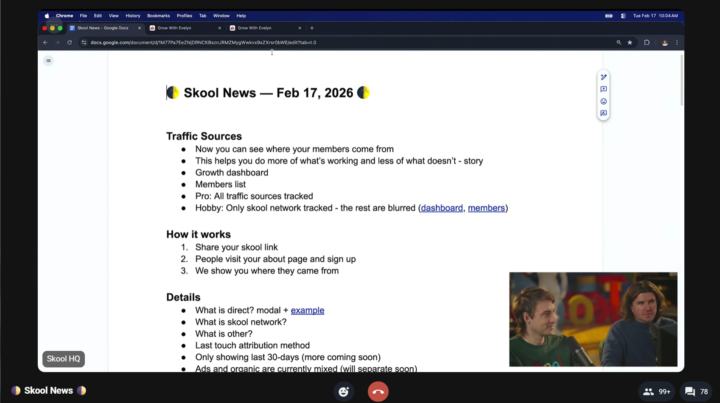
You can now see exactly where each member comes from! Pro Plan subscription gets the Traffic Analytics 1. Grab your Skool link 2. Share it everywhere 3. See the data on where they from when they visit your community If you're seeing more than 20% "Direct" then link source isn't tracking You don't know where to double down Skool Network = Discovery, Sidebar Suggestions, Other = anything OTHER than the top 7 sources Something "too nerdy" for this skool news episode 😹 Currently ads/organic are merged, will be separated soon! Feature is live, improvements needed, more updates will ship in coming weeks Summary - New Growth dashboard shows About page visitors, signups, conversion rate, and new MRR from the last 30 days - New MRR reflects recurring revenue from brand-new members only - Traffic sources are broken down so you can see where signups come from and which sources convert best - Conversion rate and new MRR can differ from traffic volume, revealing which platforms actually produce members and revenue - Members list shows where each individual member joined from - Hobby plan tracks only Skool Network; Pro tracks all traffic sources and reveals historical data when upgraded - “Direct” traffic usually comes from typed URLs, bookmarks, emails, redirects, link shorteners, or link-in-bio tools that strip attribution - “Other” bundles sources outside the top seven; individual members still show their specific source - Attribution uses last-touch logic, with a 14-day window for affiliates - Current reporting window is 30 days; longer lookback and ad vs organic breakdown are coming - Ads and organic traffic from the same platforms are currently combined but will be separated in a future update - Feature requires only sharing the Skool About page link directly; no UTMs or special links needed Highlights - See where traffic, signups, and revenue actually come from in one place - Compare conversion rate by source, not just traffic volume - Identify which channels produce paying members vs casual visitors - Track new MRR by source to see real revenue contribution - View per-member origin in the members list - Affiliate clicks hold attribution for 14 days - “Direct” often signals tracking loss from link tools or redirects - “Other” groups lower-volume sources outside the top seven - Hobby plan blurs non-Skool sources; Pro reveals full attribution - Historical data becomes visible after upgrading to Pro - Longer reporting windows and ad vs organic separation are planned updates
1-30 of 229

skool.com/wise
Small Businesses: Create a powerful presence to increase visibility, reach and client loyalty with a connection hub more effective than social media
Leaderboard (30-day)
1

🔥
+19
2

+8
3

🔥
+6
4

🔥
+6
5

🔥
+6
Powered by