

🔥
2h •
✨ Welcome, New June Skool Extensions Friends! ✨
𝗪𝗲’𝗿𝗲 𝘀𝗼 𝗴𝗹𝗮𝗱 𝘆𝗼𝘂’𝗿𝗲 𝗵𝗲𝗿𝗲! @Jonas Goldt @Monica Froese @Süleyman Alp @Philomena Moncoeur @Andrea Brence @Gabriel Valandro @Stefan Hartmann @Jhonatan Ascarraga @Andrew Pfeiffer @Yousuf Ajaz @Danny Gerst @John Williams @Oliver King @Na’sha Budden @Andy Huang @Stephanie Wilson @Kevin Hall 𝗦𝗸𝗼𝗼𝗹 𝗘𝘅𝘁𝗲𝗻𝘀𝗶𝗼𝗻𝘀 is where Skool fans like you come to discover, optimize, and love Skool even more. It's where you unlock powerful features that enhance your community, boost productivity, and elevate the overall user experience. 💙 𝗪𝗵𝘆 𝗬𝗼𝘂’𝗹𝗹 𝗟𝗼𝘃𝗲 𝗜𝘁 𝗛𝗲𝗿𝗲: - 𝗙𝗲𝗮𝘁𝘂𝗿𝗲 𝗦𝗽𝗼𝘁𝗹𝗶𝗴𝗵𝘁𝘀: Learn pro tips to make Skool work even better for you. - 𝗚𝗹𝗼𝗯𝗮𝗹 𝗖𝗼𝗺𝗺𝘂𝗻𝗶𝘁𝘆 𝗖𝗮𝗹𝗲𝗻𝗱𝗮𝗿: Kimberly’s favorite extension—see all your meetings in one spot and never miss a thing! - 𝗖𝗼𝗹𝗹𝗮𝗯𝗼𝗿𝗮𝘁𝗶𝗼𝗻: Connect with fellow Skool enthusiasts who are passionate about Skool Extensions features. 🚀 𝗟𝗲𝘁’𝘀 𝗚𝗲𝘁 𝗬𝗼𝘂 𝗦𝘁𝗮𝗿𝘁𝗲𝗱: 1. Introduce Yourself: Reply below—what’s your favorite Skool Extensions feature? 2. Explore the ⭐ Communities Category: Share your Skool group here if you’re an owner. 3. Stay Updated: Check out the latest 🆕 Release Notes here and hit the 🔔 for updates! 🎁 𝗦𝘁𝗮𝘆 𝗧𝘂𝗻𝗲𝗱: We’ll be hosting an onboarding Q&A call soon to help you get the most out of Skool Extensions! 𝗦𝘁𝗮𝘆 𝘁𝘂𝗻𝗲!


🔥
8d •
Geburtstagskalender
Gibt es so etwas wie einen Geburtstagskalender, in den sich die Mitglieder eintragen können. Nur Tag und Monat und morgens erscheint, wer Geburtstag hat?


Apr 29 •
How Your First Course Module Should Look Like
Every community should have a Start Here module first, which includes essential lessons such as: 𝗟𝗲𝘀𝘀𝗼𝗻 𝟭 (𝗪𝗲𝗹𝗰𝗼𝗺𝗲 + 𝗪𝗵𝗮𝘁 𝗬𝗼𝘂'𝗹𝗹 𝗔𝗰𝗵𝗶𝗲𝘃𝗲) In this lession you'll explain: 1. Who the community is for 2. What results they can expect 3. How long it will take 𝗟𝗲𝘀𝘀𝗼𝗻 𝟮 (𝗛𝗼𝘄 𝘁𝗵𝗲 𝗖𝗼𝗺𝗺𝘂𝗻𝗶𝘁𝘆 𝗪𝗼𝗿𝗸𝘀) In this lesson you'll guide them: 1. Where to ask questions 2. Where resources are 3. How to earn points / lvls (Skool gamification) 4. Community rules 𝗟𝗲𝘀𝘀𝗼𝗻 𝟯 (𝗙𝗶𝗿𝘀𝘁 𝗤𝘂𝗶𝗰𝗸 𝗪𝗶𝗻) - 𝗩𝗲𝗿𝘆 𝗜𝗺𝗽𝗼𝗿𝘁𝗮𝗻𝘁 Give them something they can achieve immediately 𝐄𝐱𝐚𝐦𝐩𝐥𝐞𝐬: 1. Build first AI prompt 2. Make first $10 idea 3. Learn first skill 4. This is what increases engagement 𝗟𝗲𝘀𝘀𝗼𝗻 𝟰 (𝗜𝗻𝘁𝗿𝗼𝗱𝘂𝗰𝗲 𝗡𝗲𝘅𝘁 𝗦𝘁𝗲𝗽𝘀) In this lesson you'll guide them: 1. Which course to take next 2. What path to follow 3. What level unlocks next content 𝗙𝗶𝗻𝗮𝗹 𝗦𝘁𝗿𝘂𝗰𝘁𝘂𝗿𝗲 1. Welcome to the Community 2. How This Community Works 3. Your First Win 4. What To Do Next

🔥
26d •
🐞 Issues or bugs
The range of functions has now become large and there can always be an error or unusual behavior in the extension. Use this post and report things that you notice. My goal is always to solve problems as quickly as possible. --- Der Funktionsumfang ist mittlerweile groß geworden und es kann immer mal zu einem Fehler oder einem ungewöhnlichen Verhalten in der Extension kommen. Nutzt diesen Post und meldet Sachen, die euch auffallen. Mein Ziel ist es immer schnellst möglich Probleme zu lösen.

8d •
Can Skool Extensions 🧩 Be Improved?
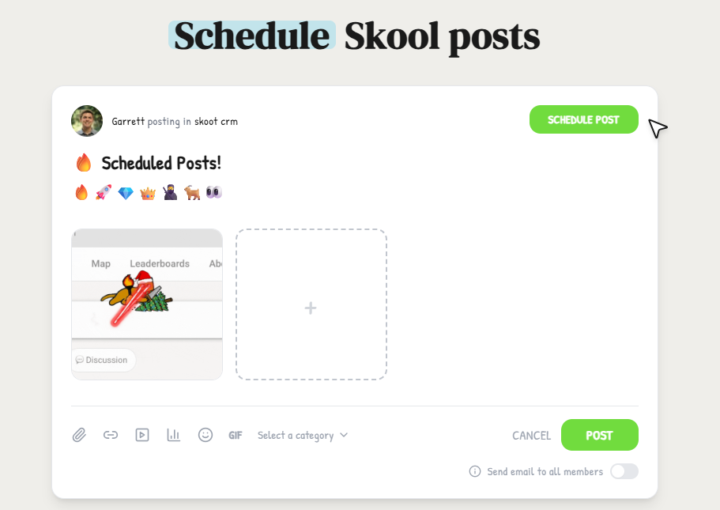
Hi Marco, I love the way you’re building this moving forward. However, there’s another extension that works in skool, which is quite popular. Now, obviously, when someone does something and it works, it’s a good idea to look at what they’re doing well and improve on it. So, to give you a heads‑up, I saw someone using this option to schedule posts, which I believe will be quite useful. Obviously I’m not trying to advertise that extension here, but here are some features that they have; I’m just going to screenshot them for you to see below. I believe you can do something similar or even better.
1-30 of 69

skool.com/skool-extensions
Global Calendar - Community Stream - Group Chat - Voice Messages - Bold Text - Bookmarks - Skool CRM - Skool Automations
Leaderboard (30-day)
1

🔥
+83
2
🔥
+77
3

🔥
+53
4

🔥
+43
5

🔥
+42
Powered by