Activity
Mon
Wed
Fri
Sun
Nov
Dec
Jan
Feb
Mar
Apr
May
Jun
Jul
Aug
Sep
Oct
What is this?
Less
More
Owned by Mihai
Practical nutrition support for adults with joint pain who want to eat better, support strength, manage weight where relevant and stay active.
Panda | Skool Business OS
225
5.0
$37/m
Kettlebell Warriors
1.9k
Free
Kettlebell Juggling Course
308
Free
Skoolers
152.5k
Free
12 contributions to Skool Extensions 🧩

🔥
May 22 •
🐞 Issues or bugs
The range of functions has now become large and there can always be an error or unusual behavior in the extension. Use this post and report things that you notice. My goal is always to solve problems as quickly as possible. --- Der Funktionsumfang ist mittlerweile groß geworden und es kann immer mal zu einem Fehler oder einem ungewöhnlichen Verhalten in der Extension kommen. Nutzt diesen Post und meldet Sachen, die euch auffallen. Mein Ziel ist es immer schnellst möglich Probleme zu lösen.

1 like • Jun 17
Hey Marco — quick Loom on the WelcomeDM template issue. The placeholder seems to be pulling in the wrong name (it’s showing “calendar” instead of the person’s first name), and I’m not sure if I’m missing a setting or if something’s off in templates/messages. Can you take a look when you get a sec? https://loom.com/share/9fcdc7bdb96d471e8043448a963f195e
🔥
Jun 16 •
🔥 Moderator Found!
I’m excited to announce that I’ve found our new moderator: @Kimberly Armatys 🎉 She’ll be helping to bring more action, engagement, and fun into the community. Expect more discussions, challenges, and creative ideas Kimberly will also get deeper insight into the extension, early access to upcoming features, and the opportunity to provide direct feedback that helps shape future development. Please give Kimberly a warm welcome 👇🏼

5 likes • Jun 16
Welcome @Kimberly Armatys
🔥
Jun 8 •
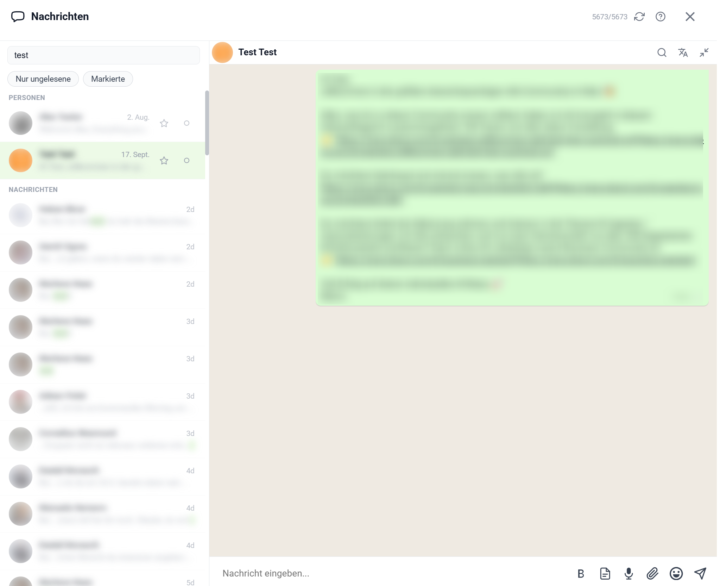
Chat Panel + Chat Search
𝗦𝗸𝗼𝗼𝗹 𝗖𝗵𝗮𝘁 — 𝗬𝗼𝘂𝗿 𝗪𝗵𝗼𝗹𝗲 𝗗𝗠 𝗜𝗻𝗯𝗼𝘅, 𝗥𝗲𝘄𝗼𝗿𝗸𝗲𝗱 𝗜𝗻𝘁𝗼 𝗢𝗻𝗲 𝗙𝗮𝘀𝘁 𝗣𝗮𝗻𝗲𝗹 Skool's own chat lives in a long sidebar list: to read a conversation you click away to a separate page, there's no way to filter or pin the threads that matter, and the search box only matches member names. Skool Chat rebuilds the whole direct-message experience as a single toolkit panel — your conversations on one side, the open chat right next to them, and everything you'd otherwise hunt for one click away. Open it from its own icon in the toolbar, where a live badge counts your unread DMs. The panel shows a compact list of every conversation — avatar, name, time of the last message, and a one-line preview, with unread threads clearly marked. Click any row and the conversation opens inline, right inside the panel, instead of throwing you out to skool.com. A back arrow returns you to the list, and you can pin the panel open so it stays put while you keep browsing Skool. Reading and writing happen in the same place. Type a message and send it with Enter — Shift+Enter for a line break — and it appears instantly while it's on its way; new incoming messages show up on their own without a refresh. The composer carries everything you need: an emoji picker that remembers your recents, a bold button for real bold text, your saved text templates, and a translate button. Attach a file with the paperclip — images, PDFs, Word, Excel, ZIP and more — or just drag it straight onto the conversation and drop it. Voice and video messages record right from the input bar. Two filters sit above the list. "Unread only" strips it down to threads you haven't read yet — invaluable in a busy inbox — and "Bookmarked only" shows just the conversations you've starred. The two combine, so you can see, say, only the unread messages among your important contacts. A star on every row bookmarks that conversation, and your bookmarks are cloud-synced — the threads you starred on your laptop are starred on your desktop too. You can mark any chat read or unread by hand, and that state stays consistent across every open tab and device.
5 likes • Jun 8
Great, love it.
2 likes • Jun 10
Hey @Marco Berlin , I noticed that the template doesn't work in the new chat panel. It doesn't work for me. What am I doing wrong? Thank you.
Jun 8 •
Can Skool Extensions 🧩 Be Improved?
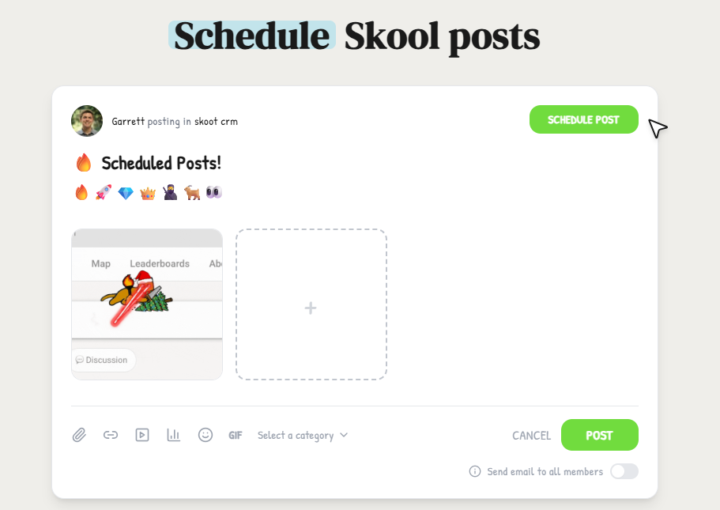
Hi Marco, I love the way you’re building this moving forward. However, there’s another extension that works in skool, which is quite popular. Now, obviously, when someone does something and it works, it’s a good idea to look at what they’re doing well and improve on it. So, to give you a heads‑up, I saw someone using this option to schedule posts, which I believe will be quite useful. Obviously I’m not trying to advertise that extension here, but here are some features that they have; I’m just going to screenshot them for you to see below. I believe you can do something similar or even better.
🔥
Mar 16 •
Member Tags (Premium Feature 👑)
𝗠𝗲𝗺𝗯𝗲𝗿 𝗧𝗮𝗴𝘀 — 𝗢𝗿𝗴𝗮𝗻𝗶𝘇𝗲 𝗬𝗼𝘂𝗿 𝗖𝗼𝗺𝗺𝘂𝗻𝗶𝘁𝘆 𝘄𝗶𝘁𝗵 𝗖𝘂𝘀𝘁𝗼𝗺 𝗟𝗮𝗯𝗲𝗹𝘀 As your community grows, keeping track of who's who becomes a challenge. Member Tags let you create custom color-coded tags and assign them to individual members — giving you a personal CRM-like layer right inside Skool. Open the Members Panel and click the tag icon in the header to manage your tags. Create as many tags as you need (e.g. "VIP", "Coaching Client", "Affiliate Partner"), each with a distinct color chosen from 8 presets. Click any color dot to cycle through the palette. To assign tags, click the tag icon on any member row and check the tags you want — assignments are saved instantly. Tags appear as small colored badges next to member names throughout the entire platform: in the feed, comments, classroom, and anywhere Skool displays a username. This way you can instantly recognize tagged members without opening the Members Panel. If a member has more than two tags, a "+N more" indicator keeps things tidy. You can also right-click any profile name or avatar anywhere on Skool to quickly assign or remove tags via a popover — no need to open the Members Panel first. All tag data syncs across your devices via Chrome Sync. The feature is available for community admins and owners and can be toggled on or off in the Toolkit Settings under the Admin section. --- 𝗠𝗶𝘁𝗴𝗹𝗶𝗲𝗱𝗲𝗿-𝗧𝗮𝗴𝘀 — 𝗢𝗿𝗴𝗮𝗻𝗶𝘀𝗶𝗲𝗿𝗲 𝗱𝗲𝗶𝗻𝗲 𝗖𝗼𝗺𝗺𝘂𝗻𝗶𝘁𝘆 𝗺𝗶𝘁 𝗲𝗶𝗴𝗲𝗻𝗲𝗻 𝗟𝗮𝗯𝗲𝗹𝘀 Je größer deine Community wird, desto schwieriger wird es, den Überblick zu behalten, wer wer ist. Mitglieder-Tags lassen dich eigene farbcodierte Tags erstellen und einzelnen Mitgliedern zuweisen — wie eine persönliche CRM-Ebene direkt in Skool. Öffne das Mitglieder-Panel und klicke auf das Tag-Icon im Header, um deine Tags zu verwalten. Erstelle so viele Tags wie nötig (z.B. "VIP", "Coaching-Kunde", "Affiliate-Partner"), jeweils mit einer eigenen Farbe aus 8 Voreinstellungen. Klicke auf einen Farbpunkt, um durch die Palette zu wechseln. Um Tags zuzuweisen, klicke auf das Tag-Icon in einer Mitgliederzeile und hake die gewünschten Tags an — Zuweisungen werden sofort gespeichert.

5 likes • Mar 26
@Marco Berlin No, I'm talking about the tags. When I press the tag icon, I should be able to choose a tag that I want to filter the list, isn't it?
3 likes • Mar 26
@Marco Berlin Oh I see now, my bad, sorry but yeah thank you very much for making this clear. Appreciate it.
1-10 of 12

@mihai-balan-6120
Rehab Specialist & Nutrition Coach helping adults with joint pain eat better, stay active and keep doing what matters to them.
Active 2h ago
Joined Mar 18, 2026
Powered by