

Feb 12 •
Virtual Coaching and Live Role Play with chatGPT
Check out what we did in session one: https://chatgpt.com/gg/v/698e02a24800819f81a0c5f8b75f7b69?token=5pqHteYelGhbOt_hGXiRag Recording to be posted soon.... but how would you like to be live coached and role play with 15 experts?
0
0
Nov '25 •
AI Security
In preparation for a new talk on AI Security that I am giving at NAR NXT in Houston, I developed these 3 companion guides. Feel free to have early access as Skool members :) One of many free value adds I try to provide to go above and beyond delivering value to you. Access the resources via these links: Complete Guide to AI Security & Best Practices in Real Estate https://designrr.page/?id=467595&token=1427039426&type=FP&h=8614 AI Compliance Checklist Template for Real Estate https://designrr.page/?id=467593&token=253925935&type=FP&h=9390 AI Security Quick Reference Card for Real Estate Agents https://designrr.page/?id=467594&token=422592767&type=FP&h=7118
0
0

Nov '25 •
Video Promo created by AI
I just used meta.ai to convert text to video (e.g. create an aerial timelapse at dusk of the Dallas, TX skyline). I then used perplexity.ai to help me identify which of the four skyline options most closely resembled Dallas (as I would not recognize it myself). https://www.perplexity.ai/search/which-of-these-most-looks-like-PbQFpGVXT.S4e_VcoDRpRg#0 I created the music using suno (AI).
2
0

Oct '25 •
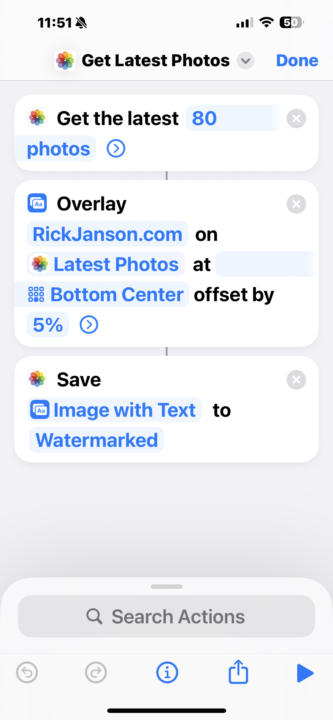
Watermarking GMB Photos
One of the things we learned today was how to watermark photos with your website when uploading to Google and Google My Business. My photos have over 31,000,000 views on Google. This process will now make it much easier for me to upload more than my existing 924 photos with this little shortcut.
Sep '25 •
Projects in ChatGPT
Organize, revisit, and continue your work—all in one place Overview Projects are smart workspaces that keep everything related to a long‑running effort in one place. Group together chats, upload reference files, and add custom instructions so ChatGPT remembers what matters and stays on‑topic. With memory, context, and flexible tools, they’re ideal for repeated and evolving work such as writing, research, planning, and more. Projects are available to all free and paid subscription types globally. Note: You must be logged in to a ChatGPT account in order to use projects. Getting started Why use a project? - Keep context together. Files, instructions, and chats live in one place so ChatGPT stays on‑topic and helps you stay organized. - Switch devices seamlessly. Start on your phone, continue on the web, or vice versa. - Repeatable workflows. Reuse your project for multi-threaded or recurring tasks like weekly research or content drafts. Great starter ideas - School: “AP Biology study guide,” attach class PDFs, ask for practice questions using study mode. - Work: “Marketing launch plan,” set the tone to PM/mentor, draft briefs and assets. - Personal: “Wedding planning,” track vendors, budgets, and timelines. Create your first project 1. Click New project in the sidebar. 2. Give it a name and pick an icon and color to spot it quickly in the sidebar.
1-6 of 6
powered by

skool.com/jansonai-3836
Solve 40+ real estate problems with AI. Get weekly live calls and a community built to help you save time, win more clients, and close more deals. (
Suggested communities
Powered by