
Write something

13d •
Supercomputer vs MCP?
Hello. What is the difference between HIGGSFIELD supercomputer and MCP? Is there any? Is the supercomputer more skilled and capable of creating videos? Or is there no difference?
0
0
13d •
Help for Lifestyle Product Video
Hello, I try since hours to create a lifestyle product video for a toddler bed. But the AI deny to create the video because of the child. How can we get around this? I mean its a bed for little children and the client wants a lifestyle video, I cannot create the video without happy child jumping on the bed or cuddle with her mom. I would appreciate your help! Thank you in advance!
0
0

Feb 27 •
👋 Welcome to Higgsfield Lab! Start Here
Hi, I’m Ania Melnik — AI creator, digital designer, art director, and founder of an AI creative studio working with real clients worldwide. My work sits at the intersection of technology and artistry — and it’s been recognized globally. • 4000+ students trained • 300+ international creative awards earned by our students • Alumni working worldwide • Certificate of Recognition from the California State Senate for innovation in merging technology and digital art This community exists for one reason: To help you turn AI skills into paid client work. Here’s how to start: 1️⃣ Pick your track: Creator / Client / Ads 2️⃣ Download the Starter Pack 3️⃣ Create your first clip within 48 hours Don’t overthink. Execute. Drop your track in the comments: Creator / Client / Ads 👇

18d •
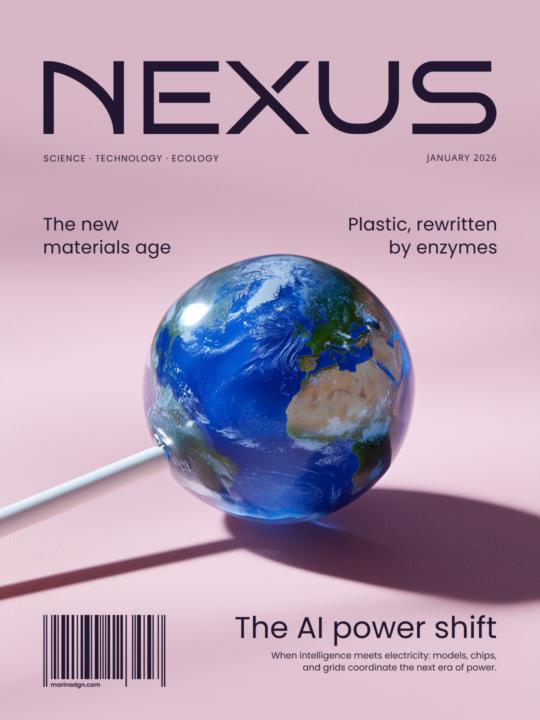
Which issue would you pick up first?
Hi everyone, Lately I've been exploring how far AI can go beyond "pretty images" and into visual storytelling. As an experiment, I created a series of fictional magazine covers where each issue is built around a single idea or future trend. I'm curious: which cover grabs your attention first if you imagine seeing it on a shelf? I'd love to hear your honest thoughts.
Poll
2 members have voted

May 20 •
Made A Fun Cartoon Promo video for a Mobile Car Detail Business
Combine ChatGPT and Seedance 2.0 to create a pretty cool 3D cartoon video project. That's a lot of fun. Looking forward to the next one. Not perfect, of course, but I certainly appreciate any feedback.

1-30 of 83
powered by
skool.com/higgsfield-7889
100% AI. One platform. Unlimited potential 🤖
Create AI videos & visuals with Higgsfield
Suggested communities
Powered by