
Write something
Pinned

Feb 10 •
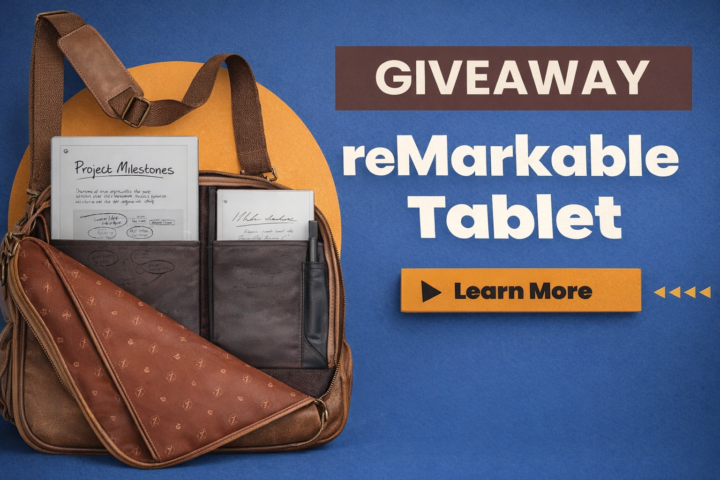
🎉 reMarkable Tablet GIVEAWAY ANNOUNCEMENT 🎉
Win a reMarkable Journey Bag + reMarkable Paper Pro We’re running a 60-day community giveaway and keeping it simple, fair, and transparent. No purchase required. No tricks. Just community participation. 🏆 What You Can Win 🎒 reMarkable Journey Bag ✍️ reMarkable Paper Pro 🔥 How the Winner Is Chosen This is NOT a random drawing. The winner will be selected based on: - 📈 Your position on the Skool Leaderboard - 💬 Your community participation - 🤝 Your referrals (when they join) 👉 The higher you rank on the leaderboard, the better your chances. Community involvement matters. ✅ How to Enter (Tracked Here in Skool) 1️⃣ Join this Skool community → 1 entry If you’re reading this, you’ve already completed step one 🙌 2️⃣ Share this group with a friend → 2 entries Know someone with a reMarkable (or who wants one)? Invite them. You receive credit once they join. 3️⃣ Share with multiple people → 3 total entries (max) More shares = better odds. 👉 To make sure we track your entries: Comment below once you’ve shared and tag who you invited. You’ll receive credit once they join. 👉 Your Group participation level must be Level 2 or higher to qualify. 📊 Want to Increase Your Odds? Check the Leaderboard inside the group and see where you rank. The higher your engagement: - Posting - Commenting (Meaningful) - Helping others - Sharing the group The stronger your position becomes. Sharing gives you a 2x boost, but overall involvement is what sets you apart. ⏳ Giveaway Details 📅 Runs for 60 days 🌍 Open worldwide 💳 No purchase necessary 🏁 Winner announced inside this Skool group quick note: we can only ship the prize to countries/addresses currently supported by reMarkable shipping.
Pinned
Sep '25 •
👋 Welcome to E-Ink Tablet Users community
Where creativity, clarity, and connection come together. Hey there! Whether you’re a reMarkable user, Supernote fan, BOOX explorer, or just getting started with e-ink tablets — you belong here. This space is all about sharing ideas, learning from each other, and helping you get the most out of your digital tools. Here’s what to do next: ✅ Introduce Yourself Let us know: • What tablet(s) you use • What you’re hoping to accomplish (productivity, art, journaling, etc.) • Any favorite tools or hacks you’ve discovered ✅ Check out the Free Community Templates We’ll be posting curated packs here on a rotating basis. Make sure you download the latest set! ✅ Ask, Share, Help Post a question, show off your setup, or jump in to help someone else — this is a collaborative space and we’re better together. 🧭 Looking for more tools or walkthroughs? If you want access to advanced tools like Binder Pro, Ep Template Studio, Ciphnote, or early access to CalSync, check out our Creator and Legacy Circles. We’re glad you’re here. Welcome to the Circle. — Jason & the eInkPads Team
Pinned
Nov '25 •
Do You Use One or More reMarkable Tablets? Let’s Compare Workflows!
I’m curious — does anyone here use two reMarkable tablets? If so, how do you fit them into your daily workflow or creative setup? Do you split them by purpose (work vs personal)? Or maybe one is your planner while the other’s your sketchbook? Share your setup below — I’d love to see how you’ve made multiple devices part of your productive life. Let’s compare notes and maybe inspire some new ideas for getting even more out of your devices. ✍️
Poll
137 members have voted

2h •
How to create stable and long term income ?
Hello, Dear. Thx for clicking my post. My name is Matt(or Kane), a Senior AI System Engineer & AI Architecture. Now I am looking for a realiable and passionate long term partner who wanna make income under my tech support. Both men and women are available. Also I don't mind if you are developer or not. I am gonna work with you on Linkedin, freelancer.com & upwork.com. You only need to invest 30 minutes a day, so you can do it alongside your main job. We plan to split the profits generated through the collaboration 30:70 or 50:50. This is an amount equivalent to 3,000$ to 10,000$ USD for you every month. If you meet the conditions below, please send me a DM. Then, I will explain the specific plans and methods of collaboration. Importance : Please upload your real face Photo when you send me DM. Conditions : 1. You must have stable internet. 2. You have to offer me secondary laptop and remote access for work. (Dont Worry, I will only open freelancer, upwork & Linkedin Browser) 3. Once a schedule is set, you must be available for google meet. 4. I will handle the AI technology coding entirely, so you do not need to know the program. 5. You must possess proficient English speaking skills. 6. You must be a person with a neat appearance. 7. Your age must be in your 30s. Telegram : software19970726 Whatsapp : +1 (561) 271-8658
1
0
16h •
🚀 CalSync 1.7.5 Is Here! Microsoft To Do Sync Improvements
We’ve just released CalSync 1.7.5, focused on making task syncing more reliable. A big thank you to everyone in our community who continues to share feedback and help us improve CalSync! ✨ What’s New? ✅ More Reliable Microsoft To Do Sync Tasks you check off with your pen now continue syncing back to Microsoft To Do, even during longer sessions. Previously, syncing could stop after the first successful update. ✅ Better Task Sync Notifications If something goes wrong during task syncing, CalSync now tells you why in the Activity feed instead of failing silently. You’ll also see retry information. ✅ Additional Fixes & Improvements We’ve made several behind-the-scenes improvements to keep CalSync running smoothly. ✍️ Your Pen. Your Tasks. All Connected. With CalSync’s Task Markup, you can check off tasks directly on your reMarkable planner and have those changes reflected in your connected task service. We’re continuing to improve that experience with every release. 📥 Download CalSync 1.7.5: Download the latest version Windows https://www.einkpads.io/api/calsync/win32/releases/latest macOS (Apple Silicon) https://www.einkpads.io/api/calsync/darwin/arm64/releases/latest macOS (Intel) https://www.einkpads.io/api/calsync/darwin/x64/releases/latest einkpads.io Important: This release includes connector updates, so please install the full 1.7.5 download rather than relying on an in-app restart update. As always, thank you for being part of our community. Your feedback genuinely shapes what we build next. Have questions or suggestions? Drop them below! ❤️ The eInkPads Team
1-30 of 625
skool.com/einkpads
Learn. Share. Create. — Empowering reMarkable, Supernote, and BOOX tablet users worldwide. einkpads.com
Leaderboard (30-day)
1

+11
2

+9
3

+8
4

+6
5

+5
Powered by