
Write something
Pinned

👑
⭐
2d •
Welcome to Clief Notes. Here's where to start.
1. Go check out 📚Navigating The Course to see how to get around and what's here. 2. Start with The Foundation. Concepts, folder architecture, prompting framework. Everything else builds on this. 3. Check in at the bottom of each lesson. Polls, discussion posts, other members working through the same stuff. Use them. 4. When you're ready to build real things join in on our Biweekly competitions and win some real cash. ⭐ Competitions Mega Thread 5. If you are wanting to dive into the masterminds, grab all the past templates, artifacts and resources. Upgrade and head into the The Vault for Premium and The Drawing Room (VIP) for VIP 6. Post your work. Ask questions. Help others when you can. What are you here to build?
Pinned

3d •
🏆 HOW COMPETITIONS WORK FROM NOW ON 🏆
Quick update on the competition schedule so everyone knows what to expect. 📅 NEW CADENCE: TWICE A MONTH We're dropping comps on the 15th and the 30th of every month. Two chances to compete, every month, on a set schedule you can plan around. ✍️ WHY THIS SCHEDULE Spacing them out this way means we can give tailored feedback on every single submission. Not just the winners. Everyone who enters gets notes on what worked, where it's weak, and what to do next. 🎁 WHAT WINNERS GET Along with the prize, every winner gets a 15-minute one-on-one with Jake. Use it to talk through your build, ask questions, or bring whatever else is on your mind. Two comps a month. Feedback on every entry. Direct time with Jake for the winners. Mark your calendar for the 15th and let's get to work!
Pinned
3d •
🎆 GOOD NEWS: THE SALE STAYS OPEN. HAPPY 4TH 🎆
We're holding the last sale through the holiday weekend so nobody misses it. 🎉 Premium: $27 → $14/mo 🎉 VIP: $97 → $67/mo This is the cheapest it will ever be. Once it closes, the price is gone for good. ⏰ New deadline: July 5th, 10:00 AM EST. This is the last extension. If you've been on the fence, sign up now. You lock this rate in and keep it every month going forward. 🖥️ ONE MORE REASON TO JOIN The week of July 5th we're dropping the software we've been building for this community. It goes out for beta testing first, and only Premium and VIP members get access. Sign up before the sale closes and you're in from day one.

6m •
I’ve been quietly building and learning here’s a journey update!
Quick BuilderCore / agent-system update. I’ve been quiet for a while because I’ve been deep in the worker-runtime layer. The biggest lesson so far is that the hard part is not just “getting agents to do work”. The hard part is governing them properly. Over the last 10–15 worker-runtime milestones I’ve been building out the foundations for: - model registries - worker identity policies - routing policy - review/judge/operator separation - API cost awareness - premium model gating - OpenAI / Claude provider separation - Fable 5 added as an inert premium model profile - evidence-linked worker chains - controlled ingestion gates - reviewer/judge frozenset policy - no self-review / no self-judgment boundaries One of the biggest things I’ve learnt is that API cost changes the architecture. You cannot just let a system “pick the best model” freely, because the best model may also be the most expensive one. So BuilderCore now needs to think in terms of: - cheapest sufficient model - risk-based routing - premium model approval - per-call cost caps - per-ticket cost caps - token tracking - worker performance history - when a model is allowed to be used - when a model is only catalogue-aware but not live-enabled For example, Fable 5 may be extremely powerful, but it is too expensive and too high-risk to make default. So I added it as an inert premium profile first: BuilderCore knows it exists, knows it is premium, but cannot dispatch it yet until premium gates and usage governor are ready. That is the kind of architecture decision I’m learning matters. The other big lesson is identity separation. A model is not the same thing as a worker identity. For example: - claude-code is a tool identity - codex-implementer is a provider worker identity - claude-sonnet-4-6 is both a model identity and a reviewer identity in the current court chain - human/operator remains the final authority This matters because if the system confuses models with identities, it can accidentally allow the wrong worker to review or judge its own work.
1
0

57m •
It’s the little things…
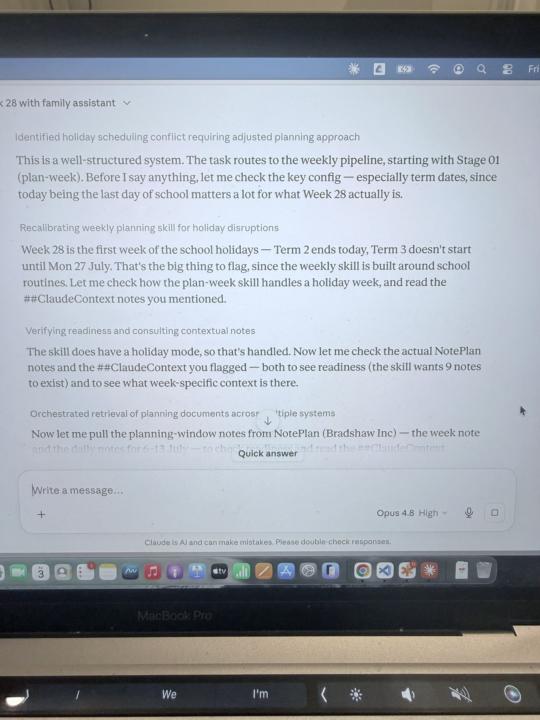
I am kicking off my weekly planning workflow for next week. At the start of last school holidays, this was a brand new system and I was just moving from a set of saved prompts and skills to ICM. (Hey, it’s been an 11 week term - in ICM time, that’s a few lifetimes!) So, to say I had a little bit of trepidation was an understatement. I have to say every week when I kick this stage off in desktop (I am currently on NotePlan - the connector only works on Desktop) it makes me happy to see Claude go in and say “this is a well-structured system”. Honestly, every week, and I still get the warm fuzzies. I’d done extra context set up and everything. And I knew I already had school holiday templates… Turns out Mira back in April had taken the time to put in a holiday mode to the system. Did I remember this? No, not at all. Did my system make sure that Claude had everything and it went smoothly? Of course it did. Honestly, thank you past me. I didn’t even remember the skill’s holiday mode and my *goodness* does that make my life easier for the next 3 weeks.
1-30 of 2,224

skool.com/cliefnotes
What we give away free beats most paid courses. Build durable AI systems with a Marine vet and Edinburgh researcher. 40+ lessons, growing.
Leaderboard (30-day)
1

🔥
+1736
2

🔥
+1661
3
+1269
4

+940
5

+619
Powered by