
Pinned

May 3 •
The Folder System Became My Agency
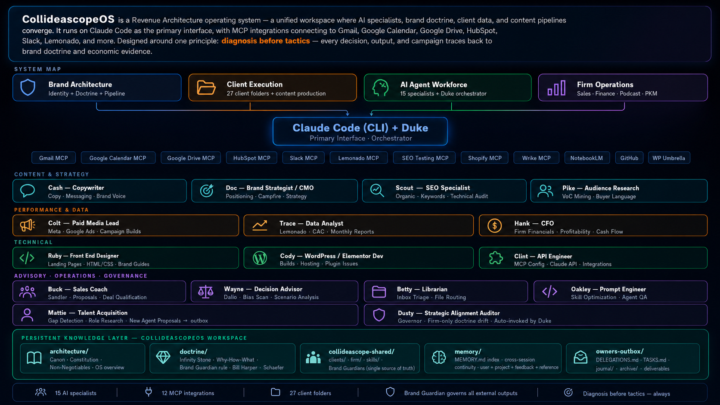
Twenty-four days ago I posted about Jake's folder system video. This is what happened next. Same foundation — markdown files, orchestration prompts, clear roles. I just kept building. Fifteen named specialists. Each one with a soul file, guardrails, and a playbook. Duke orchestrates. Cash writes. Trace pulls the data. Hank runs the financials. Clint handles the MCP integrations. Behind each one is either a human counterpart doing the real work alongside them — or a role I can't afford to hire yet. Katie who's been with me for 18 years, now has her own orchestrator running the same system. Twenty-seven client folders. Twelve live MCP integrations. One shared repo. The folder system isn't replacing my agency. It becoming my agency. Jake gave me the unlock. This is how it's going.
Pinned

Mar 15 •
Welcome to Clief Notes. Here's where to start.
1. Watch the intro video and introduce yourself in the intro post here 2. Start with The Foundation (free course). Concepts, folder architecture, prompting framework. Everything else builds on this. 3. Check in at the bottom of each lesson. Polls, discussion posts, other members working through the same stuff. Use them. 4. When you're ready to build real things, move to Implementation Playbooks (Level 2). When you're ready to build your own tools, Building Your Stack (Level 3). 5. Post your work. Ask questions. Help others when you can. What are you here to build?
Poll
6606 members have voted
Pinned
5d •
🏆 WEEKLY COMP #7: THE OPERATOR 🏆
🎟️ PRIZE: FREE SEAT IN THE LYCEUM 🎟️ Pick your cohort. Technical, Business, or Creator. Your call. ---- 🇬🇧 We're back. Good morning from London. 👋 Thanks for the patience last week. Jake and I needed a few days to breathe before London Tech Week kicked off, and you all responded with nothing but support. We don't take that for granted. Now let's get back to building. ---- 📋 THE CHALLENGE Build a folder-based AI operator that handles ONE operational workflow end-to-end. You pick the workflow. This week's deliverable is one operator folder that someone could drop into a Claude project and use to handle a real business workflow without babysitting. ---- 🎯 PICK YOUR WORKFLOW The workflow is yours. Pick something specific. Pick something you'd actually use. A few sparks to get you thinking: - 🎫 Customer support triage (which tier handles this ticket?) - ✅ Content review and approval - 📨 Lead intake and qualification - 💸 Refund request handler - 🤝 Partnership pitch evaluator - 🎙️ Podcast guest pitch sorter - 💼 Freelance project intake - 📄 Resume screen for one specific role - 📅 Meeting request triage (book, decline, delegate) The more specific, the better. "Customer support" is too broad. "Refund request triage for an ecommerce store doing under 200 orders per month" is right. 📎 If you want a fully written client brief as a reference, the attached PDF walks through one example. Don't build the example. Use it as a template for how to think about scoping your own operator. ---- 🗂️ THE METHODOLOGY If this is your first comp, welcome. Here's what you need to know: This week (and every week) you're learning interpretable context methodology. Folders as architecture. Each file does one job well. Your operator is a folder with five things: - 📄 identity.md (who the operator is and what workflow they own) - 📐 rules.md (the decision logic: criteria, edge cases, escalation rules) - 💬 examples.md (decisions in action, including at least one edge case) - 📚 reference/ (checklists, templates, rubrics) - 📖 README.md (how to use it)

23h •
To Linux or not to Linux, that is the question.
Way back when I was just a wee lad in grade 6, my math teacher introduced me to Linux. I had no clue what an operating system even was at the time, but he handed me an old laptop, a beast to haul around back then, and told me to play around with it. I didn't realize it then, but he planted a seed that would eventually grow into what I'm building now. Even after that, I didn't really get into computers until later. When I did, I started on Windows 95 and stuck with Windows from there on out. That only changed in the last 10 years. Mostly for tin foil hat reasons, I started looking at Linux again. I had always reached for Linux programs first whenever I could because commercial software is expensive. Tools like GIMP and Blender were free and got the job done. Fast forward to when I got serious about AI and coding. Even though I had zero real experience with Linux, I made the call to build my new desktop for AI work on Linux. It felt almost instinctive. If I was diving deep into custom open source software, Linux just seemed like the better place to mess around and learn. I remembered the old Linux UIs being pretty janky compared to the Windows experience I had grown used to since I was a kid. But after running Linux steadily for the past seven months, I can say it has not let me down once. My workflows didn't really change because I was already living in free and open source tools out of necessity. The latest Ubuntu is actually really nice to work in, and the new communities I'm part of default to offering Linux versions for pretty much every tool you could want. Windows usually wraps everything into one polished program with a single UI, while on Linux you often piece together the same functionality yourself, which is probably why mass adoption has been slower. A big reason I made the switch was seeing the writing on the wall with Windows heading toward a SaaS subscription model. Everywhere you turn these days it's another account and another monthly fee, and it gets incredibly frustrating always being at the mercy of subscriptions. Linux feels like a real path away from that mentality. And now with the power of ICM and AI behind me, I feel confident I can handle any rough edges I run into during the transition. My main desktop is still on Windows 11 for now, but I can say with confidence that its days on my systems are numbered. What are your thoughts on this? Have you had similar realizations? Did you bring Linux back into the fold, or has it always been there for you?

4h •
Chinese models US hosted & Private
There is a method of using Chinese models like: Qwen, MiniMax, Zai, Moonshot, etc. That are hosted in the US on the latest NVIDIA B300 datacenter GPUs, where your data stays private and is never trained on. This is where Ollama, the self hosted go to source for local models comes in. Ollama offers a selection of cloud based models. Simply append your model call with :cloud https://ollama.com/search?c=cloud&o=newest What's your favorite model?
Poll
1 member has voted
1-30 of 1,739

skool.com/cliefnotes
Jake Van Clief, giving you the Cliff notes on the new AI age.
Leaderboard (30-day)
1

🔥
+1603
2

+1442
3
+1146
4

+620
5

+415
Powered by