
Write something
4d •
I had my AI red-team the Garmin setup — here's a hardened version (Win + Mac)
(works with any AI you use) Like many of you I wanted my Garmin recovery data (sleep, HRV, resting HR, body battery) going into my AI coach — it's the data Strava can't give you, and for me it changed the conversation from "how far did you run" to "why was your Wednesday night 4.5 hours of sleep." Before running the setup from the classroom guide, I did what the guide itself kind of teaches us: I asked my AI to review it first — and then to red-team the result. A proper adversarial security review. It found real things worth fixing before I'd type my Garmin password anywhere. So we rebuilt it, audited it, and I'm sharing the result so you don't have to choose between your data and your peace of mind. Same idea, same open-source library (python-garminconnect), one script — but hardened: - Read-only, and provably local. The only network connection is to Garmin. No upload endpoints, no analytics. The script is ~350 lines — you (or your AI) can read every one. - Your password is typed once, hidden, never stored — not in files, not in environment variables, not in your shell history. The script even refuses to run in terminals that can't hide your password. - Your login token never gets printed and is saved with locked-down permissions. (A printed token = a year of account access sitting in your terminal scrollback.) - Dependencies pinned to exact versions, so a compromised future release of some library can't silently install itself on your machine. - Smarter failure behavior: if the network is down, it tells you it's the network — so you never get trained into re-typing your password "just in case." That habit is exactly what phishing lives on. What you get: a garmin/ folder of clean markdown notes — one wellness note per day, one per workout, plus a data.json. Point your AI coach at it and every morning it knows how you slept before it tells you what to do. Setup: unzip, follow the README. Five minutes, Windows and Mac covered, including how to schedule it to run automatically every morning (with catch-up for days your machine was off). The only thing you ever type is your Garmin login, once.
11h •
All Trails + Claude = Trail Running & Hiker Heaven
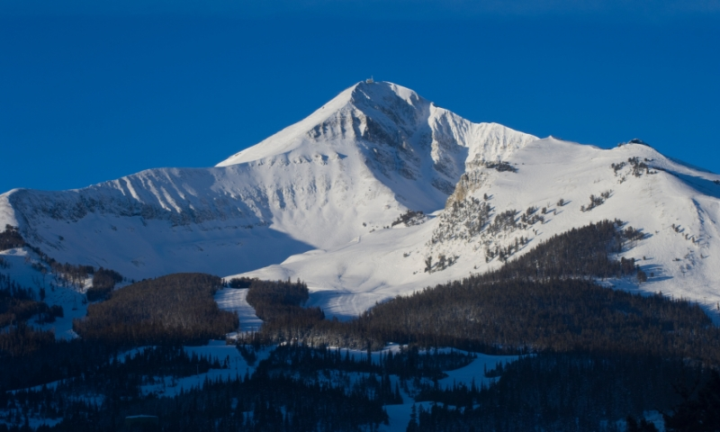
All Trails has an official Claude connector! You no longer need to spend hours sifting through trails that aren't relevant. Just prompt Claude and tell it to find you trails that are within your criteria! Here is how to set it up: 1) Go to customize in Claude app 2) Head to Connectors 3) Then go to Add + Browse Connectors 4) Search "All Trails" and hit the + sign 5) Prompt away! Here is the base prompt I used to plan a training run in Big Sky Montana: https://www.skool.com/athlete-ai-community/classroom/c89bd042?md=5a456a0f2fa149e39860cfaf536817ba
1
0
1d •
Tour Recap Prompt
I took the Prompt that Kevin shared and asked Chat GPT to modify it to create an infographic for a completed stage showing the key moves, strategy, cooperation, impact of the type of finish. This is the propmt that it created. I won't share the image in case you havn't watched it yet. v3 & v4 prompts in comments (so this is easier to read)
2d •
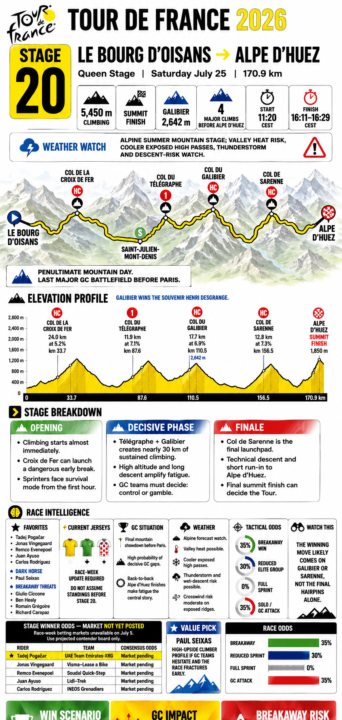
Tour de France Race View
I used the ChatGPT race planner we built and turned it on the Tour de France! All you have to do is plug it in and point it at a stage to get the full breakdown of what to expect! Check it out! https://www.skool.com/athlete-ai-community/classroom/c89bd042?md=602e30470a7842e392675bcd166648a6
2d •
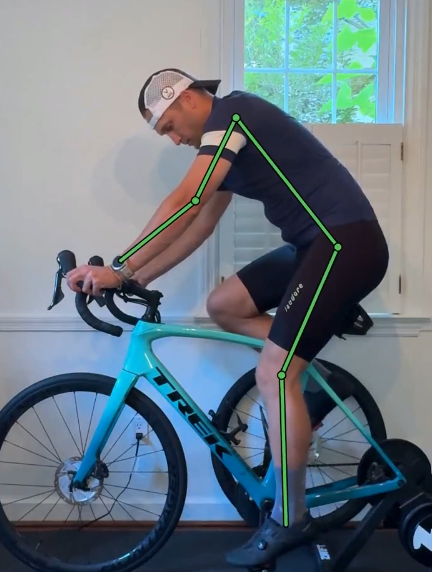
Claude + Roboflow = Bike Fit Analyzer
I've been diving deeper into the latest vision models and the tech coming out is actually next level. This weekend I was playing around with getting an optimized bike fit. Using these two GitHub repos, I figured Claude could prob do it lol: https://github.com/roboflow/supervision https://github.com/ultralytics/ultralytics They tracks every joint, draw a colored skeleton on the video (green = dialed, red = fix), and tell you the exact change. Two things were off for me: saddle a touch high, and my cockpit was way too closed - all my weight on my hands. That's the numb wrists. Dropped the saddle 6mm, opened my reach, filmed it 2 more times. All green in about 20 min. Full guide and prompt here: https://www.skool.com/athlete-ai-community/classroom/c89bd042?md=305a8587020041bab91475f3db26f8e3 Drop your before and after in the comments. Research and a starting point, not a pro fit. But it beats guessing. I am going to do one of these too for running, let me know if anyone is interested in anything else!
2
0
1-14 of 14
skool.com/athlete-ai-community
For athletes & coaches curious about AI, who want to learn & build their own tools. No code. Come learn, build & connect. Start FREE 7 Day Challenge!
Leaderboard (30-day)
1
+24
2
+17
3
+13
4
+7
5

+6
Powered by