

Jun '25 •
Facebook and instagram
I’m exploring ways to enhance our chatbot’s reach for clients. Currently, we’d love the ability to connect chatbots directly to clients’ Facebook and Instagram Business accounts (with their permission, of course). This would allow us to: - Automate messaging replies via the chatbot. - Sync leads from Meta platforms to our AskSpot workflows. Is this type of direct API integration on your roadmap? I couldn't see a way to do this. I'm currently still on the free trial. If not, could we discuss workarounds (e.g., Zapier/webhooks)
Jan 13 •
Flow Builder
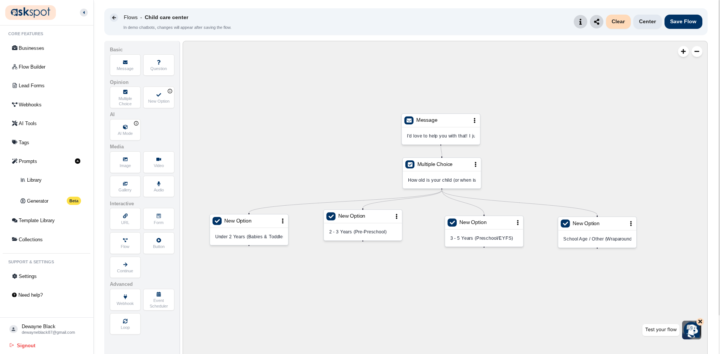
Can i not add a Question block after this flow? i'm trying to ask another/same question regardless of what option the user picks. but an error comes up saying.....This node already has a parent. Cannot create multiple connections to the same node.

Dec '25 •
API Endpoint for Selective Chat Data Retrieval
Hi AskSpot Team, I'm integrating AskSpot with external systems and currently rely on webhooks. The webhook delivers the entire conversation payload, which can be quite large, especially for estimation workflows. Is there (or will there be): - A REST API endpoint to fetch a chat session by ID - Ability to request only specific fields or variables (e.g., final estimate, user selections) - A way to define a schema for the exact data points we want returned - Support for partial exports instead of full conversation transcripts This functionality would be extremely valuable for storing structured outputs in databases or other systems without unnecessary overhead. Any guidance or roadmap details would be greatly appreciated. Thanks! Chandrakanth Udari

Dec '25 •
Longer text for training?
I'm setting up an AskSpot for a new prospect, and found a couple of YT vids where she's being interviewed, One is an hour long, and the other is nearly 2 hours long. I tried to copy the transcript and paste it into AskSpot but it stopped after 10-11 minutes. Video interviews are packed with interesting info, and it seems they'd be great to use for training. Has this limitation come up before? If you could split them into 5-10 min chunks and load them up separately, but would the AI understand that they're all related? I have posted some quite lengthy video transcripts on both ChatGPT as well as Claude, and they have no problem working with them.
1-30 of 69

skool.com/askspot
Join the AskSpot Community to connect, learn, and grow! Get the latest updates, expert tips, training videos, and support from fellow users.
Powered by