Activity
Mon
Wed
Fri
Sun
Aug
Sep
Oct
Nov
Dec
Jan
Feb
Mar
Apr
May
Jun
Jul
What is this?
Less
More
Memberships
Local Newsletter Launchpad
1.5k members • Free
Jeff Herschy
116 members • Free
Affiliating
761 members • Free
AI Decoded
515 members • Free
AI Agency Starter Kit
3.4k members • Free
The Next Level
2.3k members • Free
The Vibe Code
422 members • Free
AskSpot.ai User Community
345 members • Free
AI Automation Agency Hub
328.4k members • Free
8 contributions to AskSpot.ai User Community

Mar 19 •
🚨 Live Help Session: Law Firm Consultation Assistant (Spotlight)
Hey AskSpot community! In this session, we built a Law Firm Consultation Assistant using Spotlight — a smart AI tool designed to guide potential clients through a structured intake before they even speak to a lawyer. Instead of sending users to static pages, this assistant walks them through their situation, asks the right questions, and organizes key details — helping law firms receive more qualified, complete inquiries from the start. We also added multiple interaction paths like free case evaluation, legal education, and consultation booking — giving users flexibility while improving lead quality and engagement. Here’s what we covered: • 01:39 – Intro to Office Hours and session overview • 02:17 – Use case and goals of the legal consultation assistant • 04:00 – Building the Spotlight and setting up branding • 09:23 – AI prompt structure and assistant behavior • 12:49 – Creating channels (evaluation, legal rights, consultation form) Check the comments for your duplicate link. Questions? Drop them here or email support@askspot.ai

0 likes • Mar 21
@Kimberly Amio I got stuck at the place where you were adding in the Channels... In the video you show selecting a pre-created lead form (from the Lead Forms on the left). Do we simply create a lead form based on what you show and if so is the Optin version or Chat version? That part is a bit unclear as your video shows selecting from a bunch of premade forms. Many thnx! 🙏
0 likes • Mar 23
@Kimberly Amio Thanks for the info! I'm working with a local real estate Canadian law firm that specializes in real estate law, conveyancing, probate, wills/estates. I've got it built and have sent it to the firm for their thoughts. I made the contact form pretty simple (see below) w/Name, Email, Phone, Date/Time preferred and a text area for a quick overview of what issue they are having.

Jan 9 •
Couldn’t Make a Live Help Session? We've Got You Covered
Hey folks! We know it’s not always easy to make the live calls, and that’s totally okay. We’ve put together a simple doc with all the past session topics + import links so you can catch up anytime and start using the templates in your own bots: 👉 Live Help Sessions – Topics & Import Links Hope this makes things a little easier. And if you try any of them out (or put your own spin on one), we’d love to see it, feel free to share in the comments 💬

1 like • Feb 9
This is perfect... I keep missing out on the excellent training and "build" sessions that I really would like to participate in! THANKS! 🙏👍

Jun '25 •
Spotlight Use Case Idea: The "Instant Expert" Kiosk
Let's talk about using the Spotlight feature for something completely different something that happens right inside your client's physical business. I'm calling it the AI "Instant Expert" Kiosk. Okay, picture this... Your client runs a local garden center. It's a sunny Saturday, and the place is packed. A customer is standing in an aisle, holding two different bags of fertilizer, looking totally confused. Meanwhile, the only available employee the one who's a total plant guru is way across the nursery, helping someone load a giant ficus tree into their minivan. The confused customer can't get a simple question answered. So, they just grab the cheaper bag and hope for the best, or worse, they leave empty-handed. Now, what if you could CLONE that plant guru? With Spotlight, you can. Here’s the "magic trick" you can set up for them: 1. You grab all the expert knowledge. You sit down with the owner for 15 minutes. "What are your top 20 most asked questions? Let's get the real answers for how much sun a hydrangea needs, which soil is best for tomatoes, and if a lily is safe for cats." 2.You create a new Spotlight page. You feed all that expert info into the AI in the "Sources" tab. You're basically teaching the AI to think like their best gardener. 1. You create a simple QR code. Then you tell your client, "Let's put small signs in each aisle that say: 'Have Plant Questions? Ask Our AI Expert!'" That's it. That's the whole "kiosk." Now, that customer holding the two bags of fertilizer scans the code. They land on the Spotlight page and just start asking questions: - "What's the difference between these two fertilizers?" - "I have a shady backyard, what flowers can I plant?" - "Is this plant safe for my dog?" The AI gives them perfect, detailed answers instantly. Why Your Client Will Go Nuts For This: - Their team can finally focus. The AI handles the endless stream of questions, so the human staff can focus on bigger sales and customer checkouts. - It helps them sell more! The AI can explain why the premium, organic soil is a better choice. It educates customers to make better buying decisions, which often means bigger sales. - It's a total "WOW" moment. It makes a local garden center feel like a high-tech Epcot exhibit. It's fun for customers and shows the business is modern and helpful.

0 likes • Aug '25
Another EXCELLENT Spotlight use... THANKS!👍
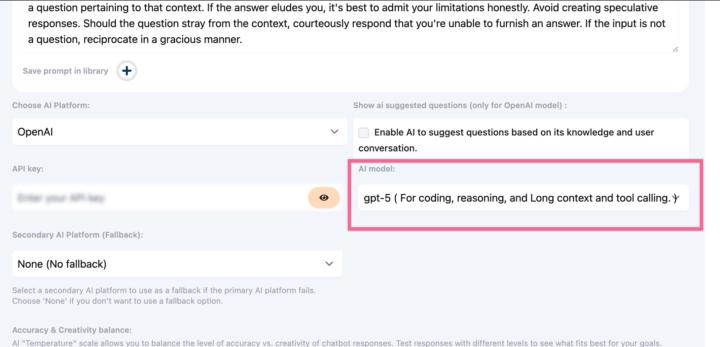
1 like • Aug '25
@Carla McNeil Love it!!🤩👏👍
1 like • Aug '25
👏🙏
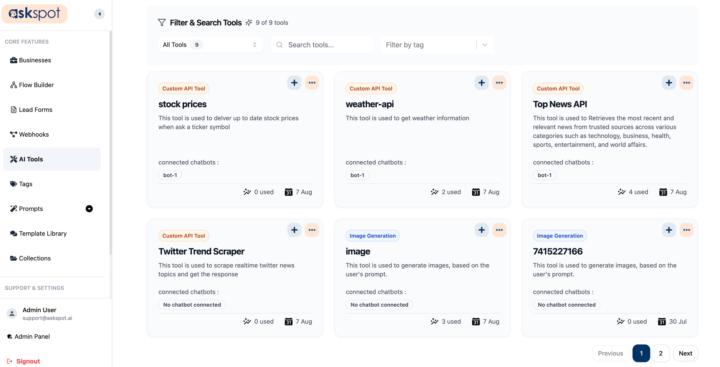
0 likes • Aug '25
Wow... this is turning into a powerhouse!! Thanks guys! 🙏👏
1-8 of 8

@daryl-austman-9727
Owner of Greymouse Services since 1998, providing local businesses on the Sunshine Coast, BC w/Web Design, GBP, SEO, & Social/Digital Marketing.
Active 16m ago
Joined Jun 20, 2025
Gibsons, BC, Canada
Powered by