

🔥
3d •
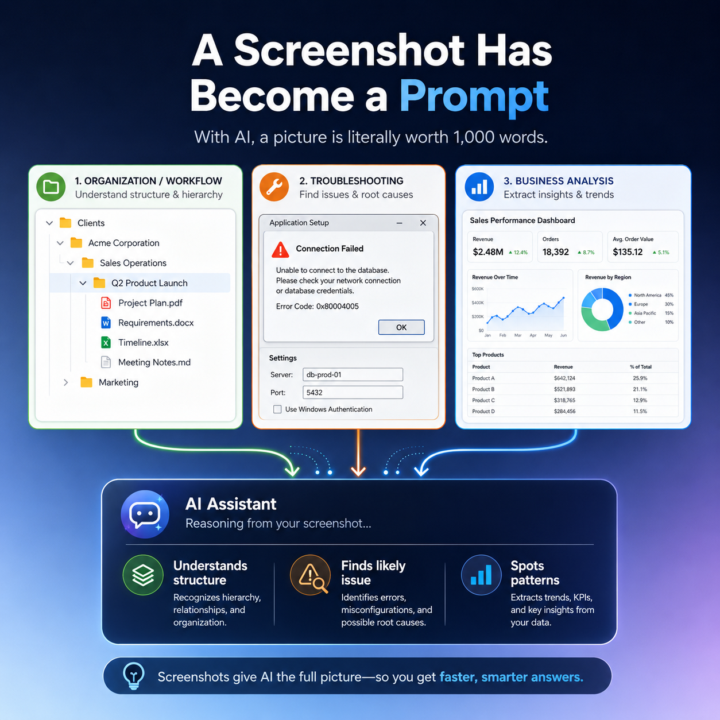
🖼️ With AI, a Picture Is Literally Worth a 1,000 Word Prompt
"A picture is worth a thousand words." That phrase has always been true, but with today’s LLMs it is starting to take on a much more practical meaning. One of the quiet advances in AI is not just better writing, coding, or summarization. It is image recognition and, more importantly, image understanding. I have noticed this in my own workflow. In the past, when I wanted Claude or ChatGPT to understand what I was looking at on my screen, I would usually describe it first. I would explain the structure, the problem, or the context, and then I would paste the screenshot to support what I had already written. Now I often skip that step entirely. I just paste the image and go. And the AI gets it. That is a bigger shift than it sounds. The improvement is not simply that the model can read text inside an image. It is that it can often understand what the image is doing, why it matters, and how it connects to the broader conversation. In other words, the image itself has become usable context. I ran into this recently while organizing my directory structure for a new project. I needed to update Claude on changes I had made, and instead of describing the folder structure, I simply pasted the screenshot into the chat. Claude immediately responded: “That's a clean hierarchy: client → business area → project. Every future engagement follows the same pattern.” That response stood out to me because Claude did more than recognize folder names. It understood the hierarchy. It understood the logic behind the structure. It understood the intent of the organization. And it connected that image to the ongoing context of the conversation without me needing to explain much at all. This is starting to change how I work with LLMs, and I think it has broader implications for a lot of people using AI in practical ways. A screenshot is no longer just supporting material. In many cases, it is now the prompt. Example 1: A very useful example is organizational or workflow context, like the file folder case. Instead of describing a folder structure, a software layout, or a system you are building, you can often just show it. The AI can quickly interpret the structure, identify patterns, and give feedback on what is organized well, what may be unclear, and what the next step should be.
🔥
14d •
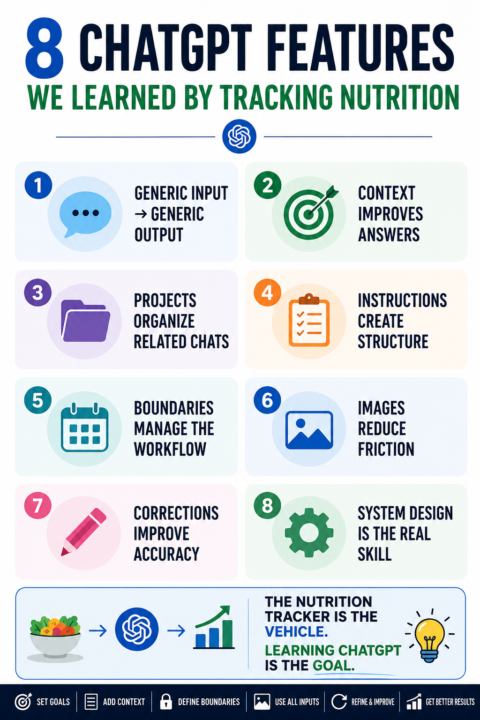
🔥 8 ChatGPT Key Features & Concepts We Learned by Tracking Nutrition
So far, this simple tracker has taught us a lot about how LLMs actually work in daily use. Here are the 8 features used when tracking nutrition in ChatGPT (or any LLM). 🔥🔥 1️⃣ Generic chats produce generic answers Nutrition Tracker Feature: - Basic food and activity logging ChatGPT Capability: - General reasoning from limited context Why? When I first entered a day’s food and activity, ChatGPT could estimate calories and macros, but it did not know my goal, calorie target, BMR, or protein target. Benefit: This shifts your thinking from “How do I write a better prompt?” to “What information is ChatGPT missing?” 🔥🔥 2️⃣ Context changes everything Nutrition Tracker Feature: - Goal tracking, BMR, calorie target, protein target ChatGPT Capability: - Context-aware response generation Why? Once ChatGPT knew my goals and targets, the same food log produced much more useful feedback. Benefit: Better context often improves output more than writing a better prompt. 🔥 🔥 3️⃣ Projects create a context folder across chats Nutrition Tracker Feature: - Dedicated Nutrition Tracker Project ChatGPT Feature: - Projects Why? A Project gives related chats, instructions, files, and ongoing work a shared place to live. Think of it as a context folder for a specific topic or workflow. Benefit: Better continuity, less repetition, and more useful outputs over time. 🔥🔥 4️⃣ Project Instructions create structure Nutrition Tracker Feature: - BMR rules, macro tracking, summary format ChatGPT Feature: - Project Instructions Why? Instructions define the operating rules for the Project. Benefit: More consistent outputs, better alignment with your goals, and less time repeating yourself. 🔥🔥 5️⃣ LLMs need boundaries Nutrition Tracker Feature: - DAY START and DAY LOCK ChatGPT Capability: - State management through defined boundaries Why? LLMs read a stream of messages but do not automatically know what belongs together.
🔥
13d •
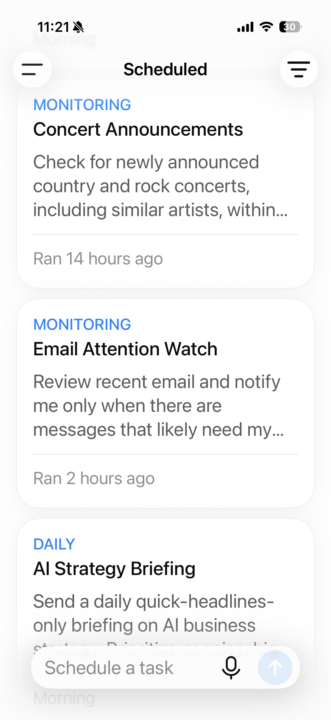
📦 Out of The Box in 30: ChatGPT Scheduled Tasks
Welcome to the Out of The Box Series, where I test how far curiosity and AI can take you in 30, 60, or 90 minutes using today’s best no-code and low-code tools. No setup. No training. Just pure exploration, right out of the box. 🎬 This Episode: ChatGPT Scheduled Tasks ChatGPT now has a Scheduled feature, and I wanted to see how practical it really is for everyday work. Not a complex automation build. Not a workflow platform. Not a technical setup. Just simple reminders, recurring tasks, research requests, and monitoring activities created in plain English. The result? ✅ ChatGPT finally makes basic automation feel easy enough for everyday use. 🧪 The Challenge Can ChatGPT help you create useful scheduled tasks and reminders without code, workflow builders, triggers, or integrations? That was the test. ⏱️ The 2-Minute Playbook (Literally) 1. Open ChatGPT 2. Select Scheduled from the menu 3. Describe what you want ChatGPT to do and when 4. Set the timing 5. Save Each scheduled task runs automatically and places the result in your “Recent” chats for review. 📋 Example Scheduled Tasks “Every morning at 8:00 AM, send me a summary of the top AI business news.” “Remind me every weekday at 7:30 AM to write my AI Bits & Pieces post.” “Every Friday at 4:00 PM, remind me to review my sales pipeline.” “Watch for new AI strategy jobs paying over X dollars and notify me when one appears.” 💡 Bits & Pieces Pro Tips Start simple. Do not try to build a full automation system on day one. Start with one useful reminder or recurring task. Be specific. Instead of saying, send me news. Try, “Every morning at 8:00 AM, send me the top 5 AI business news stories with one sentence on why each matters.” Use it for things you already forget or tend to procrastinate. Sales follow-ups. Weekly reviews. Content reminders. Market updates.Research checks. That is where Scheduled becomes useful fast. ✅ Out of The Box Takeaway Awesome feature with one catch. You are limited to five scheduled tasks or reminders. 😣
🔥
15d •
📸 Nutrition Tracker Part 5: Using Images to Make Tracking Easier
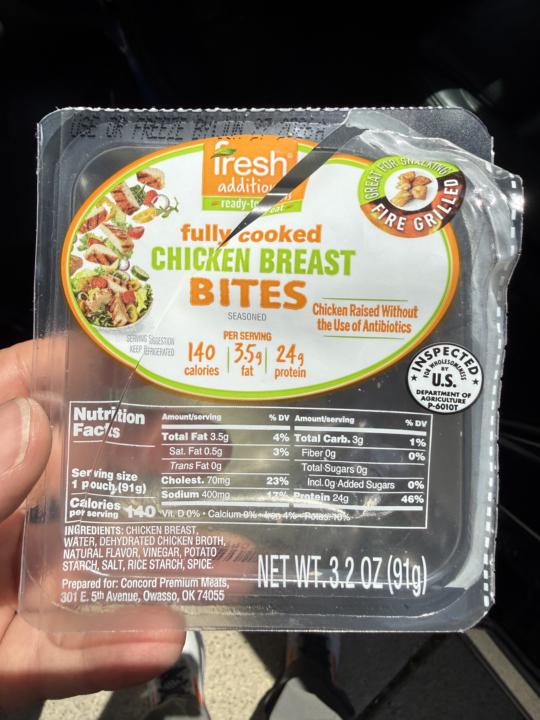
One of the biggest changes in ChatGPT is that it is no longer limited to text. You can upload an image, and ChatGPT can read, interpret, and reason about what is in the picture. That matters because real life does not always come neatly typed out. Food comes on plates. Nutrition facts come on labels. Products come in wrappers. Restaurants meals come with sauces, sides, and unknown portions. This is where image understanding becomes useful. At a simple level, ChatGPT can look at an image, identify visual patterns, read text when available, and combine that with general knowledge to make an estimate. For my nutrition tracker, that means I can upload: - A picture of a meal - A nutrition label - A protein bar wrapper - The front of a box - A restaurant plate - A drink label If I upload a nutrition label, it can usually pull out the calories, protein, carbs, fat, fiber, and serving size. If I upload a food photo, it can estimate what is on the plate and give me a starting point. Is it perfect? It is impressively accurate, especially ChatGPT. However, understanding food weight or size is hit or miss. And that is important. A photo is not the same thing as weighing food on a scale. ChatGPT may not know whether a piece of chicken is 120g or 200g. It may not know how much butter was used, how much oil was absorbed, or how much sauce is under the food. So I treat photos as a fast data entry tool, not final truth, especially at restaurants. Restaurant meals are harder because portions, sauces, oils, and cooking methods are not always obvious from a picture. However, it is better than guessing - for me. But the photo still gives ChatGPT a very good starting point. Obviously, if I have a nutrition label, that usually works much better because ChatGPT can read the actual calories, protein, carbs, fat, fiber, and serving size from the label. So the rule is simple: - Photos are great for fast estimates. - Labels are better for precision.Corrections make the tracker useful.
🔥
17d •
📊 Nutrition Tracker Part 4: Clearing Up Misunderstanding (My Bad 🙃)
Ok, I am getting lots of questions on the ChatGPT nutrition tracker, so I want to clarify the platform and intention of the series. First, I may have confused some members by using the word "dashboard". That’s on me. When I say dashboard, I do not mean I built a custom software app in Claude Code. I did not. It is just a prompt I use inside ChatGPT to create a daily graphic snapshot with the output I want to see. By using the word "dashboard", I confused some members, and understandably they thought I had built something more technical around it. I have not. However, I am tracking my daily nutrition in ChatGPT and sharing it for three very specific reasons: 1. To share how I am actually using ChatGPT to track my nutritional habits. 2. To help teach the practical capabilities and limitations of ChatGPT in a real-world use case, including projects, project instructions, context, memory, images, prompts, and daily workflows, and more. 3. And this is the big one for me. I want to personally experience how ChatGPT and LLM technology are improving over time, especially around context, memory, repeated use, and structured outputs. For me, the nutrition tracker is not just about counting calories. It is a practical way to interact with ChatGPT every day around something that matters to me personally. That daily interaction helps me build an intuitive feel for what works, what does not, where the model is improving, and where it still needs clear instructions and boundaries. So when I share this, I am not saying: > Look at this app I built. I am saying: > Here is a simple, practical way I am using ChatGPT in everyday life, and here is what it is teaching me about AI. That leads to the bigger question a member asked, which is a good one: "Do you log it each day? And how do you carry forward session context if you're using ChatGPT? That’s fantastic you're hitting your fitness goals!" Yes, I log it each day. And the way I carry context forward is by using a dedicated ChatGPT Project with specific instructions, repeated daily logging, and simple boundaries like DAY START and DAY LOCK.
1-30 of 43
skool.com/ai-bits-and-pieces
AI lessons you can read in under 3 minutes and apply in everyday work and life.
Leaderboard (30-day)
1

+102
2

+46
3

🔥
+38
4

+22
5

+21
Powered by