
Pinned

💎
⭐
17h •
🚀New Video: I Tried 100+ Claude Code Skills. These 6 Are The Best.
After 400 hours in Claude Code, I noticed that businesses keep paying for the same six types of skills. In this video, I break down each one, what it does, and why these simple, boring skills are the ones that actually sell. Whether you're brand new to AI automations or already building for clients, these are the skills worth learning first.
Pinned
💎
⭐
3d •
🚀New Video: Build & Sell Claude Code Operating Systems (2+ Hour Course)
This is the full walkthrough of how I build my AI Operating System inside Claude Code, from the frameworks I use to think about it (the Three Ms and the Four Cs) to the actual setup, connections, skills, and routines that run while I sleep. By the end you'll know exactly how to set up your own AIOS, even if you've never opened Claude Code before. The full template, docs, and resources are free in my school community linked below. GITHUB REPO
Pinned

🔥
2d •
🏆 Community Wins Recap | Apr 25 – May 1
From AI roles and first clients to live receptionist systems and enterprise training deals - this week inside AIS+ showed what happens when builders stop watching and start executing. 🚀 Standout Wins of the Week inside AIS+ 👉 @Griffin Maklansky went from being laid off to landing an AI Workflow Builder role in just 1 month. 👉 @Ahmed Bin Faisal landed another $2,000 USD client — an interior design firm — and broke down exactly what led to the close 👉 @Narsis Amin built a working AI restaurant receptionist handling bookings, availability, and CRM logging end-to-end. 👉 @Josh Holladay closed a $4.5K (+$1K) client with half up front today — and dropped his top 10 lessons from the close 👉 @Dion Wang received his first official testimonial, validating real client impact and around 40 hours/month saved. 🎥 Super Win Spotlight | @Duy Nguyen Duy started as an engineer who was curious about AI — but unsure how to turn that curiosity into something real. After joining AIS+, he went from learning passively to building his own AI-operated business, Sharper Automations. Since then, he has: • Built a 24-agent AI business operating system • Landed 2 local paying clients through word-of-mouth • Created a system that improves itself weekly through feedback loops • Started moving toward his goal of leaving his corporate job His biggest shift? From “Can I really do this?” → to building a real business around AI automation.


2d •
I cloned a full SaaS frontend in under 10 minutes.
No Figma. No dev handoff. Just Claude. --- 𝗧𝗛𝗘 𝗣𝗥𝗢𝗕𝗟𝗘𝗠 Replicating a polished UI used to take days. Inspect element. Screenshot every section. Brief a designer. Wait. Founders without dev resources just... gave up. --- 𝗧𝗛𝗘 𝗦𝗛𝗜𝗙𝗧 UI cloning is no longer a coding task. It's a prompt-engineering task. --- 𝗛𝗢𝗪 𝗜 𝗗𝗜𝗗 𝗜𝗧 → Open a fresh Claude session. Paste the target URL. → Drop in one screenshot of the sidebar for navigation context. → Ask Claude Opus 4.7 to decompose the full layout into detailed section-by-section prompts. → Wait 4-5 minutes. It returns a complete prompt blueprint. → Paste that blueprint into Claude Design. Answer its clarifying questions. → Watch a functional frontend appear. Total active work: under 10 minutes. --- 𝗧𝗛𝗘 𝗥𝗘𝗦𝗨𝗟𝗧 I cloned app.gojiberry.ai front-to-back. 5 minutes of active input. Zero lines of manual code.


13d •
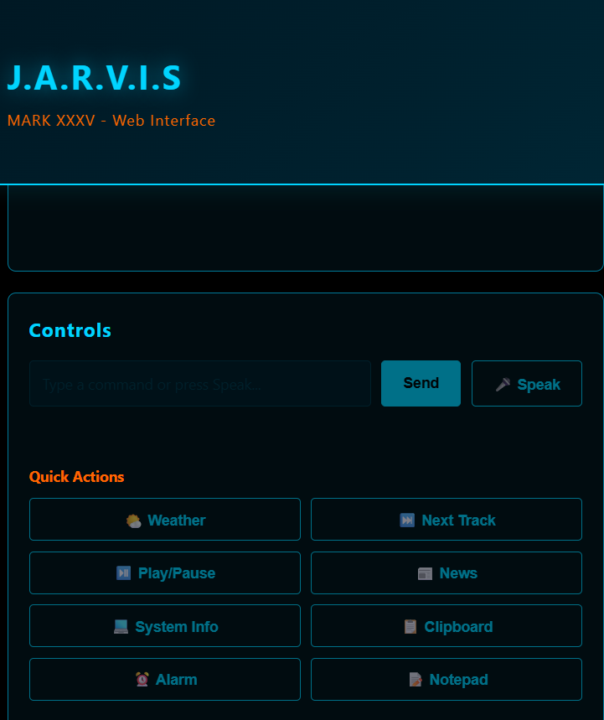
Day 3 — JARVIS just got a serious upgrade.
I thought Day 2 was good. Day 3 is different. I spent today adding real-world actions. Not just "answer a question" stuff. Actually useful commands I use daily. What JARVIS can now do: 🖥️ "How much Api token are left ?" — pulls live system info instantly 🎵 "Play next song" — skips the track without touching my keyboard ⏰ "Set alarm for tommorow 6 AM with news" — fires with a beep, no phone needed 📸 "Capture my screen" — saves screenshot directly to my desktop 📋 "Write to clipboard / show clipboard" — full copy-paste control remotely 📧 "Send email to..." — composing and sending, just by commanding it 🖥️" Create me a sample website" - Making a locally hosted live website All of this. From my phone. While away from my desk. The interface now has quick-action buttons for the most used commands so I don't even have to type — one tap and it executes. This is starting to feel less like a project and more like an actual assistant. Day 1 — had an idea Day 2 — deployed it live Day 3 — it's doing things my laptop can't even do without me touching it Still a long way from the movie. But getting closer every day. Which of these would you use the most? Drop it below! 👇
1-30 of 16,290

skool.com/ai-automation-society
Learn to get paid for AI solutions, regardless of your background.
Leaderboard (30-day)
1

+5818
2

🔥
+4442
3

+3961
4

+2295
5

+888
Powered by