
Pinned

💎
⭐
18h •
🚀New Video: I Tested Every Claude Code Feature, These 12 Are the Best
I've spent over 500 hours inside Claude's ecosystem, so I ranked every feature from D tier all the way up to S tier based on how much each one actually changes my day-to-day knowledge work and automation. Then I walk through my top 12 in order and explain exactly why each one earned its spot. Keep in mind I'm doing a lot of automation and knowledge work, not heavy software engineering, so you'll probably disagree with some of my placements. That's the point, you value these features differently based on how you use Claude Code.
Pinned

🔥
6d •
🏆 Weekly Wins Recap | May 23 – May 29
From $64K+ in closed deals to first paid projects, first workflows, and first technical builds - this week inside AIS+ showed what happens when builders stop consuming and start moving. Some wins were big money. Some were first steps. Both matter. 🚀 Standout Wins of the Week inside AIS+ 👉 @Jacob West closed two deals in one week — a $22.5K custom software build for a local gym and a $42K AI OS rollout for a mid-market energy business. 👉 @Luca Giovinazzo delivered his first full client project live — 11 n8n workflows, CRM, Telegram bot, inventory alerts, booking system, KPI tracking, user guide, and Loom walkthrough. 👉 @Fadwa Naboulssi landed her first client three weeks into the community — a candidate sourcing workflow on a $150-per-successful-hire commission. 👉 @George Maitland completed his first technical build using Claude Code + n8n MCP — a local content engine with Telegram as the command center. 👉 @James O Neill built a free portfolio site for a friend-of-a-friend’s side hustle… and she insisted on paying anyway. First real money landed. ⸻ 🎥 Super Win Spotlight | @Josh Holladay Josh joined AIS+ because he wanted more than scattered learning. He wanted momentum. Focused content. Better access. And a room full of people actually moving. Since joining, he has: - Closed real client work - Built stronger confidence around pricing and value - Used the portfolio course to get clear on where he was and what needed to happen next - Learned how to turn client conversations into real business opportunities - Found a place to celebrate wins with people who actually understand the journey

Pinned
💎
⭐
17h •
What do you get if you upgrade to AIS+?
Some of you have never heard of the AIS+ community. Others have but the part that trips you up is the actual difference between the two. Either way, this post will give you clarity. This free group is a bundle of quick resources pulled from my YouTube videos, plus a massive open community that anyone can join. It's a great place to get your bearings and see what's possible. But it's open to everyone, it can be noisy and overwhelming, and there's no path through it. You can get help from other members, but I rarely answer questions here. AIS+ is the opposite: - A step by step roadmap with a clear order, so you're never guessing what to do next - A much smaller community of people who are seriously committed to building and selling AI agents - I answer questions every day and run a weekly Q&A call where you can get direct access to me For the course material: The roadmap takes you from zero to building and selling AI agents, and the whole thing is built on the latest tech like Claude Code and Codex. We update it constantly. The old n8n material has been archived. It's still there if you want it, but it's no longer the focus, because the way you build today has moved on and the courses moved with it. Here's the actual roadmap inside, in order, with when each piece opens up: 1. Start Here (opens the moment you join). Gets you oriented. How the community works, the path ahead, and how to get help when you need it. 2. Build Your Portfolio (opens the moment you join). Why a portfolio matters, beginner level tutorials, and what types of projects to focus on. You end up with real work you can show a client. 3. Claude Code (opens the moment you join). This is now its own dedicated course. Build faster, turn ideas into working automations, and go deep on the tool serious builders are using right now. This takes you from beginner to advanced, step-by-step. 4. Get Your First Clients (opens after 30 days). Getting your first clients is hard, because you don’t have any case studies yet. So, we analyzed all of the success stories from our members and found they get their initial clients with two different techniques: warm outreach and Upwork. So, we teach both techniques in detail with exactly what to say, exactly how to position yourself when you have no proof.
💎
⭐
Mar 24 •
🚀New Video: STOP Using Bypass Permissions, Use This New Feature Instead
Claude Code just released auto mode, a new permission setting that sits between "ask before every edit" and "dangerously skip permissions." Instead of stopping your workflow every few seconds or giving Claude free rein to do anything, auto mode uses a classifier to check each action for risk before executing it. Safe actions run automatically, risky ones get flagged. In this video I break down how it works, test it with some real examples, and show you how to turn it on.

1m •
#7dayAISChallenge - Day 3 ✅
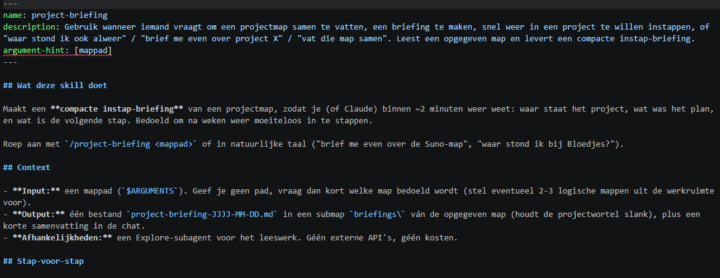
Built two skills: /project-briefing and /klant-intake-dossier So for Day 3 I went a bit further than one skill. Instead of writing a skill by hand, I used the skill-builder skill to interview me first (goal, trigger, steps, inputs/outputs, guardrails) and then build it. Building a skill with a skill — that clicked for me. The first one, /project-briefing, summarizes any project folder into a 2-minute "get back in" briefing (goal, status, open points, next step). A sub-agent does the reading so my main chat stays clean. The second one is the one I'm actually excited about: /klant-intake-dossier. It combines a skill with web scraping (Firecrawl). I give it a company name or URL, it scrapes the public website + socials, and returns a client intake dossier — including which of my services fits each opportunity. As a Business Support Partner that means I walk into a client conversation properly prepared, every time. The biggest lesson wasn't the building, it was the iterating: run it, watch where it's slow or wrong, give feedback, run again. And understanding where a skill lives — global (works everywhere) vs project-level (only in that project) vs just stored in a library. Both skills are now live globally. Process first, then AI. 😉
0
0
1-30 of 18,358

skool.com/ai-automation-society
Learn to get paid for AI solutions, regardless of your background.
Leaderboard (30-day)
1

🔥
+7584
2

🔥
+4971
3

🔥
+3563
4

+2862
5

+1464
Powered by