
Pinned

💎
⭐
2d •
🚀New Video: STOP Fixing n8n Workflows. Let Claude Code Do It.
In this video, I show you how I built a self-healing automation system using n8n and Claude Code. Whenever one of my n8n workflows throws an error, it automatically triggers an error workflow that calls Claude Code. Claude then uses its n8n MCP server to audit the broken workflow, understand what went wrong, and fix it, all without any manual intervention. I just get a notification that the error was caught and resolved. The next time the workflow runs, it works perfectly because Claude already patched it. It's like having an AI engineer on call 24/7 to maintain your automations.
Pinned
💎
⭐
4d •
Want to get featured in front of 500,000+ people?
If you've sold an AI automation to a client, any tool, any industry, I want to hear about it. I'm collecting case studies to break down on the channel. This is your chance to build authority, get your brand out there, and showcase what you've built. 🎁 Bonus: I'll be analyzing all submissions and sharing the trends with you: what's selling, which industries are buying, and where the opportunities are. So even if you don't get featured, you'll benefit from the data. 👉 Fill it out HERE Takes 5 minutes. You can submit multiple projects.

Pinned

🔥
20h •
🏆 Weekly Wins Recap | Jan 17 – Jan 23
This week inside AIS+ was a reminder of what happens when clarity meets action. From massive client deals to first builds and mindset shifts, members kept stacking real progress - not theory. Here are a few standout wins 👇 👉 @David Kim closed a $385K contract with $25K upfront and a 76% profit margin - a masterclass in value-driven execution. 👉 @Rishi Raj delivered his first paid client project, shipping a complete learning platform end-to-end. 👉 @Krishna A built a lead-tracking automation using n8n + Supabase, then followed it up with his own Voice AI agent in just 3 hours. 👉 @Anthony Caspari saved a client 3+ hours with a small but powerful filtering automation - proof that tiny builds can create outsized value. 👉 @Tetsuo Koyama earned “New & Popular” on Udemy with his Dify × n8n course - global impact unlocked. 🎥 Super Win Spotlight: @Patrick Siewert | From Learning to Real Momentum Patrick joined AIS+ to strengthen his automation skills and learn how to build real-world value around them. Since joining, he’s shipped multiple personal automations, streamlined his LinkedIn content workflow, launched a newsletter and recently started a lead-gen MVP that already landed a client. 🎥 Watch Patrick share his journey 👇 Patrick’s story is a great reminder: consistent building + an active community accelerates progress faster than learning alone. ✨ Want to see wins like this every single week? Join AI Automation Society Plus and start turning learning into real builds, real clients, and real confidence 🚀


1m •
What Is the Most Expensive Thing an AI Audit Can Miss?
The most expensive thing an AI Audit can miss is not bias, drift, or technical debt. It is false confidence.When teams believe an AI system is “under control,” they stop paying attention. Signals get ignored, exceptions get normalized, and early warnings are reframed as noise. The system does not fail loudly. It degrades quietly, until the cost is no longer reversible. Many audits focus on identifying risks. Fewer audits examine how quickly organizations stop seeing them. Overconfidence is rarely written down, yet it shapes every decision around monitoring, escalation, and investment. Once confidence hardens, learning slows. For AI Transformation Partners, the real work is not risk enumeration. It is keeping uncertainty alive where certainty feels convenient. An AI Audit that does not actively reduce false confidence may look successful, but it leaves the organization more exposed than before.
1
0

9h •
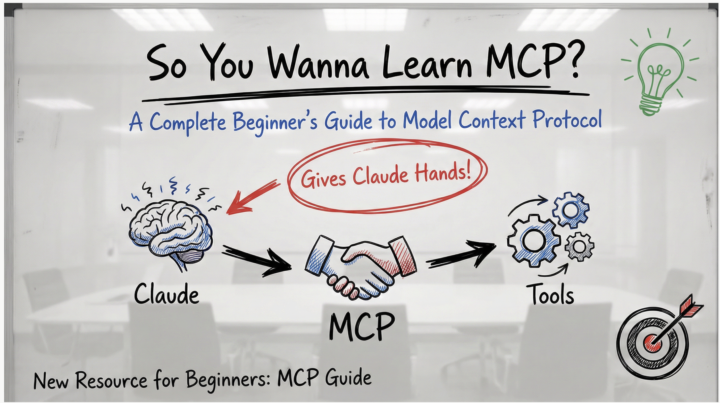
🚀 New Resource: So You Wanna Learn MCP?
Hey everyone! 👋 I just put together a complete beginner's guide to MCP (Model Context Protocol) - the new system that lets Claude actually connect to your tools and do real work. What's MCP? Think of Claude as having a really smart brain but no hands. MCP gives Claude those hands - letting it read your Gmail, work with GitHub, access Notion, search the web, organize your files, and connect to hundreds of other tools. The best part? Someone builds one MCP server and it works with Claude, Cursor, Cline, Windsurf, and any other AI app that supports MCP. No more reinventing the wheel. What's in the Guide? ✅ Visual explanations (diagrams, flow charts, analogies) ✅ Zero technical jargon - plain English throughout ✅ Step-by-step setup walkthrough (takes ~20 minutes) ✅ Hands-on tests to verify it's working ✅ Security tips for evaluating MCP servers ✅ 5 practical exercises to try immediately ✅ Troubleshooting guide Goal: Get you from "What is MCP?" to having your first server running in under 20 minutes. Pro Tips from the Community 🔥 Don't install 100 MCP servers at once! (h/t [Name if you have one]) Start with 2-3 that you'll actually use. Too many servers: - Bloat your context window - Slow down Claude's response time - Make it harder to figure out what's not working - Create unnecessary complexity Start simple. Add more as you need them. What to Try First? The guide walks you through setting up the filesystem MCP server - it's the easiest to configure and immediately useful: - Organize files - Batch rename - Create project structures - Search and analyze your documents Once that's working, expand to tools you actually use daily (GitHub, Slack, Notion, etc.) Let's Learn Together 🤝 This community thrives on sharing knowledge, so: ✨ Try the guide - Follow along and get one MCP server running 💬 Share your results - What worked? What was confusing? 🆘 Ask questions - No question is too basic. We all started here. 🧠 Share your tips - If you've used MCPs, drop your learnings below!
1-30 of 12,463

skool.com/ai-automation-society
A community built to master no-code AI automations. Join to learn, discuss, and build the systems that will shape the future of work.
Leaderboard (30-day)
1

+12252
2

🔥
+7534
3

+4054
4

🔥
+2848
5

+2700
Powered by