
Pinned

💎
⭐
4h •
🚀New Video: Building Realistic Voice Agents Has Never Been Easier
Voice agents used to mean clicking through ElevenLabs dashboards and wiring up API endpoints by hand. In this one I built a working voice agent for a website that captures leads and books discovery calls through cal.com, all by describing it in plain English to Claude Code. You'll see the full build, the bugs I hit along the way, and how I debugged them without ever touching the docs.
Pinned
💎
⭐
1d •
🚀New Video: I Tried 100+ Claude Code Skills. These 6 Are The Best.
After 400 hours in Claude Code, I noticed that businesses keep paying for the same six types of skills. In this video, I break down each one, what it does, and why these simple, boring skills are the ones that actually sell. Whether you're brand new to AI automations or already building for clients, these are the skills worth learning first.
Pinned

🔥
3d •
🏆 Community Wins Recap | Apr 25 – May 1
From AI roles and first clients to live receptionist systems and enterprise training deals - this week inside AIS+ showed what happens when builders stop watching and start executing. 🚀 Standout Wins of the Week inside AIS+ 👉 @Griffin Maklansky went from being laid off to landing an AI Workflow Builder role in just 1 month. 👉 @Ahmed Bin Faisal landed another $2,000 USD client — an interior design firm — and broke down exactly what led to the close 👉 @Narsis Amin built a working AI restaurant receptionist handling bookings, availability, and CRM logging end-to-end. 👉 @Josh Holladay closed a $4.5K (+$1K) client with half up front today — and dropped his top 10 lessons from the close 👉 @Dion Wang received his first official testimonial, validating real client impact and around 40 hours/month saved. 🎥 Super Win Spotlight | @Duy Nguyen Duy started as an engineer who was curious about AI — but unsure how to turn that curiosity into something real. After joining AIS+, he went from learning passively to building his own AI-operated business, Sharper Automations. Since then, he has: • Built a 24-agent AI business operating system • Landed 2 local paying clients through word-of-mouth • Created a system that improves itself weekly through feedback loops • Started moving toward his goal of leaving his corporate job His biggest shift? From “Can I really do this?” → to building a real business around AI automation.


1m •
Most People Are Using AI Wrong — Here’s the Real Opportunity
Most people are using AI just for content. But the real opportunity is in AI automation systems:→ Lead generation workflows→ Customer support agents→ Automated onboarding→ Personalized outreach systems Instead of just “using AI”, I’m focusing on building systems that actually save time or generate revenue. I’m currently focusing on building these kinds of systems.Curious—what are you guys building right now?
1
0

14h •
#7DayChallenge AIS - Day 3
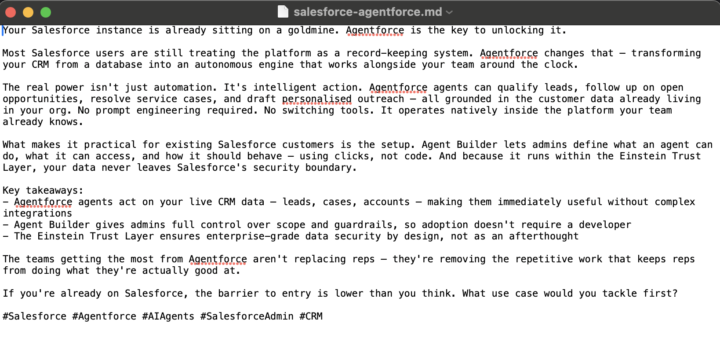
- What skill you built - name, what it does, and how you trigger it I built a LinkedIn post generator which is triggered when the user says, "Draft a LinkedIn post about X". The output is a file for the user to review and manually post. - One optimization you made - what did you change after watching the agent work? I updated the skill to limit the post size to 300 words and include a few hashtags. - Screenshot - show your skill.md or the output it produced
1-30 of 16,331

skool.com/ai-automation-society
Learn to get paid for AI solutions, regardless of your background.
Leaderboard (30-day)
1

+5822
2

🔥
+4503
3

+3978
4

+2295
5

+904
Powered by