
Pinned

💎
⭐
2d •
🚀New Video: How I'd Learn n8n if I had to Start Over in 2026
If I had to start over and learn n8n from scratch today, this is the exact path I’d follow. The skills to focus on, the mistakes to avoid, and the fastest way to go from beginner to building real workflows that clients actually pay for. This is one of my most valuable videos yet, so I hope you guys enjoy!
Pinned
💎
⭐
4d •
🚀New Video: n8n 2.0 is Here (What You Need to Know)
I just walked through everything new in n8n version 2.0. This update brings a refreshed UI, smoother animations, and a few behavior changes that make building automations feel more intuitive. In the video, I highlight the biggest improvements, show how they affect your workflows, and share what you should expect as you transition to the new version. If you want a quick overview of what’s changing and why it matters, this breakdown will get you up to speed.
Pinned

🔥
7d •
🏆 Weekly Wins Recap | Nov 29 – Dec 5
From new client wins to digital twins and foundation-level breakthroughs - another week of real progress inside AIS+ Here are this week’s highlights inside AIS+ 👇 👉 Kevin Hardin built a job-sorting automation using Apify + n8n to instantly organize Upwork leads - a solid real-world workflow in action. 👉 @Elijah Williams restructured his entire agency model after completing the One-Person Agency course — turning insights into a roadmap. 👉 @Rakshith Gowda solved a Veo 3.1 API error after hours of debugging - a reminder that persistence pays off. 👉 @Simon Cousineau is now featured weekly on Canadian radio as their official AI expert - turning consistency into credibility. 👉 Malek Kilani built an AI-powered language coach in under an hour, shared the PRD, and inspired others to ship faster. 🎥 Super Win Spotlight of the Week: @Lutfiya Miller | From Toxicologist to AI Consultant Lutfiya went from learning AI workflows to landing two new clients at a scientific conference - proving what happens when confidence meets consistency. AIS+ helped her go from fear and uncertainty to building powerful automations and speaking at multiple events in 2025. 🎥 Watch her story 👇 Lutfiya’s journey is proof that when you replace fear with action, everything starts to click. ✨ Want to see more wins like these every week? Join the builders inside AI Automation Society Plus - where learning turns into confidence and results 🚀


12m •
Title: Build a Voice AI Receptionist That Books Appointments With MCP in n8n
Voice AI agents have come a long way. What used to take a bunch of custom tools and webhook wiring can now be done much faster using MCP. In this video, I show how to build a simple AI receptionist that: - Answers calls - Collects customer info - Checks availability - Books appointments into Google Calendar - Saves the customer record into Google Sheets - Sends a confirmation email Here is the flow, step by step: 1. Set up the voice agent in Vapi - Use GPT 4.1 mini for lower cost and faster responses - Make the assistant speak first - Add a system prompt with identity, tone, and tool instructions 2. Connect Vapi to n8n using MCP - Add an MCP Server Trigger in n8n - Build your tools as sub workflows - In Vapi, create an MCP tool and paste the MCP server URL - Add an Authorization header using your n8n API key 3. Create the sub workflows (these become your tools) - Get user - Search the Google Sheet by email - If not found, return “new client” so the agent knows to create them - Create user - Append a new row with name, phone, email, and call date - Get available slots - Pull calendar events for the requested date - Return busy times between business hours (example 9:00 AM to 5:00 PM) - Book appointment - Create the Google Calendar event - Update the user row with service type and appointment time - Send a confirmation email 4. Let the model fill tool parameters automatically - In the MCP trigger inputs, use “defined automatically by the model” - This avoids extra agents and reduces latency and cost 5. Test the full experience end to end - Call the number - Book an appointment - Confirm the data shows up in Sheets and Calendar - Confirm the email is sent If you want to build this exact setup, I included the resources and workflows in the description. Subscribe for more tutorials on voice AI agents, MCP, and real automations you can deploy. https://youtu.be/IiTV70i-2zA?si=IQAZEllSWNTqoPyH
1
0

21h •
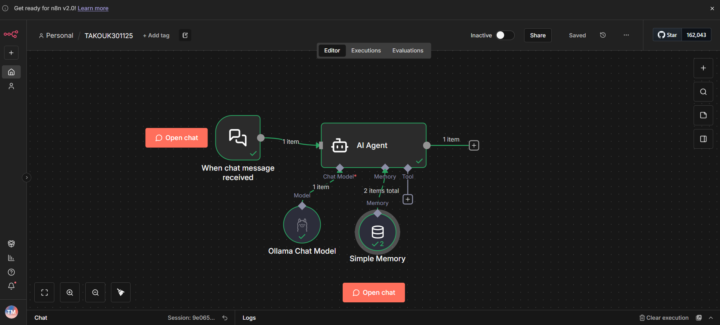
My first workflow
Today I completed my first workflow on the N8 automation platform , after installing docker container on my modest computer and using the Ngrok program. I installed a version of Llama 3.2 on my computer. Then I set up some simple chat node and simple memory node.. The result was fantastic.
1-30 of 10,621

skool.com/ai-automation-society
A community built to master no-code AI automations. Join to learn, discuss, and build the systems that will shape the future of work.
Leaderboard (30-day)
1

🔥
+2477
2

🔥
+1172
3

+1056
4

🔥
+935
5
🔥
+726
Powered by